
How to Turn on Light Mode in Discord in 2022
If you use Discord on desktop or mobile, you might know that the gaming service uses the dark theme as default. Yes, if you have manually enabled the light mode on your Android/iOS, you will see the light theme, but by default, the app was set to use the dark theme.
The dark mode in Discord was introduced way back in 2015, and shortly after that, the dark mode became the main theme of the application. When the dark mode is enabled on the Discord, you see white text on a dark mode, whereas on the light mode, you see dark text on a white background.
Users cherish the dark mode because it reduces eye strain and saves battery life, and it is well accepted by the Discord community. Although the dark mode is helpful, many users use Discord outside, and they prefer to have a bright interface.
Steps to Turn on Light Mode in Discord for Desktop & Mobile
Also, some users fail to adapt to the dark theme and feel light mode is more comfortable to use. Hence, we have written this article for those users. In this article, we will share a step-by-step guide on how to enable or turn on the Light theme in Discord for desktop & mobile. Let’s check out.
1) Enable Discord Light Mode in Desktop
If you want to enable light mode on Discord for desktop, you need to follow this guide. Here’s how to enable Discord light mode in Desktop.
1. First of all, open your desktop web browser or the Discord desktop client and log in with your account.
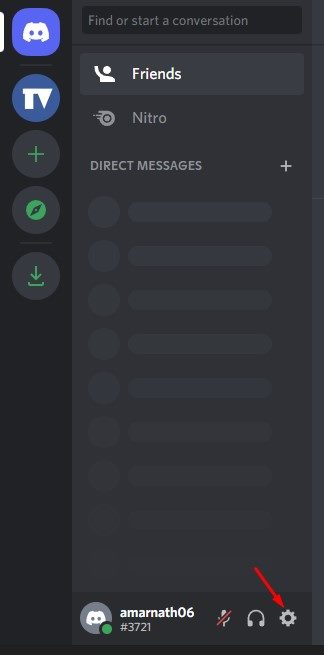
2. On the bottom left corner, click on the Settings gear icon, as shown in the screenshot below.
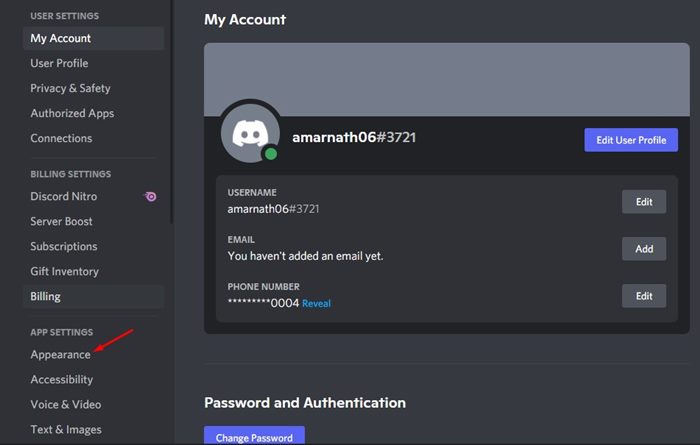
3. This will open the My Account page. On the left, scroll down and click on the Appearance tab.
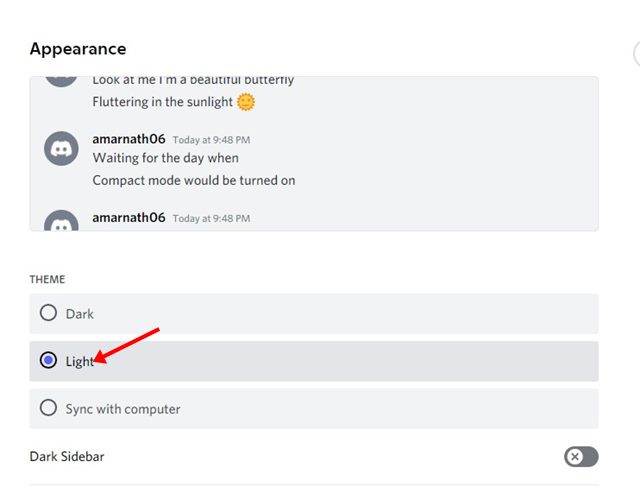
4. On the right pane, select the Light option under the Theme to switch to the Light mode.
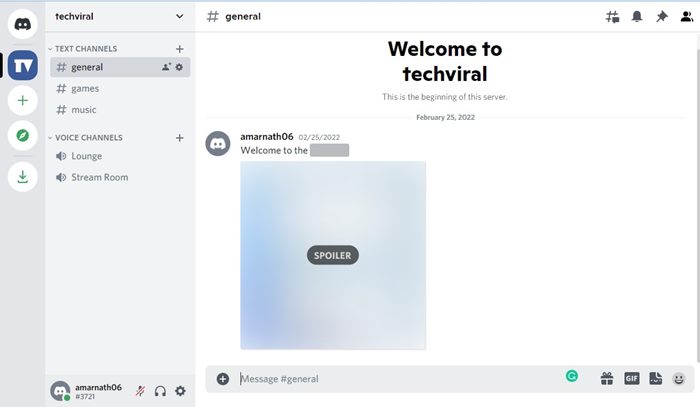
That’s it! You are done. Discord will instantly switch the theme, and everything will become bright.
Note: The steps are the same for Discord desktop client and web. Hence, you need to implement the same steps while using the web version of Discord.
2) Enable Discord Light Mode in Mobile
If you use the Discord Mobile app to connect with the gaming community, you need to follow these steps to enable the light mode. Here are the simple steps to activate the light mode in Discord for Mobile.
1. First of all, launch the Discord app on your Android/iPhone and log in to your account.
2. On the bottom of the screen, tap on your profile picture.
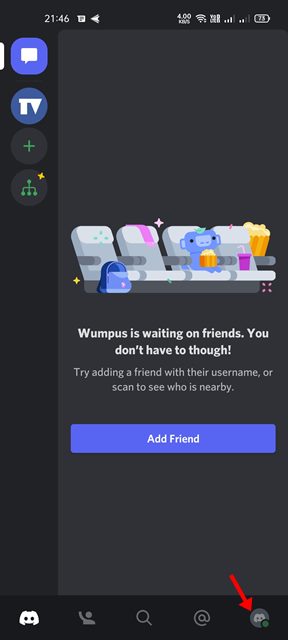
3. This will open the User Settings page.
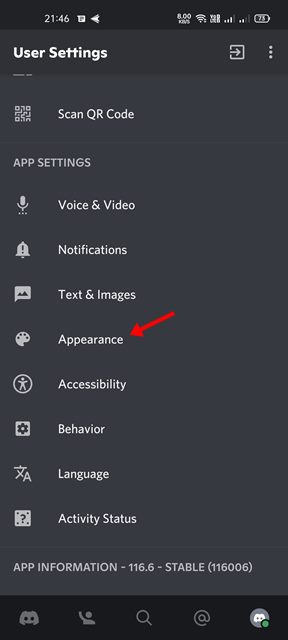
4. Simply scroll down and tap on the Appearance under the App Settings section.
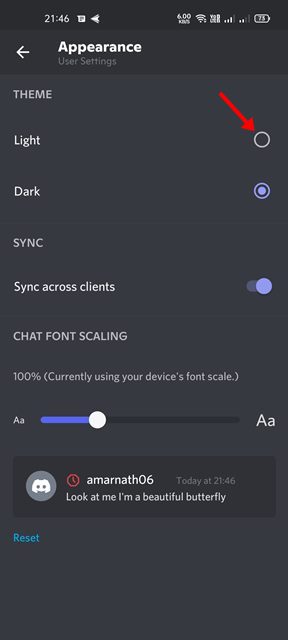
5. On the Appearance, you will find the theme options. To enable the light mode, select the Light option.
That’s it!. This is how you can enable light mode in Discord for mobile.
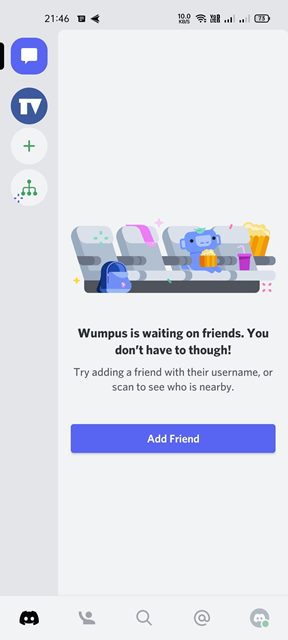
It’s pretty easy to switch themes in Discord for web, desktop, and mobile. If you are not comfortable with the Light mode, simply enable the Dark Mode again. I hope this article helped you! Please share it with your friends also. If you have any doubts related to this, let us know in the comment box below.
The post How to Turn on Light Mode in Discord in 2022 appeared first on TechViral.
ethical hacking,hacking,bangla ethical hacking,bangla hacking tutorial,bangla tutorial,bangla hacking book,ethical hacking bangla,bangla,hacking apps,ethical hacking bangla tutorial,bangla hacking,bangla hacking pdf,bangla hacking video,bangla android hacking,bangla hacking tutorials,bangla fb hacking tutorial,bangla hacking book download,learn ethical hacking,hacking ebook,hacking tools,bangla ethical hacking course, tricks,hacking,ludo king tricks,whatsapp hacking trick 2019 tricks,wifi hacking tricks,hacking tricks: secret google tricks,simple hacking tricks,whatsapp hacking tricks,tips and tricks,wifi tricks,tech tricks,redmi tricks,hacking trick paytm cash,hacking trick helo app,hacking trick of helo app,paytm cash hacking trick,wifi password hacking,paytm cash hacking trick malayalam,hacker tricks, tips and tricks,pubg mobile tips and tricks,tricks,tips,tips and tricks for pubg mobile,100 tips and tricks,pubg tips and tricks,excel tips and tricks,google tips and tricks,kitchen tips and tricks,season 2 tips and tricks,android tips and tricks,fortnite tips and tricks,godnixon tips and tricks,free fire tips and tricks,advanced tips and tricks,whatsapp tips and tricks, facebook tricks,facebook,facebook hidden tricks,facebook tips and tricks,facebook latest tricks,facebook tips,facebook new tricks,facebook messenger tricks,facebook android app tricks,fb tricks,facebook app tricks,facebook tricks and tips,facebook tricks in hindi,tricks,facebook tutorial,new facebook tricks,cool facebook tricks,facebook tricks 2016,facebook tricks 2017,facebook secret tricks,facebook new tricks 2020,blogger blogspot seo tips and tricks,blogger tricks,blogger,blogger seo tips,blogger seo tips and tricks,seo for blogger,blogger seo in hindi,blogger seo best tips for increasing visitors,blogging tips and tricks,blogger blog seo,blogger seo in urdu,adsense approval trick,blogging tips and tricks for beginners,blogging tricks,blogger tutorial,blogger tricks 2016,blogger tricks 2017 bangla,tricks,bangla tutorial,bangla magic,bangla motivational video,bangla tricks,bangla tips,all bangla tips,magic tricks,akash bangla tricks,top 10 bangla tricks,tips and tricks,all bangla trick,bangla computer tricks,computer bangla tricks,bangla magic card tricks,ms word bangla tips and tricks,bangla computer tips,trick,psychology tricks,youtube bangla,magic tricks bangla,si trick Credit techviral


