
3 Best Ways to Disable Error Reporting in Windows 11
The error reporting feature is available on every Windows version, and it shows alerts after a specific program or system crash. It prompts you to send information about the error/problem to Microsoft.
Many users want to disable this feature because this report usually holds private information about the PC. The report that the feature generates has this information:
- Information about the problem/error
- Where the problem occurred (Hardware/software).
- Important logs provide detailed information about the problem.
- Information about your PC’s specifications.
- Various information related to OS Compatibility.
Since the error reporting tool collects and sends the error information to Microsoft’s servers, it can consume your CPU & RAM resources. If you have a low or mid-end computer, you may want to disable the error reporting feature completely.
1. Disable Error Reporting via Services
You can easily disable the error reporting feature on Windows 11 from the Services app.
1. Open the Services app from the Windows Search.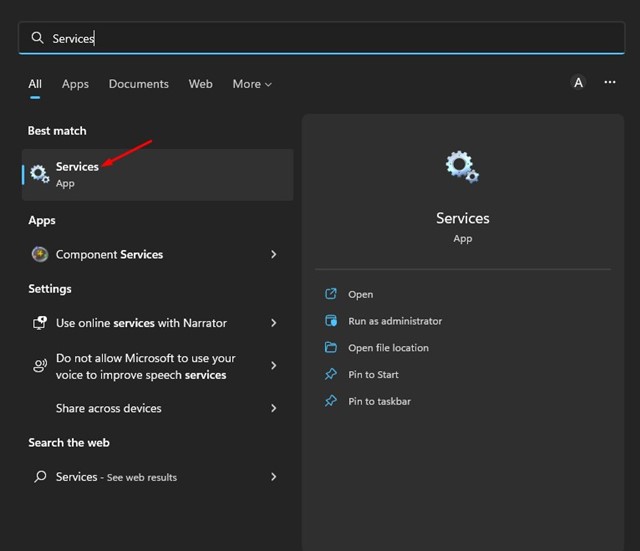
2. Find the Windows Error Reporting service. Right-click on it and select Properties.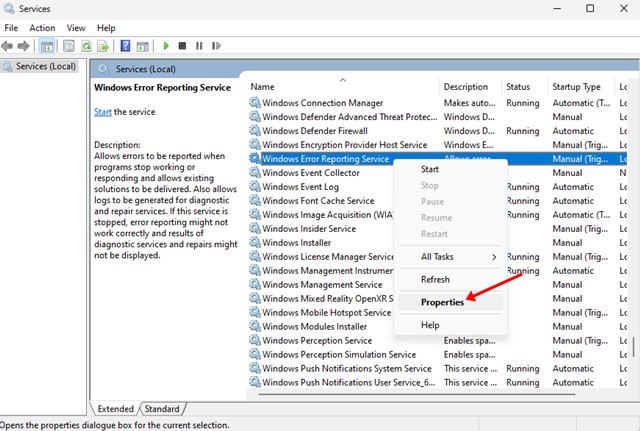
3. Switch to the General tab.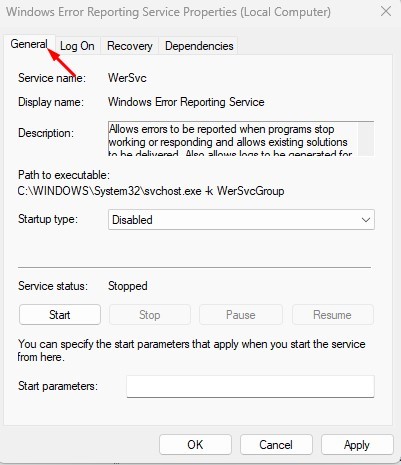
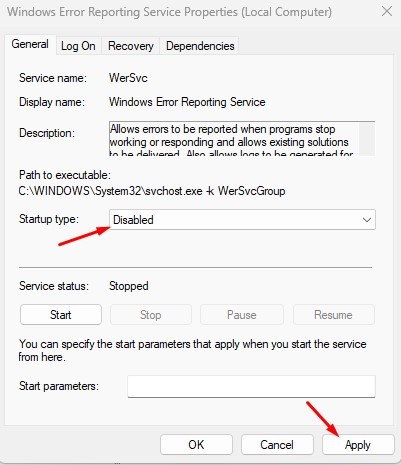
4. Select Disabled and click Apply on the Startup.
2. Disable Error Reporting in Windows 11 Using Local Group Policy Editor
You can make some changes to the Local Group Policy Editor to disable Error reporting as well.
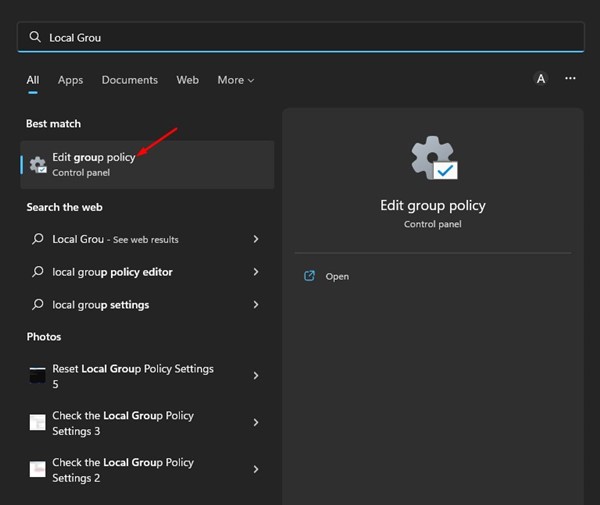
1. Open the Local group policy editor from the Windows Search.
2. Navigate to the following path:
Computer Configuration > Administrative Templates > Windows Components > Windows Error Reporting
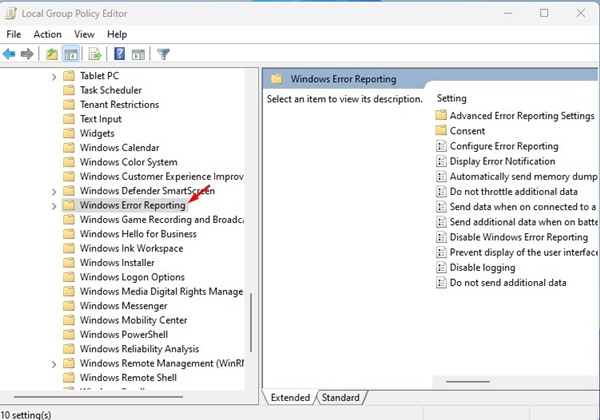
3. Double-click on the Disable Windows Error Reporting Policy.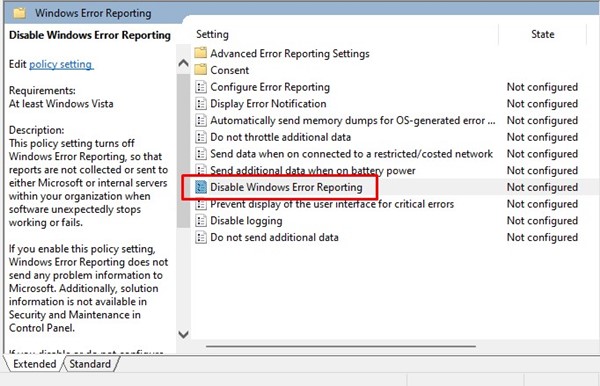
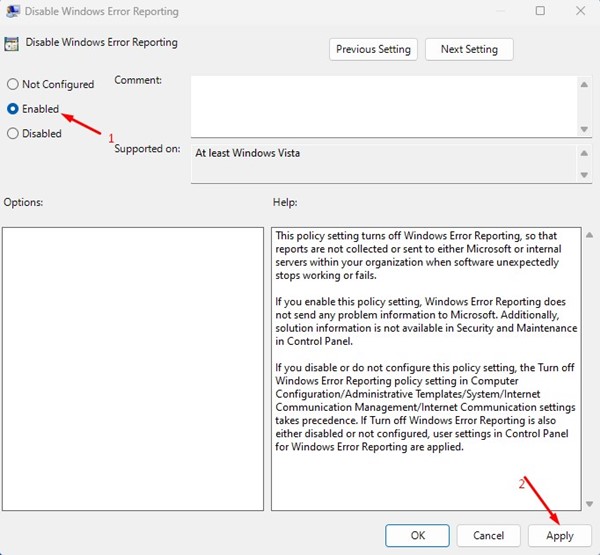
4. Select Enabled and click Apply.
3. Turn off Error Reporting in Windows 11 using Registry Editor
If you’re comfortable handling the Windows Registry, here’s how you can turn off the error reporting by modifying it.
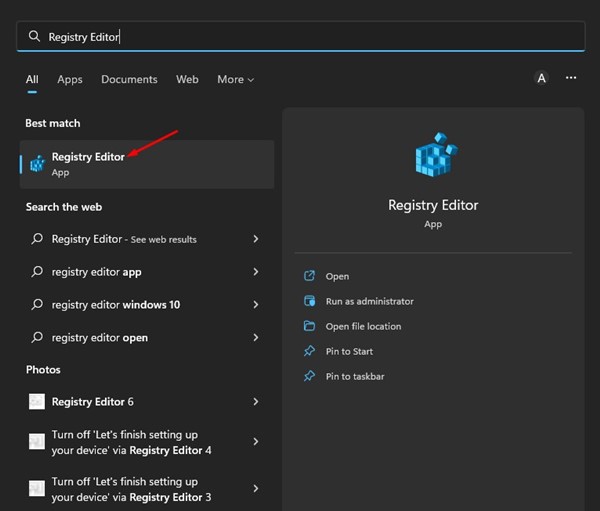
1. Open the Registry Editor from the Windows Search.
2. Navigate to the following path:
HKEY_LOCAL_MACHINE\SOFTWARE\Microsoft\Windows\Windows Error Reporting
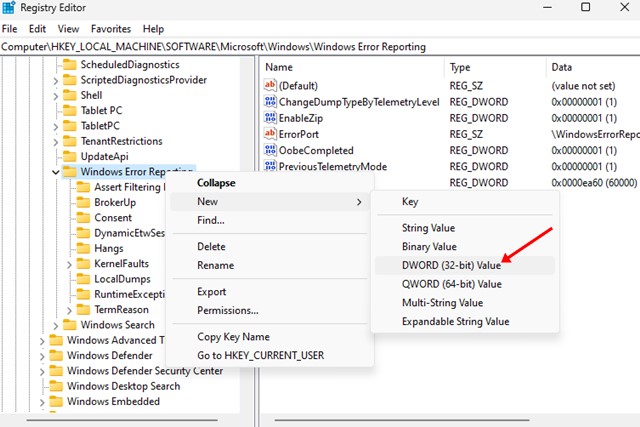
3. Right-click on the Windows Error Reporting and select New > DWORD (32-bit) Value.
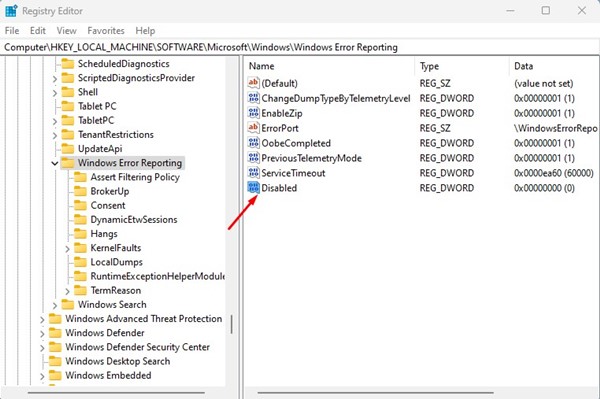
4. Name the newly created key as Disabled.
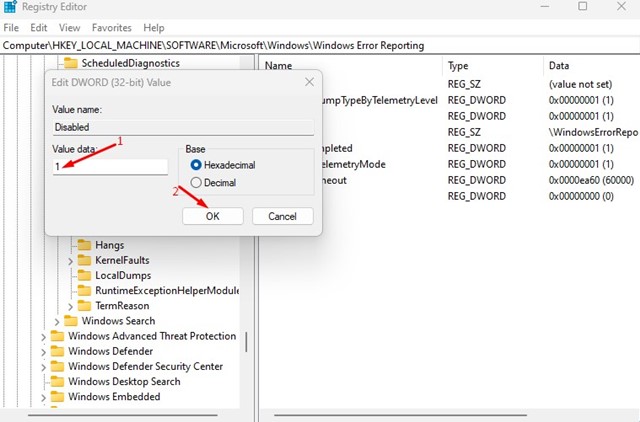
5. Double-click the Disabled REG_DWORD key and enter 1 in the Value Data field. Once done, click OK.
Frequently Asked Questions:
Should You Disable Windows Error Reporting?
If you don’t want a product to spy on you, you should disable this feature. It just collects the crash reports and sends them to Microsoft’s servers.
Is it safe to disable the Windows Error Reporting service?
Yes, it’s safe to disable the Windows Error Reporting service. The reporting feature is meant to help Microsoft find and fix existing problems.
Does Error Reporting hold private information?
Yes, Windows Error Reporting collects and shares private information about your PC, such as where the problem occurred, your PC’s specs, several log files, etc.
Does Windows Error Reporting Raise CPU Usage?
Yes, the Windows Error Reporting does raise the CPU and RAM consumption. This is because the tool collects and sends the information to Microsoft’s servers.
This guide is about disabling Error reporting on your Windows 11 PC. This service does nothing apart from sending your error reports to Microsoft. If you need more help disabling Error reporting in Windows 11, let us know in the comments below.
The post 3 Best Ways to Disable Error Reporting in Windows 11 appeared first on TechViral.
ethical hacking,hacking,bangla ethical hacking,bangla hacking tutorial,bangla tutorial,bangla hacking book,ethical hacking bangla,bangla,hacking apps,ethical hacking bangla tutorial,bangla hacking,bangla hacking pdf,bangla hacking video,bangla android hacking,bangla hacking tutorials,bangla fb hacking tutorial,bangla hacking book download,learn ethical hacking,hacking ebook,hacking tools,bangla ethical hacking course, tricks,hacking,ludo king tricks,whatsapp hacking trick 2019 tricks,wifi hacking tricks,hacking tricks: secret google tricks,simple hacking tricks,whatsapp hacking tricks,tips and tricks,wifi tricks,tech tricks,redmi tricks,hacking trick paytm cash,hacking trick helo app,hacking trick of helo app,paytm cash hacking trick,wifi password hacking,paytm cash hacking trick malayalam,hacker tricks, tips and tricks,pubg mobile tips and tricks,tricks,tips,tips and tricks for pubg mobile,100 tips and tricks,pubg tips and tricks,excel tips and tricks,google tips and tricks,kitchen tips and tricks,season 2 tips and tricks,android tips and tricks,fortnite tips and tricks,godnixon tips and tricks,free fire tips and tricks,advanced tips and tricks,whatsapp tips and tricks, facebook tricks,facebook,facebook hidden tricks,facebook tips and tricks,facebook latest tricks,facebook tips,facebook new tricks,facebook messenger tricks,facebook android app tricks,fb tricks,facebook app tricks,facebook tricks and tips,facebook tricks in hindi,tricks,facebook tutorial,new facebook tricks,cool facebook tricks,facebook tricks 2016,facebook tricks 2017,facebook secret tricks,facebook new tricks 2020,blogger blogspot seo tips and tricks,blogger tricks,blogger,blogger seo tips,blogger seo tips and tricks,seo for blogger,blogger seo in hindi,blogger seo best tips for increasing visitors,blogging tips and tricks,blogger blog seo,blogger seo in urdu,adsense approval trick,blogging tips and tricks for beginners,blogging tricks,blogger tutorial,blogger tricks 2016,blogger tricks 2017 bangla,tricks,bangla tutorial,bangla magic,bangla motivational video,bangla tricks,bangla tips,all bangla tips,magic tricks,akash bangla tricks,top 10 bangla tricks,tips and tricks,all bangla trick,bangla computer tricks,computer bangla tricks,bangla magic card tricks,ms word bangla tips and tricks,bangla computer tips,trick,psychology tricks,youtube bangla,magic tricks bangla,si trick Credit techviral


