
How to Fix Apps Keep Crashing on Android
There’s no set reason for apps crashing on Android. The issue may be with the app installation file, the version of the app you are using, available storage space, or even bugs and glitches. Whatever the reason, here are some of the best things you can do to resolve the problem
1. Reopen the App
Certain bugs & glitches may prevent an Android device from functioning properly, leading to an app crash.
So, before you try the complex methods, close the app from memory and open it again. This should fix Apps keep crashing issue on your Android.
2. Restart your phone
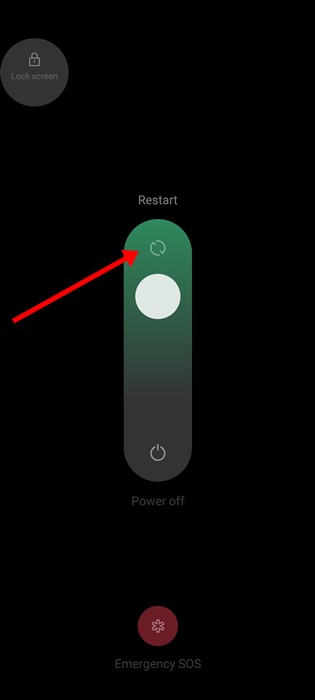
The next best thing you can do to prevent apps from crashing on Android is to restart your Android phone.
Restarting releases all apps & processes from the RAM and gives your device time to cool down. So, if your apps keep crashing on your Android device, press the Power button & select Restart.
3. Force Stop the Problematic App
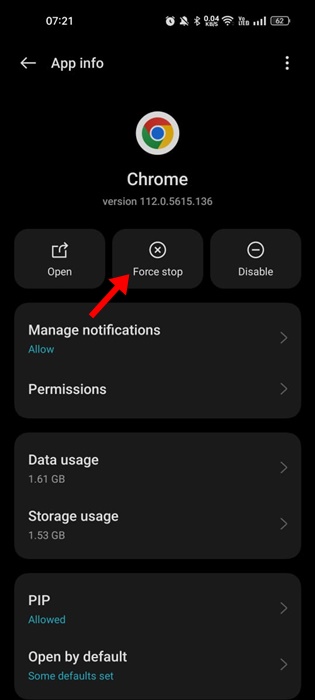
If a specific process or task is conflicting, the best way out is to force stop the app. When you force stop an app on Android, all the processes & tasks run by the app are terminated.
Long-press the app icon on your home screen and select App Info. On the App Info screen, tap Force Stop. This will force stop the app on your Android.
4. Check Your Internet

Some apps and games depend on an internet connection to function. They can lag or crash when you don’t have active or stable internet connectivity.
If you use an app that requires an internet connection, check if the internet works. You can visit fast.com to check if the internet is working.
Even when the internet is working, you need to check & rule out connection leak problems. To rule out the internet problems, you can enable/disable the Airplane mode or reset the network settings.
5. Check the App Compatibility with your Phone
Certain apps won’t work on older Android versions because they are incompatible. Compatibility issues can often make apps crash or even make your phone unresponsive.
You can check app compatibility from the Google Play Store. Open the App Store, search for the app, and open the About this app section. You will be able to see the app compatibility details.
6. Make sure your Phone has sufficient storage space
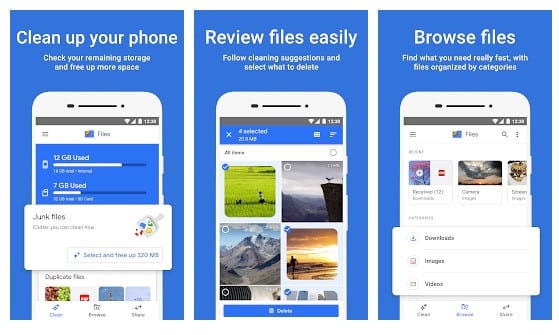
Having sufficient storage space is important for the app’s proper performance and functioning. When your phone’s storage is too low, you may experience issues using certain app features. In the worst case, the apps may lag or crash on startup.
It’s important to check if your phone has sufficient storage space. Keep your phone’s storage free as much as possible to avoid app lag or crash issues.
You can use the storage analyzer apps to analyze the storage space & find apps consuming more space. If you find any app you no longer use, uninstall it to clear its data & leftover files.
7. Clear the Data & Cache of Problematic App
Sometimes, apps may crash due to corrupted data & cache files. If the cache file gets corrupted, you may experience various issues using the app. So, it’s important to clear the data & cache of the problematic app to fix the app crashing problem on Android.
1. Long-press on the App icon and select App info.
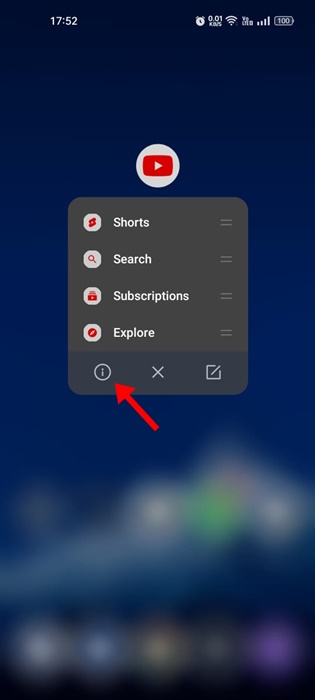
2. Tap on Storage Usage.
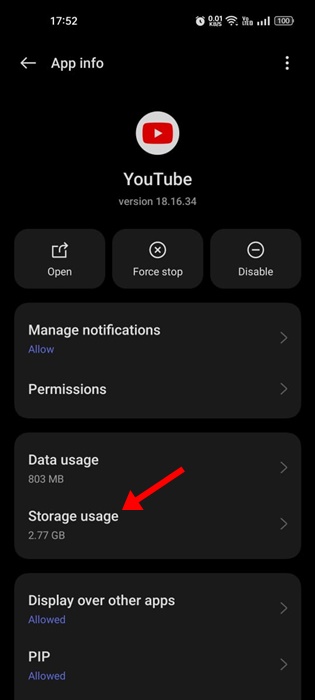
3. Tap on Clear Cache & Clear Data.
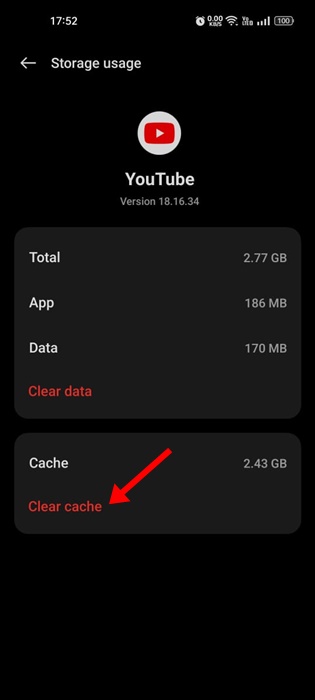
After making the changes, open the app again. This time, you can use the Android app without any crashes or lag.
8. Update the Android App
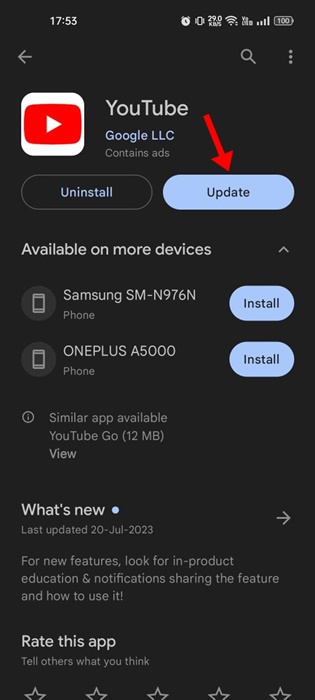
Sometimes, a specific app version has bugs and glitches that may lead to crashes and lags. You can avoid such bugs and glitches by updating the app to the latest version.
It’s also a good idea to keep Android apps up to date to ensure better performance. Open the Google Play Store and search for the crashing app.
Open the app listing and tap on the Update button.
9. Reinstall the App
Reinstalling is the best option if everything else has failed. However, when you reinstall apps on Android, you lose all data associated with the app. So, make sure you have the app data backup before you reinstall.
1. Open the Google Play Store and search for the problematic app.
2. Open the official app listing page. Tap on Uninstall.
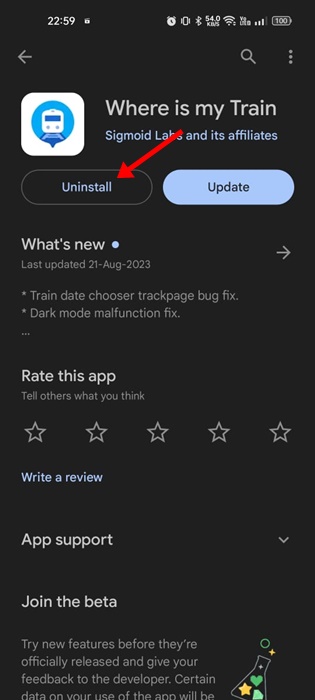
3. Tap the Install button to install the app on your phone again.

10. Update your Android Version
Android version updates ensure better stability & compatibility with the apps. Here’s how to update your Android phone.
1. Open the Settings app.
2. Scroll down and tap About Device.
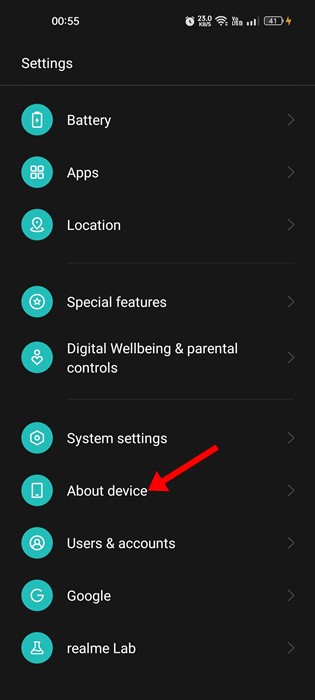
3. Tap on the System Update or Update.
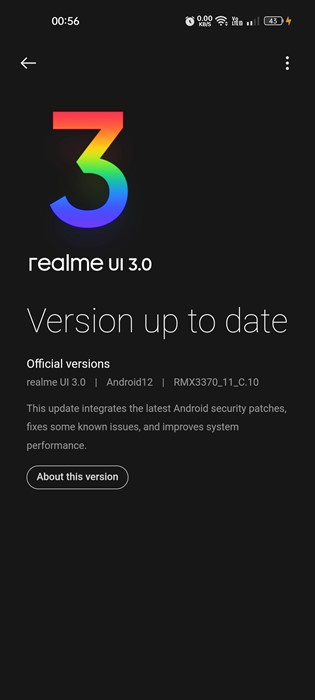
4. You will be able to see all pending Android updates.
On this screen, your phone will automatically download and install all available Android updates. Make sure your phone has enough battery life.
11. Factory Reset your Phone
If nothing works in your favor, a factory reset is your ultimate solution. Always have a proper backup plan before you factory reset your phone.
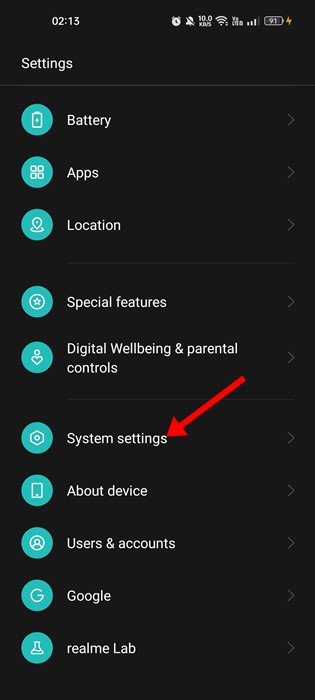
1. Open the Settings app on your phone. Scroll down and tap on the System Settings.
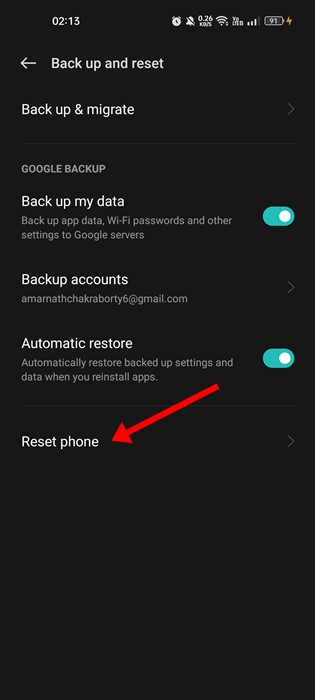
2. Tap Backup and Reset.
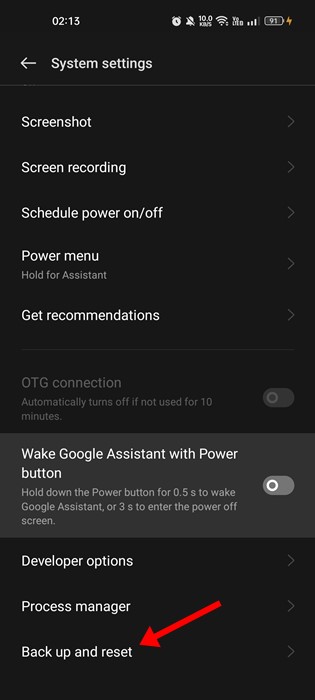
3. Tap Reset Phone.
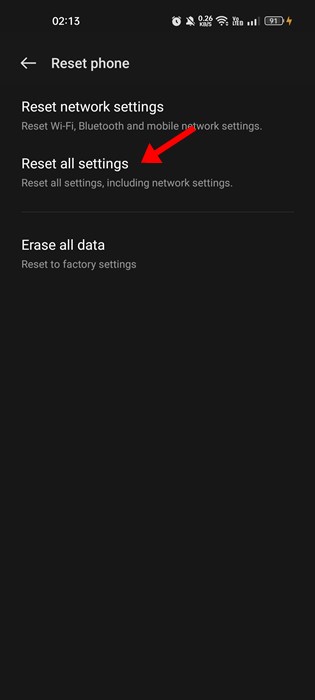
4. Tap Reset all settings.
12. Wipe Cache Partition
This is a more complicated method, but it will fix Apps crashing on Android. This will clear out complete cache files & make your Android perform better and faster.
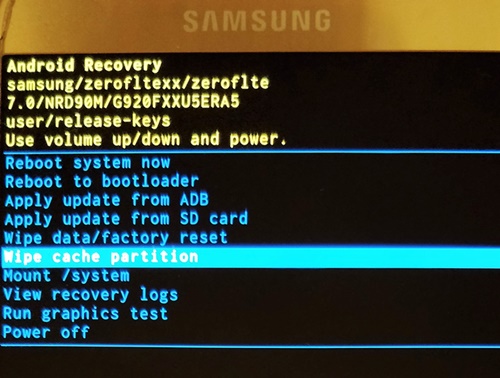
- Turn off your Android device.
- Now press the Power + Home + Volume down button together.
- This will boot you into the Recovery mode.
- Use the Volume down button to select wipe cache partition.
- Press the Power button to select the Wipe Cache Partition option.
These are some best things you can do to fix apps that keep crashing on Android devices. Let us know which method worked for you to fix the apps crashing on Android problems.
The post How to Fix Apps Keep Crashing on Android appeared first on TechViral.
ethical hacking,hacking,bangla ethical hacking,bangla hacking tutorial,bangla tutorial,bangla hacking book,ethical hacking bangla,bangla,hacking apps,ethical hacking bangla tutorial,bangla hacking,bangla hacking pdf,bangla hacking video,bangla android hacking,bangla hacking tutorials,bangla fb hacking tutorial,bangla hacking book download,learn ethical hacking,hacking ebook,hacking tools,bangla ethical hacking course, tricks,hacking,ludo king tricks,whatsapp hacking trick 2019 tricks,wifi hacking tricks,hacking tricks: secret google tricks,simple hacking tricks,whatsapp hacking tricks,tips and tricks,wifi tricks,tech tricks,redmi tricks,hacking trick paytm cash,hacking trick helo app,hacking trick of helo app,paytm cash hacking trick,wifi password hacking,paytm cash hacking trick malayalam,hacker tricks, tips and tricks,pubg mobile tips and tricks,tricks,tips,tips and tricks for pubg mobile,100 tips and tricks,pubg tips and tricks,excel tips and tricks,google tips and tricks,kitchen tips and tricks,season 2 tips and tricks,android tips and tricks,fortnite tips and tricks,godnixon tips and tricks,free fire tips and tricks,advanced tips and tricks,whatsapp tips and tricks, facebook tricks,facebook,facebook hidden tricks,facebook tips and tricks,facebook latest tricks,facebook tips,facebook new tricks,facebook messenger tricks,facebook android app tricks,fb tricks,facebook app tricks,facebook tricks and tips,facebook tricks in hindi,tricks,facebook tutorial,new facebook tricks,cool facebook tricks,facebook tricks 2016,facebook tricks 2017,facebook secret tricks,facebook new tricks 2020,blogger blogspot seo tips and tricks,blogger tricks,blogger,blogger seo tips,blogger seo tips and tricks,seo for blogger,blogger seo in hindi,blogger seo best tips for increasing visitors,blogging tips and tricks,blogger blog seo,blogger seo in urdu,adsense approval trick,blogging tips and tricks for beginners,blogging tricks,blogger tutorial,blogger tricks 2016,blogger tricks 2017 bangla,tricks,bangla tutorial,bangla magic,bangla motivational video,bangla tricks,bangla tips,all bangla tips,magic tricks,akash bangla tricks,top 10 bangla tricks,tips and tricks,all bangla trick,bangla computer tricks,computer bangla tricks,bangla magic card tricks,ms word bangla tips and tricks,bangla computer tips,trick,psychology tricks,youtube bangla,magic tricks bangla,si trick Credit techviral


