
4 Best Ways to Find all Signed In Users in Windows 11
When it comes to knowing how many users are logged in to your PC or who is signed in, things become a bit tricky. There are quite a few ways to find all signed-in users in Windows 11; here are some of them.
1. Find all signed-in users via the Start Menu
We will use the Windows 11 Start Menu to find all signed-in users.
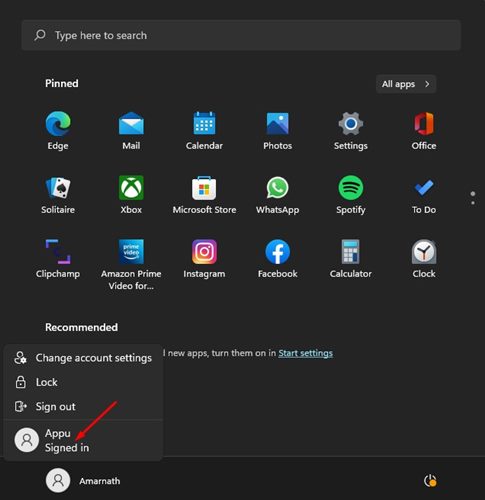
- Press the Windows Key or click on the Start button.
- Click on the profile picture displayed on the bottom left of the Start menu.
- It would be best if you found the username with the Signed in tag.
The active user accounts will have the Signed in tag on the Start menu.
2. Find all Signed in Users via Task Manager
Like the Start menu, you can use Windows 11’s task manager to find all signed-in user accounts.
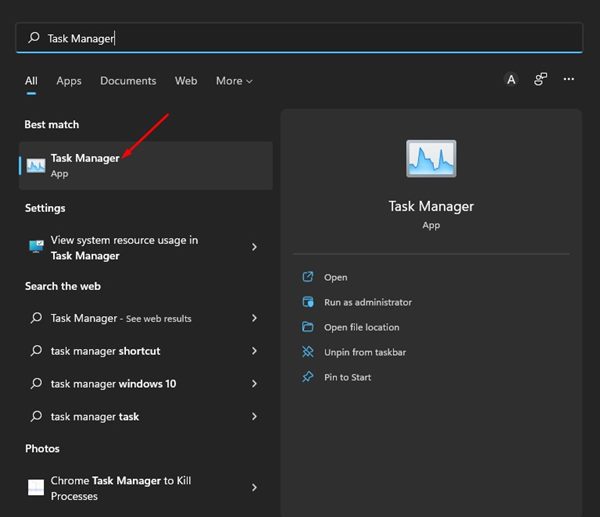
1. Click on the Windows Search and type in Task Manager. Open Task Manager from the list of options.
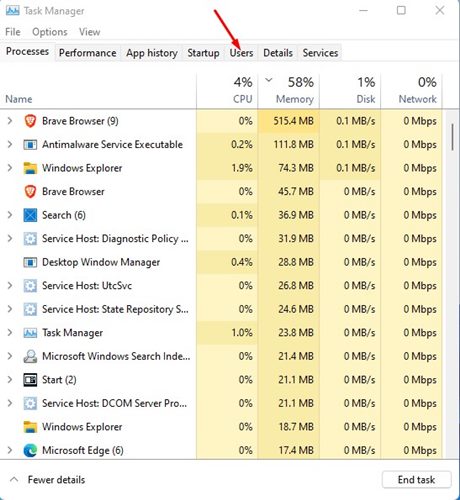
2. Switch to Users.
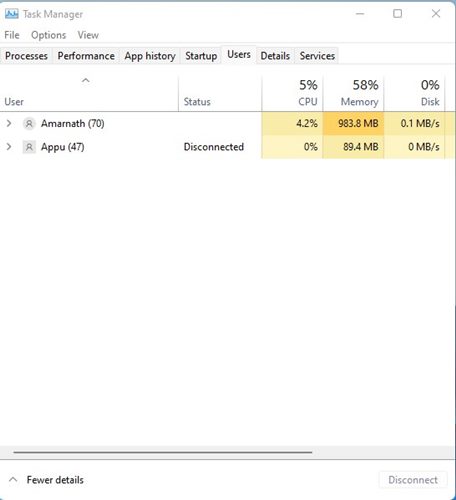
3. The user’s tab of Task Manager will show all signed-in users.
3. Find Signed Users on Windows 11 via Command Prompt
You can also use the Command Prompt to find the signed-in users on Windows 11.
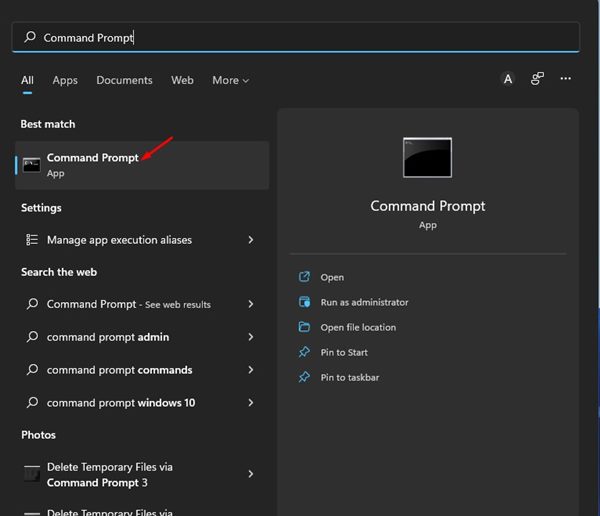
1. Click the Windows 11 search button and type in Command Prompt. Open Command Prompt from the list.
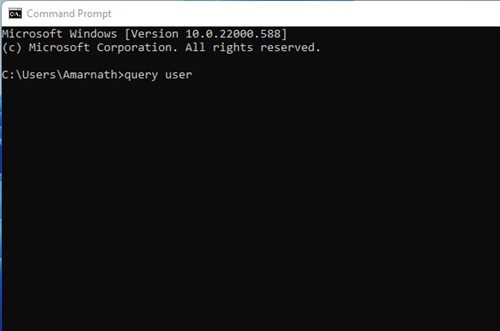
2. Type in the query user and hit Enter.
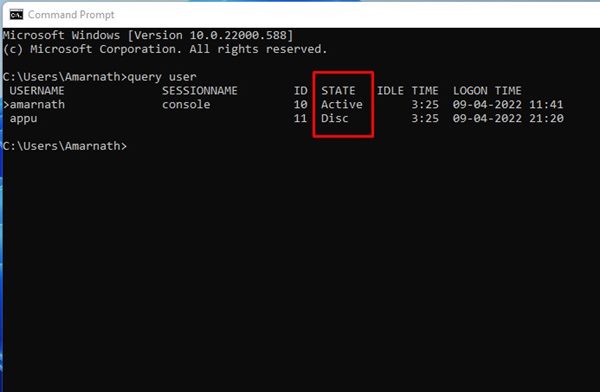
3. The Command Prompt will list all user accounts. It would be best if you looked at the State column. The user account that states Active is active on your PC.
4. Find all signed-in User Accounts using PowerShell
Like the CMD, you can use other command line utilities like the PowerShell of Windows to list all signed-in user accounts.
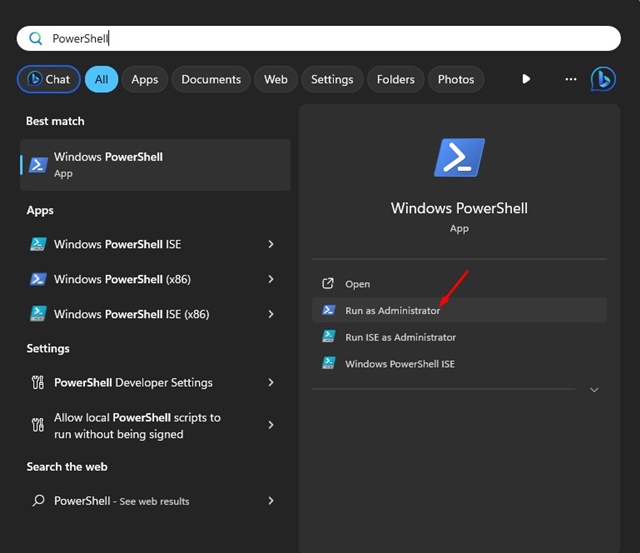
1. Right-click on the PowerShell and select Run as administrator.
2. This will open the elevated PowerShell instance. You need to execute the given script:
$users = quser.exe | Select-Object -Skip 1
$unames = @()
foreach ($u in $users) {
$uname = ($u.trim() -replace '\s+',' ' -replace '>','' -split '\s')[0]
$unames += New-Object psobject -Property ([ordered]@{
'Logged in Users' = [string]$uname
})
}
Write-Output $unames
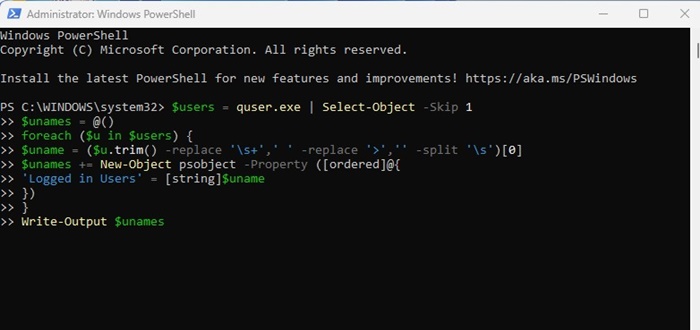
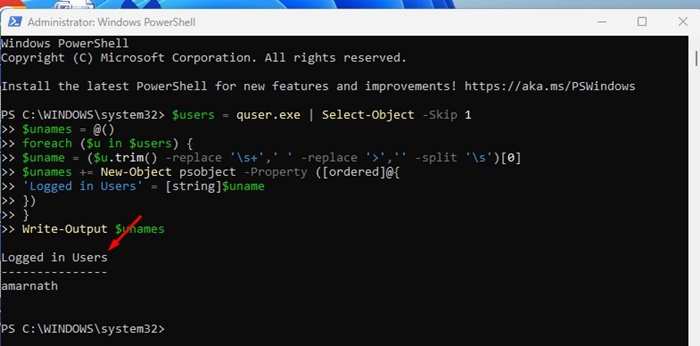
3. The script will return with all signed-in user accounts. You need to see the Logged in users field to find the accounts logged in on your computer.
How to View or Manage All User Accounts on Windows 11?
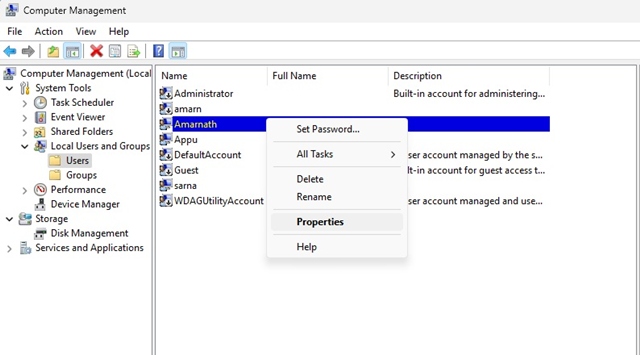
The methods shared above only tell you about the logged-in user accounts. What if you want to find all user accounts on Windows 11 and manage them? To do that, you need to take the help of the Computer Management utility.
- Type Computer Management in Windows 11 Search.
- Open the Computer Management utility.
- Switch to System Tools > Local Users and Groups > User on the right side.
- On the right side, you will see all user accounts.
- Right-click on the user account that you want to manage and select Properties.
From the account properties, you can disable an account, add password expiration time, etc. These are the best ways to find all signed-in users in Windows 11. If you have any doubts, let us know in the comment box below.
The post 4 Best Ways to Find all Signed In Users in Windows 11 appeared first on TechViral.
ethical hacking,hacking,bangla ethical hacking,bangla hacking tutorial,bangla tutorial,bangla hacking book,ethical hacking bangla,bangla,hacking apps,ethical hacking bangla tutorial,bangla hacking,bangla hacking pdf,bangla hacking video,bangla android hacking,bangla hacking tutorials,bangla fb hacking tutorial,bangla hacking book download,learn ethical hacking,hacking ebook,hacking tools,bangla ethical hacking course, tricks,hacking,ludo king tricks,whatsapp hacking trick 2019 tricks,wifi hacking tricks,hacking tricks: secret google tricks,simple hacking tricks,whatsapp hacking tricks,tips and tricks,wifi tricks,tech tricks,redmi tricks,hacking trick paytm cash,hacking trick helo app,hacking trick of helo app,paytm cash hacking trick,wifi password hacking,paytm cash hacking trick malayalam,hacker tricks, tips and tricks,pubg mobile tips and tricks,tricks,tips,tips and tricks for pubg mobile,100 tips and tricks,pubg tips and tricks,excel tips and tricks,google tips and tricks,kitchen tips and tricks,season 2 tips and tricks,android tips and tricks,fortnite tips and tricks,godnixon tips and tricks,free fire tips and tricks,advanced tips and tricks,whatsapp tips and tricks, facebook tricks,facebook,facebook hidden tricks,facebook tips and tricks,facebook latest tricks,facebook tips,facebook new tricks,facebook messenger tricks,facebook android app tricks,fb tricks,facebook app tricks,facebook tricks and tips,facebook tricks in hindi,tricks,facebook tutorial,new facebook tricks,cool facebook tricks,facebook tricks 2016,facebook tricks 2017,facebook secret tricks,facebook new tricks 2020,blogger blogspot seo tips and tricks,blogger tricks,blogger,blogger seo tips,blogger seo tips and tricks,seo for blogger,blogger seo in hindi,blogger seo best tips for increasing visitors,blogging tips and tricks,blogger blog seo,blogger seo in urdu,adsense approval trick,blogging tips and tricks for beginners,blogging tricks,blogger tutorial,blogger tricks 2016,blogger tricks 2017 bangla,tricks,bangla tutorial,bangla magic,bangla motivational video,bangla tricks,bangla tips,all bangla tips,magic tricks,akash bangla tricks,top 10 bangla tricks,tips and tricks,all bangla trick,bangla computer tricks,computer bangla tricks,bangla magic card tricks,ms word bangla tips and tricks,bangla computer tips,trick,psychology tricks,youtube bangla,magic tricks bangla,si trick Credit techviral


