
What is User OOBE Broker? How to Disable it
User OOBE, also known as the User Out-of-box experience broker, is part of the Windows Setup Process. If you’ve installed Windows 10/11 on your device, you will notice this process in the Task Manager.
Is User OOBE Broker a Virus?
No! The UserOOBEBroker.exe is a very safe executable file developed by Microsoft. It plays a crucial role in delivering a smooth user experience. The service manages the initial setup process when you install Windows for the first time.
Why is the User OOBE Broker using so much CPU?
Sometimes the User OOBE Broker process can take up too many of your CPU resources and slow down the computer. It mostly happens when the initial setup process is abrupt or when some of the operating system files are corrupted during the installation.
How to Disable User OOBE Broker?
Normally, you don’t need to disable the User OOBE Broker process, but if it’s slowing down your PC and you have no other choice, here are some ways to disable it.
1. Stop UserOOBEBroker.exe from the Task Manager
The easiest way to disable the User OOBE Broker process is to use the Task Manager.
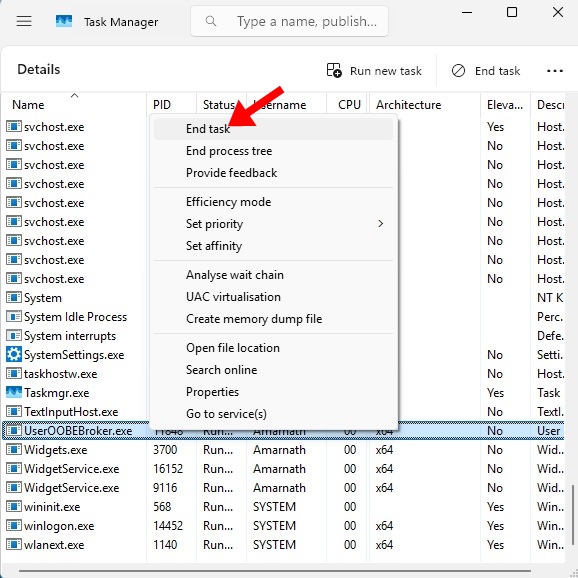
- Launch the Task Manager on your Windows PC.
- Switch to the Details tab.
- Find the UserOOBEBroker.exe process.
- Right-click on it and select End Task.
2. Disable the Windows Welcome Experience
You can disable the Windows Welcome Experience from Settings to disable the User OOBE Broker process from running.
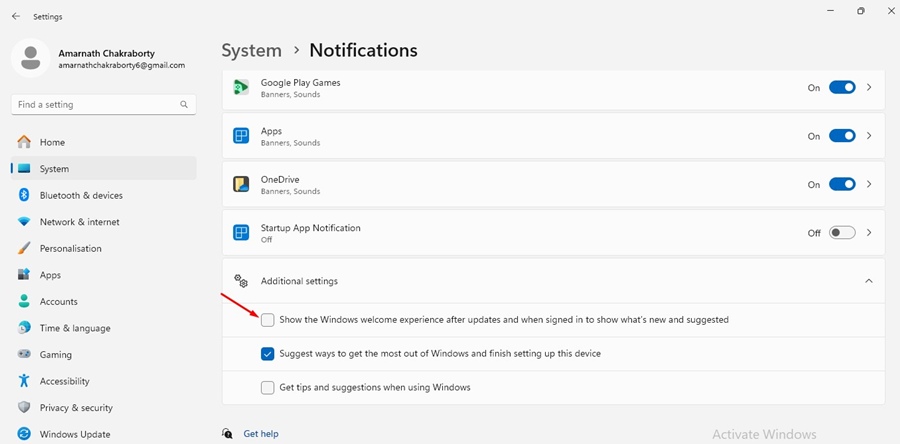
- Launch the Settings app on your Windows PC.
- Switch to System.
- Click Notifications.
- Scroll down and click on Additional Settings.
- Uncheck the Show the Windows Welcome Experience after updates checkbox.
3. Disable User OOBE Broker from Group Policy Editor
If you can’t make changes to Windows Settings, you can use the Group Policy Editor to disable the OOBE Broker process from running.
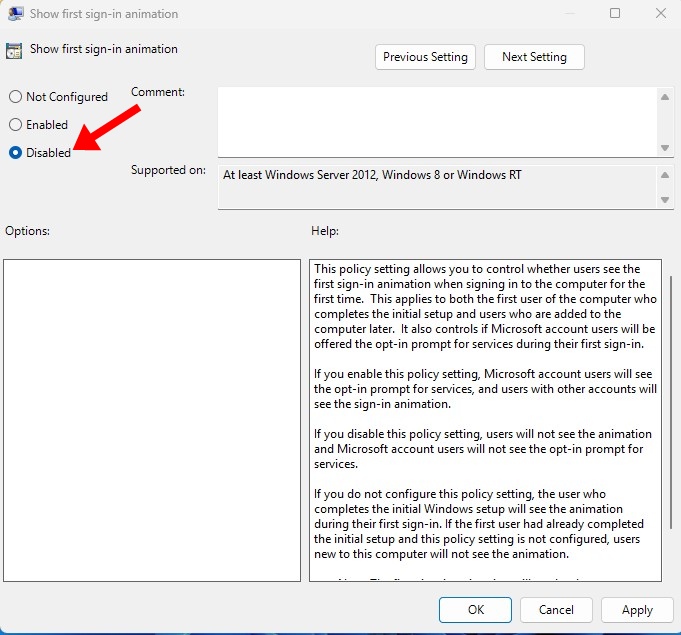
- Search for Local Group Policy Editor on the Windows Search.
- Open the Group Policy Editor app.
- Navigate to the Computer Configuration > Administrative Templates > System > Logon
- Double-click on the Show first sign-in animation.
- Select Disabled and click Apply.
4. Disable User OOBE Broker from Registry Editor
If you feel comfortable handling the Windows Registry, you can try this method to get rid of the OOBE Broker process.
- Press Windows Key + R to open the RUN dialog box.
- Type Regedit and press Enter.
- Navigate to this path:
HKEY_LOCAL_MACHINE\SOFTWARE\Microsoft\Windows\CurrentVersion\OOBE\UserOOBEBroker
- Double-click on the EnableUserOOBEBroker Value and enter the Value Data field.
- Click OK and close the Registry Editor.
Note: If you don’t find the UserOOBEBroker folder on the Registry, skip this method.
Is it safe to disable the User OOBE Broker?
Yes, it’s generally safe to disable the User OOBE Broker process. It’s a process that shows a series of screens that appear when you first turn on your computer.
If you turn it off, you won’t see the initial welcome screen that guides you through the basic Windows Settings.
This guide explains the User OOBE Broker and how to disable it. If you need more help with this topic, let us know in the comments.
The post What is User OOBE Broker? How to Disable it appeared first on TechViral.
ethical hacking,hacking,bangla ethical hacking,bangla hacking tutorial,bangla tutorial,bangla hacking book,ethical hacking bangla,bangla,hacking apps,ethical hacking bangla tutorial,bangla hacking,bangla hacking pdf,bangla hacking video,bangla android hacking,bangla hacking tutorials,bangla fb hacking tutorial,bangla hacking book download,learn ethical hacking,hacking ebook,hacking tools,bangla ethical hacking course, tricks,hacking,ludo king tricks,whatsapp hacking trick 2019 tricks,wifi hacking tricks,hacking tricks: secret google tricks,simple hacking tricks,whatsapp hacking tricks,tips and tricks,wifi tricks,tech tricks,redmi tricks,hacking trick paytm cash,hacking trick helo app,hacking trick of helo app,paytm cash hacking trick,wifi password hacking,paytm cash hacking trick malayalam,hacker tricks, tips and tricks,pubg mobile tips and tricks,tricks,tips,tips and tricks for pubg mobile,100 tips and tricks,pubg tips and tricks,excel tips and tricks,google tips and tricks,kitchen tips and tricks,season 2 tips and tricks,android tips and tricks,fortnite tips and tricks,godnixon tips and tricks,free fire tips and tricks,advanced tips and tricks,whatsapp tips and tricks, facebook tricks,facebook,facebook hidden tricks,facebook tips and tricks,facebook latest tricks,facebook tips,facebook new tricks,facebook messenger tricks,facebook android app tricks,fb tricks,facebook app tricks,facebook tricks and tips,facebook tricks in hindi,tricks,facebook tutorial,new facebook tricks,cool facebook tricks,facebook tricks 2016,facebook tricks 2017,facebook secret tricks,facebook new tricks 2020,blogger blogspot seo tips and tricks,blogger tricks,blogger,blogger seo tips,blogger seo tips and tricks,seo for blogger,blogger seo in hindi,blogger seo best tips for increasing visitors,blogging tips and tricks,blogger blog seo,blogger seo in urdu,adsense approval trick,blogging tips and tricks for beginners,blogging tricks,blogger tutorial,blogger tricks 2016,blogger tricks 2017 bangla,tricks,bangla tutorial,bangla magic,bangla motivational video,bangla tricks,bangla tips,all bangla tips,magic tricks,akash bangla tricks,top 10 bangla tricks,tips and tricks,all bangla trick,bangla computer tricks,computer bangla tricks,bangla magic card tricks,ms word bangla tips and tricks,bangla computer tips,trick,psychology tricks,youtube bangla,magic tricks bangla,si trick Credit techviral


