
How to Fix Volume Buttons Not Working on iPhone
Volume buttons not working on an iPhone can be a sign of a software issue, incorrect settings, or a hardware problem. If your Volume buttons aren’t working on your iPhone, here’s what you should immediately do.
1. Remove the iPhone Case
The case may be too tight, preventing the press. It’s also possible that the phone case you’re using has a few dust particles stuck between the volume buttons. So, remove the case and press the buttons again.
2. Restart your iPhone
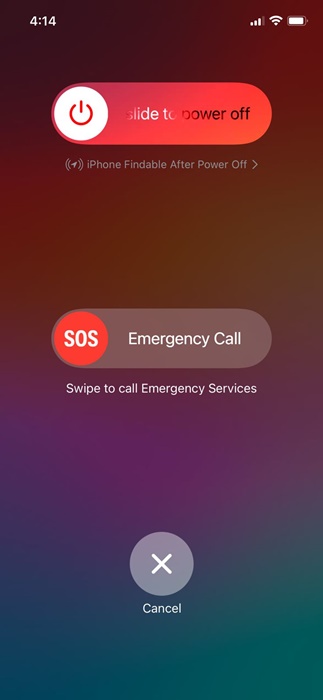
Your iPhone’s volume buttons may not be working due to a system-level bug or glitch. You can eliminate such bugs & glitches by restarting your iPhone. To restart your iPhone, long-press the Volume Up + Power button.
This will open the Power Menu; simply drag the power slider to turn off the device. Once turned off, wait a minute and hold the Power button to turn it on again.
3. Check the Volume Settings
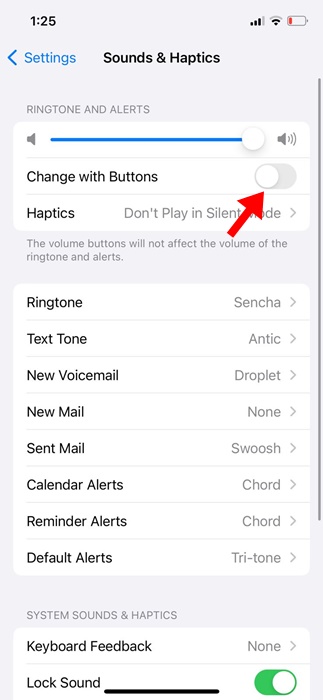
Pressing the Volume button only changes the media volume. However, you can change this action in Settings to control the ringer volume. If you want to use the volume buttons to control the ringer volume, you must make these changes.
1. Launch Settings.
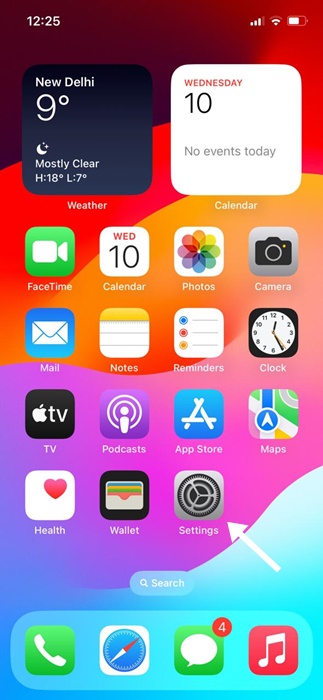
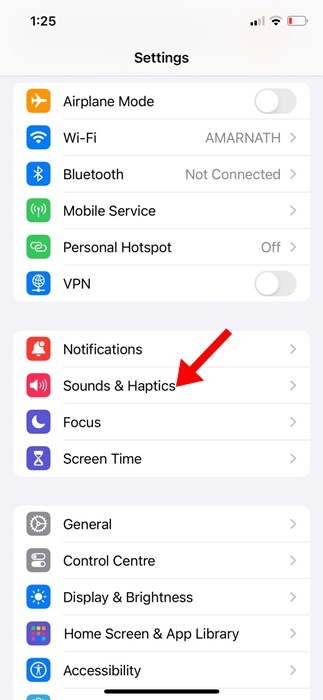
2. Tap on Sounds & Haptics.
3. Turn on the toggle for Change with Buttons.
4. Clean the Volume Buttons
Even though modern iPhones have protection against the ingress of dust, some dust particles can still pass through and stick between the buttons and their casing, preventing the press.
Turn off your iPhone and clean the volume button with a soft brush. Or else, gently blow the volume button to remove dust and debris. Whatever you do to clean the volume button, do it slowly to prevent damage.
5. Control the iPhone’s Volume Without the Volume Button
If the volume button isn’t working and you don’t have time to troubleshoot it, you can control the volume through the Control Center.
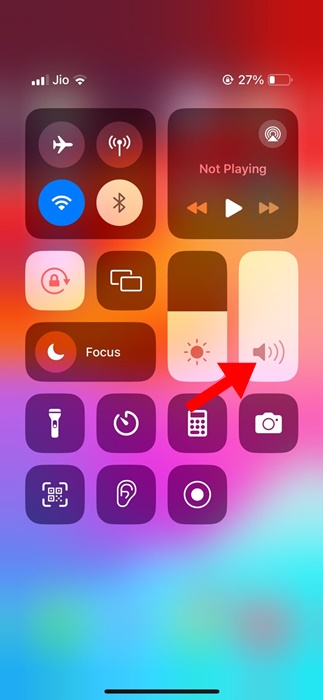
Open the Control Center on your iPhone and find the volume controls. You can swipe up and down to adjust the volume.
If you’re using AirPods, you can speak to them, ‘Hey Siri, turn up the volume’ to increase the volume of your iPhone.
6. Use AssistiveTouch to control the volume
AssistiveTouch can be used to control the volume of your iPhone. To do this, you need to set up the AssistiveTouch button to open the volume controls on your iPhone.
1. Launch Settings.
2. Tap Accessibility.
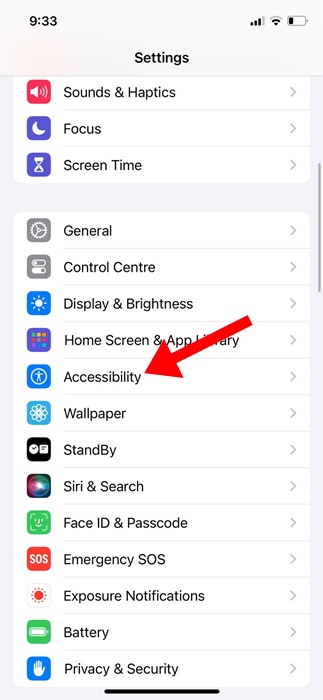
3. Tap Touch.
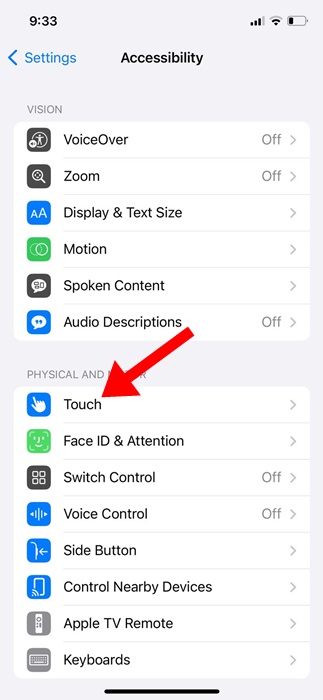
4. Tap AssistiveTouch.
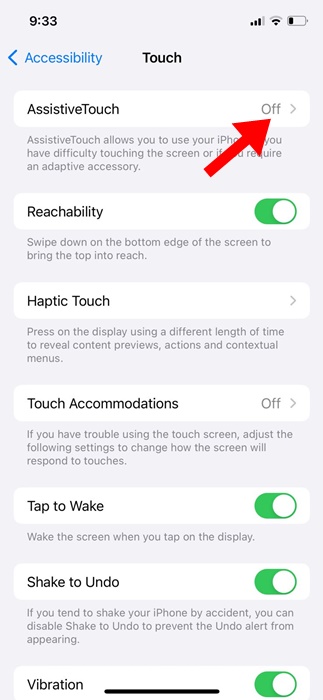
5. Turn on the toggle beside AssistiveTouch.
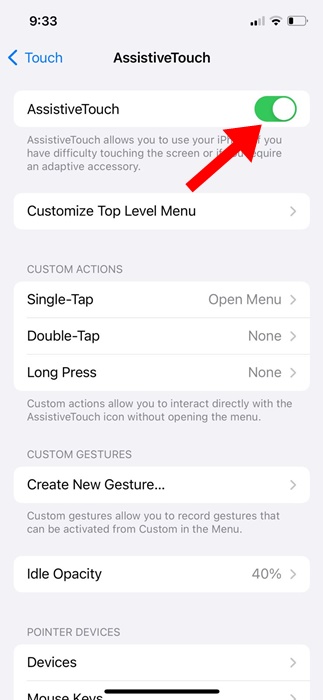
5. Set the Single-Tap, Double-Tap, and Long Press gestures to control the volume.
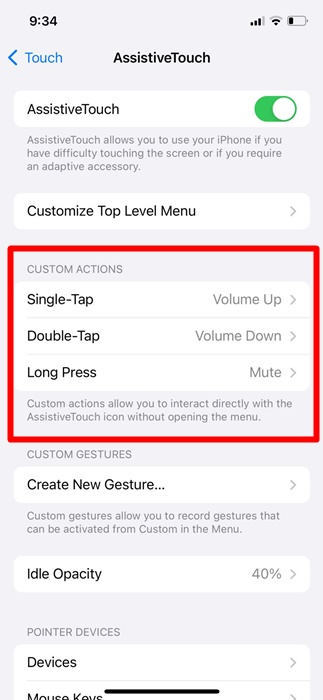
Whenever you want to control the volume of your iPhone, use AssistiveTouch.
7. Reset Your iPhone
Resetting will be helpful if you recently installed a version update and the volume button stopped working immediately after that.
1. Launch Settings.
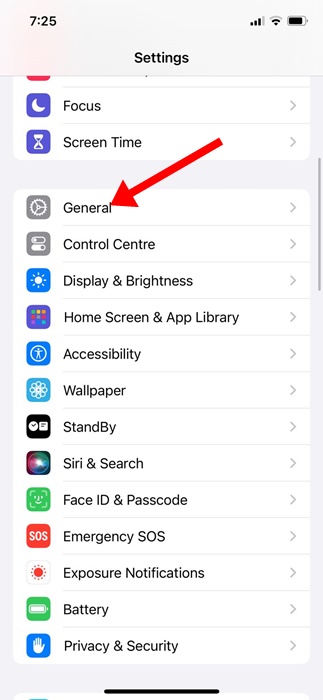
2. Tap General.
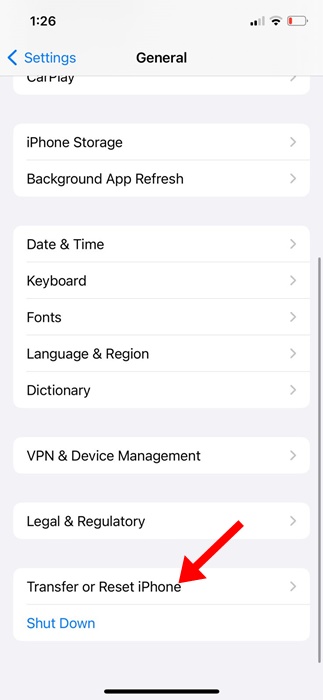
3. Tap Transfer or Reset iPhone.
4. Tap Reset.
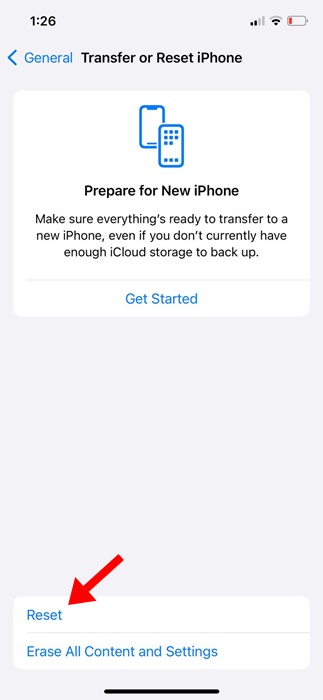
5. On the prompt that appears, select Reset All Settings.
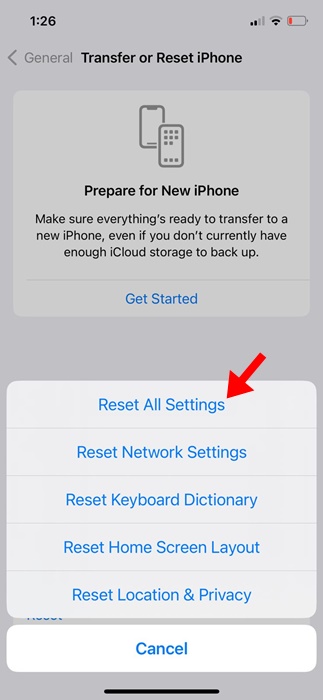
You need to enter your iPhone’s passcode to confirm the Reset process.
8. Contact Apple Support
While Apple Support can sometimes be expensive, the support team can rule out the issue of the volume buttons not working. Apple has a very good after-sales service, and they can provide solutions in no time.
If your iPhone is still under warranty, you can reach out to the nearest Apple Service Center and ask them to fix the problem. Make sure to visit an authorized service center to avoid voiding the iPhone warranty.
These are some of the best & working methods to fix the Volume Buttons not working issue. Let us know if you need more help fixing the Volume buttons not working on the iPhone.
The post How to Fix Volume Buttons Not Working on iPhone appeared first on TechViral.
ethical hacking,hacking,bangla ethical hacking,bangla hacking tutorial,bangla tutorial,bangla hacking book,ethical hacking bangla,bangla,hacking apps,ethical hacking bangla tutorial,bangla hacking,bangla hacking pdf,bangla hacking video,bangla android hacking,bangla hacking tutorials,bangla fb hacking tutorial,bangla hacking book download,learn ethical hacking,hacking ebook,hacking tools,bangla ethical hacking course, tricks,hacking,ludo king tricks,whatsapp hacking trick 2019 tricks,wifi hacking tricks,hacking tricks: secret google tricks,simple hacking tricks,whatsapp hacking tricks,tips and tricks,wifi tricks,tech tricks,redmi tricks,hacking trick paytm cash,hacking trick helo app,hacking trick of helo app,paytm cash hacking trick,wifi password hacking,paytm cash hacking trick malayalam,hacker tricks, tips and tricks,pubg mobile tips and tricks,tricks,tips,tips and tricks for pubg mobile,100 tips and tricks,pubg tips and tricks,excel tips and tricks,google tips and tricks,kitchen tips and tricks,season 2 tips and tricks,android tips and tricks,fortnite tips and tricks,godnixon tips and tricks,free fire tips and tricks,advanced tips and tricks,whatsapp tips and tricks, facebook tricks,facebook,facebook hidden tricks,facebook tips and tricks,facebook latest tricks,facebook tips,facebook new tricks,facebook messenger tricks,facebook android app tricks,fb tricks,facebook app tricks,facebook tricks and tips,facebook tricks in hindi,tricks,facebook tutorial,new facebook tricks,cool facebook tricks,facebook tricks 2016,facebook tricks 2017,facebook secret tricks,facebook new tricks 2020,blogger blogspot seo tips and tricks,blogger tricks,blogger,blogger seo tips,blogger seo tips and tricks,seo for blogger,blogger seo in hindi,blogger seo best tips for increasing visitors,blogging tips and tricks,blogger blog seo,blogger seo in urdu,adsense approval trick,blogging tips and tricks for beginners,blogging tricks,blogger tutorial,blogger tricks 2016,blogger tricks 2017 bangla,tricks,bangla tutorial,bangla magic,bangla motivational video,bangla tricks,bangla tips,all bangla tips,magic tricks,akash bangla tricks,top 10 bangla tricks,tips and tricks,all bangla trick,bangla computer tricks,computer bangla tricks,bangla magic card tricks,ms word bangla tips and tricks,bangla computer tips,trick,psychology tricks,youtube bangla,magic tricks bangla,si trick Credit techviral


