
Mouse Right Click Opening the Folder in New Tab? 5 Fixes
Some Windows 11 users have recently run into a problem where right click on the mouse doesn’t open the usual context menu. Instead, it opens the folder in a new tab. Normally, right-click should show options like Delete, Rename, Extract, Cut, Copy, and more, depending on the file type. If the context menu isn’t appearing for you, here are a few things you can try to fix the problem.
1. Make Changes to the Mouse Settings
You may have accidentally changed the primary mouse settings on your PC, causing the right-click to behave differently. Here’s how to reset it.
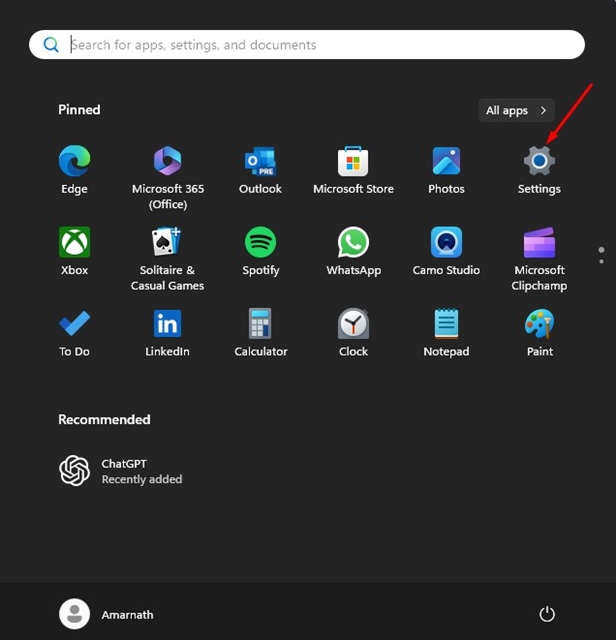
1. Launch the Settings app on your PC.
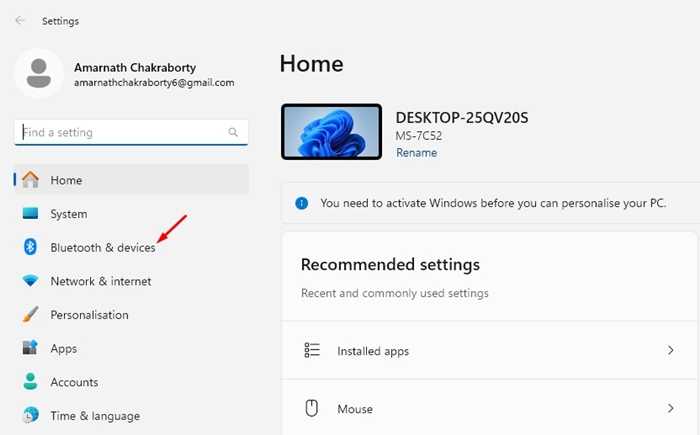
2. Switch to Bluetooth & devices.
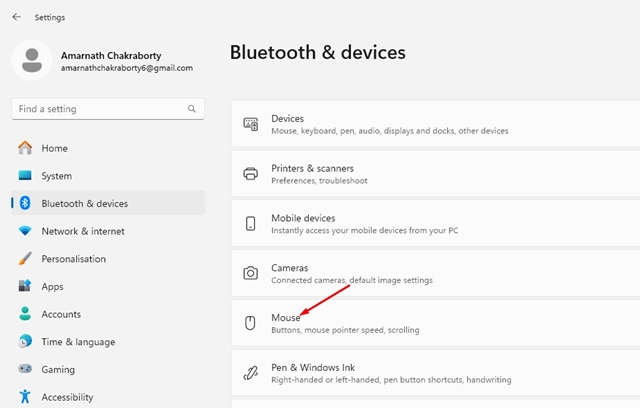
3. Click the Mouse.
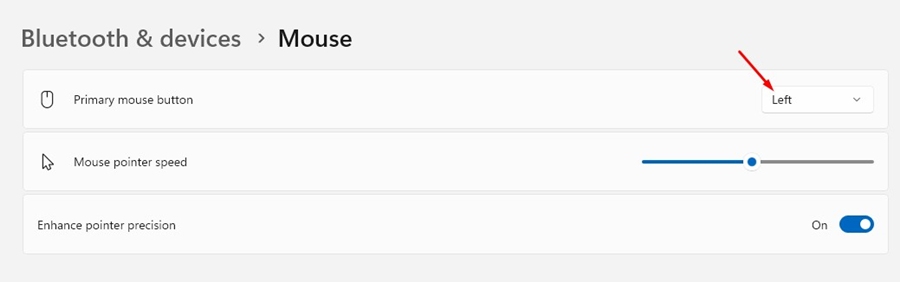
4. Select Left on the Primary Mouse button.
2. Make Changes to the Mouse Properties
You also need to make the same changes in the Mouse Properties to fix the mouse right click opening the folder in a new tab.
1. Open Settings and navigate to Bluetooth & Devices > Mouse.
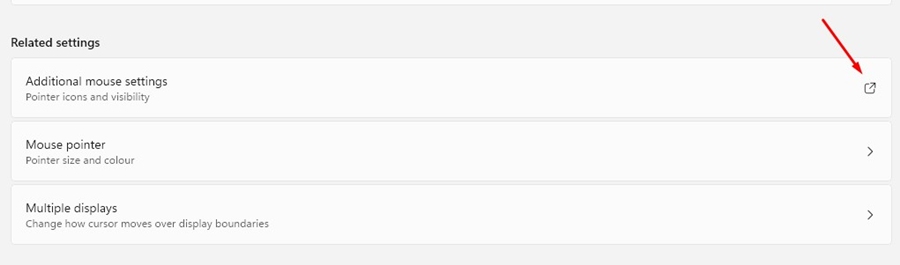
2. Scroll down to the Related settings and select Additional mouse settings.
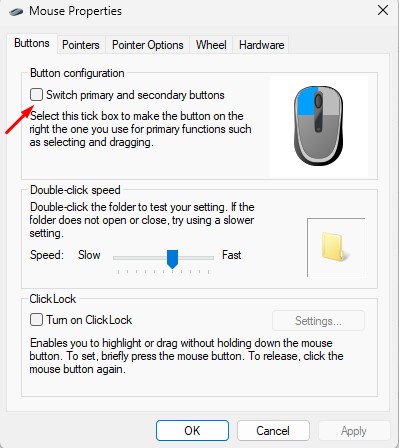
3. On the Button configuration, make sure the Switch Primary and Secondary buttons are unchecked.
3. Make Changes to the Folder Options
Now that you have made changes to the Mouse Properties, it’s time to make a few changes to the Folder Options as well.
1. Launch the File Explorer (This PC) on your Windows 11.
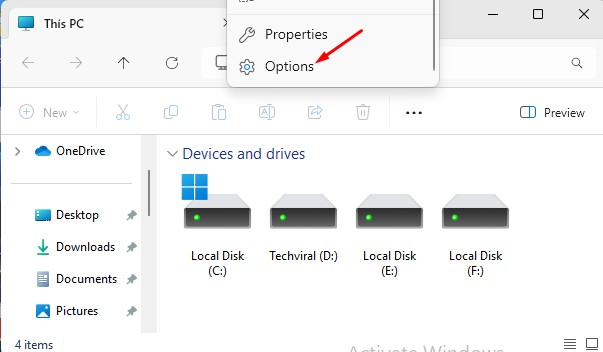
2. Click the three dots at the top and select Options.
3. Select Open Each Folder in the same window.
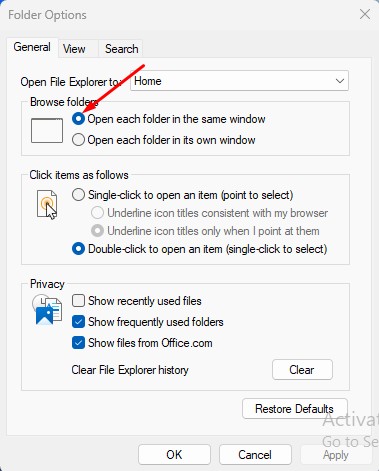
4. In the Click items as follows section, check Double-click to open an item.
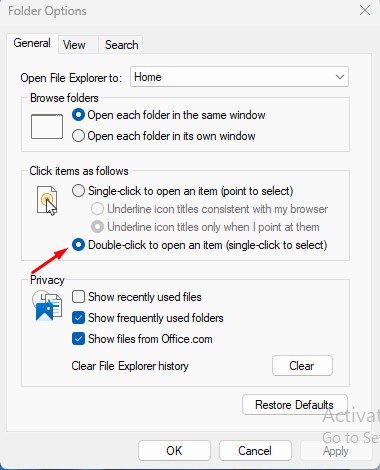
5. After making these changes, click Apply.
4. Restore Default Settings on the Folder Options
Another thing you can do to fix this type of problem is to restore the default settings on the Folder Options.
1. Launch the File Explorer (This PC) on your Windows 11.
2. Click the three dots at the top and select Options.
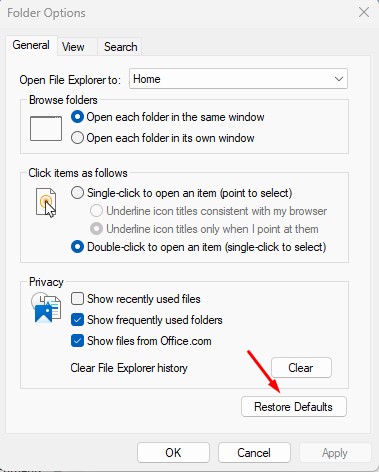
3. At the bottom right corner, click Restore Defaults.
5. Disable softwares that changes mouse settings
Certain softwares, especially the one that modifies the functionality of the mouse, can trigger such problems.
If you can’t recall installing such software, open the Control Panel > Programs and Features and then look at all softwares installed.
Once you find the software likely to trigger the problem, uninstall it.
These are a few simple ways to fix the mouse right click opening the folder in a new tab issue on Windows 11. Let us know if you need more help on this topic in the comments.
The post Mouse Right Click Opening the Folder in New Tab? 5 Fixes appeared first on TechViral.
ethical hacking,hacking,bangla ethical hacking,bangla hacking tutorial,bangla tutorial,bangla hacking book,ethical hacking bangla,bangla,hacking apps,ethical hacking bangla tutorial,bangla hacking,bangla hacking pdf,bangla hacking video,bangla android hacking,bangla hacking tutorials,bangla fb hacking tutorial,bangla hacking book download,learn ethical hacking,hacking ebook,hacking tools,bangla ethical hacking course, tricks,hacking,ludo king tricks,whatsapp hacking trick 2019 tricks,wifi hacking tricks,hacking tricks: secret google tricks,simple hacking tricks,whatsapp hacking tricks,tips and tricks,wifi tricks,tech tricks,redmi tricks,hacking trick paytm cash,hacking trick helo app,hacking trick of helo app,paytm cash hacking trick,wifi password hacking,paytm cash hacking trick malayalam,hacker tricks, tips and tricks,pubg mobile tips and tricks,tricks,tips,tips and tricks for pubg mobile,100 tips and tricks,pubg tips and tricks,excel tips and tricks,google tips and tricks,kitchen tips and tricks,season 2 tips and tricks,android tips and tricks,fortnite tips and tricks,godnixon tips and tricks,free fire tips and tricks,advanced tips and tricks,whatsapp tips and tricks, facebook tricks,facebook,facebook hidden tricks,facebook tips and tricks,facebook latest tricks,facebook tips,facebook new tricks,facebook messenger tricks,facebook android app tricks,fb tricks,facebook app tricks,facebook tricks and tips,facebook tricks in hindi,tricks,facebook tutorial,new facebook tricks,cool facebook tricks,facebook tricks 2016,facebook tricks 2017,facebook secret tricks,facebook new tricks 2020,blogger blogspot seo tips and tricks,blogger tricks,blogger,blogger seo tips,blogger seo tips and tricks,seo for blogger,blogger seo in hindi,blogger seo best tips for increasing visitors,blogging tips and tricks,blogger blog seo,blogger seo in urdu,adsense approval trick,blogging tips and tricks for beginners,blogging tricks,blogger tutorial,blogger tricks 2016,blogger tricks 2017 bangla,tricks,bangla tutorial,bangla magic,bangla motivational video,bangla tricks,bangla tips,all bangla tips,magic tricks,akash bangla tricks,top 10 bangla tricks,tips and tricks,all bangla trick,bangla computer tricks,computer bangla tricks,bangla magic card tricks,ms word bangla tips and tricks,bangla computer tips,trick,psychology tricks,youtube bangla,magic tricks bangla,si trick Credit techviral


