
How to Change Phone Number on Signal Without Losing Chats
Although Signal didn’t have a comparable user-base when put against WhatsApp, Telegram, and Messenger, it does bring some useful security and privacy features. Unlike other messaging apps that focus on features, Signal is a messaging app that prioritizes privacy and security.
Signal, like WhatsApp, also requires an active phone number to sign up, so that you can communicate with other users on the app. Before February 7, 2022, Signal’s accounts were tied to phone numbers, which meant that users could not port their existing accounts to another number.
However, the good news is that the company recently released an update enabling users to change their phone numbers without losing any chats. This essentially means users can now change their phone numbers without losing any chats.
Prior to this update, using a new number meant starting over from scratch and losing all messaging history. But, it won’t happen now as the app will now allow users to keep their chats, groups, and profile information intact while changing their phone numbers. So, if you want to change your Signal phone number without losing chat data, you are reading the right guide.
Steps to Change Phone Number on Signal Without Losing Chats
In this article, we will share a step-by-step guide on how to change your Signal Phone number without losing chat data. Let’s check out.
Note: The feature is slowly rolling to all regions. The feature is right now available on Signal version 5.30.6 on Android and version 5.27.1 on iOS. If your app doesn’t have this feature, you need to join the beta program of Signal.
1. First of all, head to the Google Play Store and update the Signal Private Messenger app for Android.

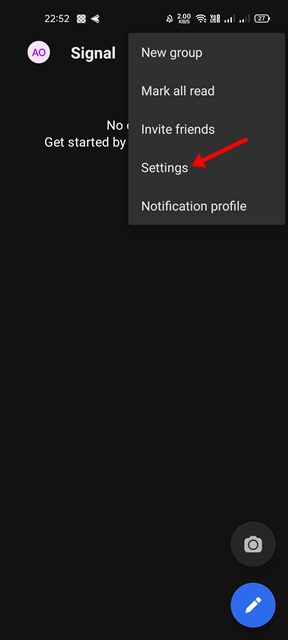
2. Once updated, open the Signal app and tap on the three dots as shown in the screenshot below.

3. From the list of options, tap on the Settings.
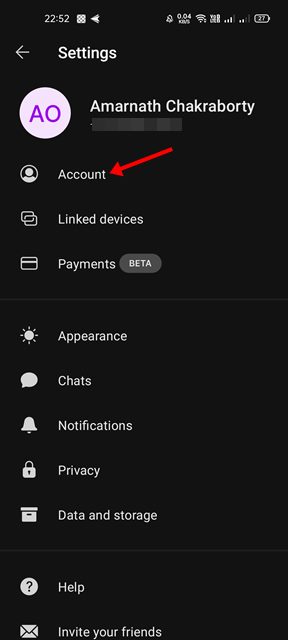
4. Ib the Settings page, tap on the Account option as shown in the screenshot below.
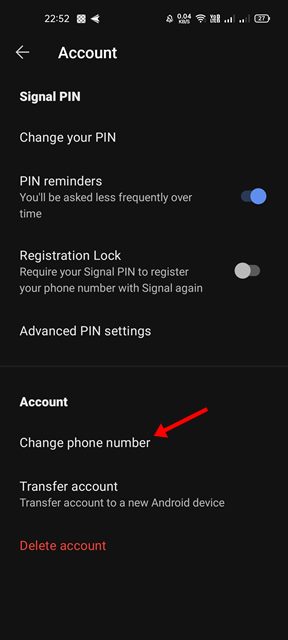
5. Under the Account Settings page, scroll down and tap on the Change phone number option.
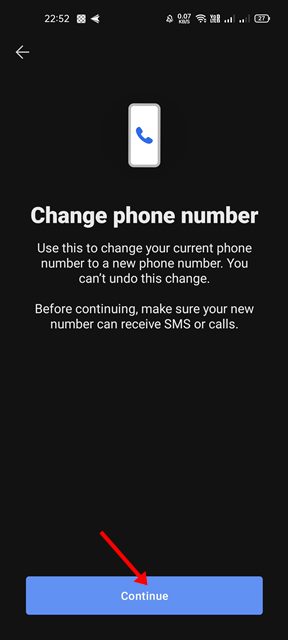
6. On the Change phone number screen, tap on the Continue button as shown below.
7. You need to enter your old and new numbers. Once done, tap on the Continue button.
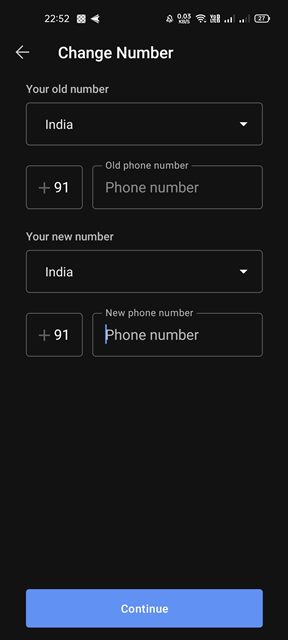
8. For verification, Signal will send you a code on your new number. Enter the number to register the new number to the Signal messaging app.
That’s it! You are done. This is how you can change your Signal phone number without losing any chat history.
It’s pretty easy to change the Signal Phone number on Android. I hope this article helped you! Please share it with your friends also. If you have any doubts related to this, let us know in the comment box below.
The post How to Change Phone Number on Signal Without Losing Chats appeared first on TechViral.
ethical hacking,hacking,bangla ethical hacking,bangla hacking tutorial,bangla tutorial,bangla hacking book,ethical hacking bangla,bangla,hacking apps,ethical hacking bangla tutorial,bangla hacking,bangla hacking pdf,bangla hacking video,bangla android hacking,bangla hacking tutorials,bangla fb hacking tutorial,bangla hacking book download,learn ethical hacking,hacking ebook,hacking tools,bangla ethical hacking course, tricks,hacking,ludo king tricks,whatsapp hacking trick 2019 tricks,wifi hacking tricks,hacking tricks: secret google tricks,simple hacking tricks,whatsapp hacking tricks,tips and tricks,wifi tricks,tech tricks,redmi tricks,hacking trick paytm cash,hacking trick helo app,hacking trick of helo app,paytm cash hacking trick,wifi password hacking,paytm cash hacking trick malayalam,hacker tricks, tips and tricks,pubg mobile tips and tricks,tricks,tips,tips and tricks for pubg mobile,100 tips and tricks,pubg tips and tricks,excel tips and tricks,google tips and tricks,kitchen tips and tricks,season 2 tips and tricks,android tips and tricks,fortnite tips and tricks,godnixon tips and tricks,free fire tips and tricks,advanced tips and tricks,whatsapp tips and tricks, facebook tricks,facebook,facebook hidden tricks,facebook tips and tricks,facebook latest tricks,facebook tips,facebook new tricks,facebook messenger tricks,facebook android app tricks,fb tricks,facebook app tricks,facebook tricks and tips,facebook tricks in hindi,tricks,facebook tutorial,new facebook tricks,cool facebook tricks,facebook tricks 2016,facebook tricks 2017,facebook secret tricks,facebook new tricks 2020,blogger blogspot seo tips and tricks,blogger tricks,blogger,blogger seo tips,blogger seo tips and tricks,seo for blogger,blogger seo in hindi,blogger seo best tips for increasing visitors,blogging tips and tricks,blogger blog seo,blogger seo in urdu,adsense approval trick,blogging tips and tricks for beginners,blogging tricks,blogger tutorial,blogger tricks 2016,blogger tricks 2017 bangla,tricks,bangla tutorial,bangla magic,bangla motivational video,bangla tricks,bangla tips,all bangla tips,magic tricks,akash bangla tricks,top 10 bangla tricks,tips and tricks,all bangla trick,bangla computer tricks,computer bangla tricks,bangla magic card tricks,ms word bangla tips and tricks,bangla computer tips,trick,psychology tricks,youtube bangla,magic tricks bangla,si trick Credit techviral


