
How to Check RAM Usage in Android 10 & Above
Users consider many factors before purchasing a smartphone such as a processor, cameras, RAM, storage, and so on. Everything is equally important, but RAM is something that decides the overall performance of your smartphone.
While Android does provide you with a recent apps screen that shows your available RAM, there is no way to check which apps are using how much memory.
So, if you are using an older version of Android, you need to utilize third-party apps to know the RAM consumption of Apps. However, if you are using Android 10, you can view the app’s RAM usage without installing any third-party app.
Steps to Check RAM Usage in Android 10 & Above
Hence, in this article, we will share a step-by-step guide on how to check RAM usage on Android 10 or above. Let’s check out. Also, we will tell you how to check RAM usage on Samsung devices. Let’s check out.
Check RAM usage on Android 10 & Above
If your phone is running on Android 10 & above, you need to follow this method to check the RAM usage. Here are some of the simple steps you need to follow.
1. First of all, open the Settings app on your Android device. You can access the Settings app from the App Drawer or from the home screen.
2. On the Settings app, scroll down and tap on the About Phone section as shown below.
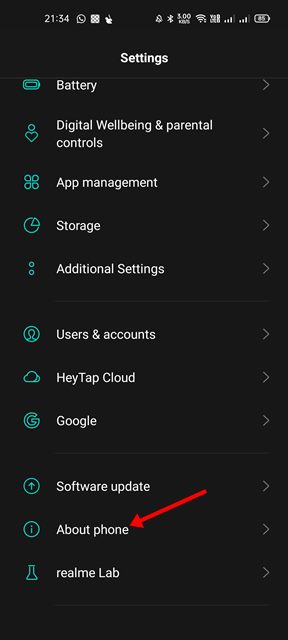
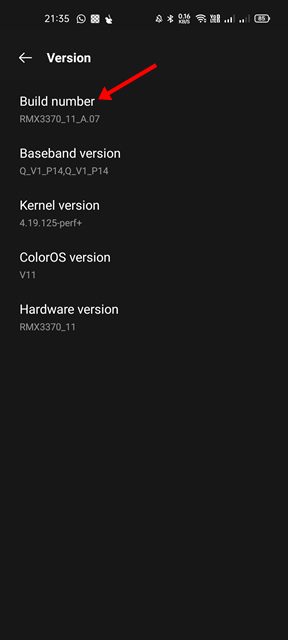
3. On the About Phone page, scroll down and find the Build Number. You need to tap on the Build number 6-7 times in a row to activate the Developer Mode.
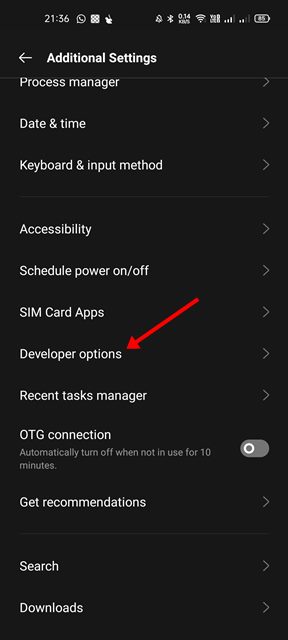
4. Now, move back to the previous page and tap on the Developer Options.
5. On the Developer options, tap on the Memory option as shown below.
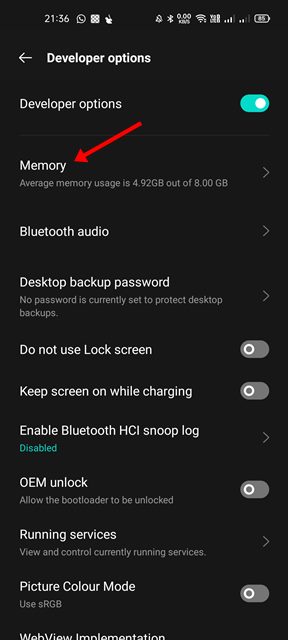
6. On the Memory use page, scroll down and tap on the Memory use by app option.
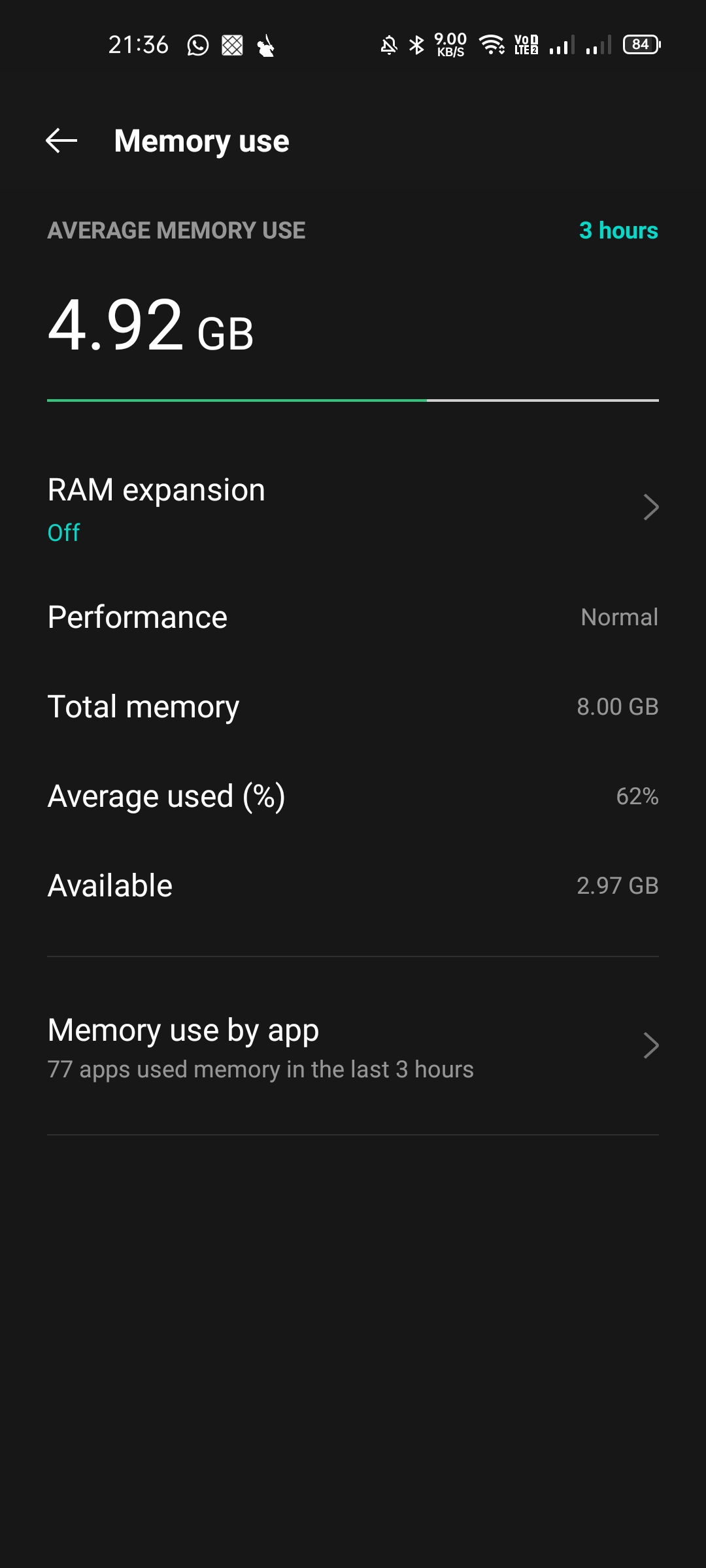
7. Now, you will be able to see all apps that have used your RAM. You can adjust the time frame to see the memory usage of apps at a specific time.
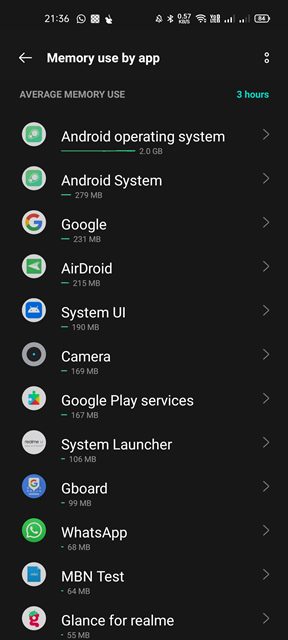
That’s it! You are done. This is how you can check RAM usage on Android 10 & above.
Check RAM usage on Samsung Smartphones
If you are using a Samsung device, you don’t need to enable the developer mode to check the RAM usage. It has a built-in feature that automatically detects and ends the RAM-hungry apps & processes. Here’s how to use the feature.
1. First of all, open the Settings app on your Samsung smartphone.
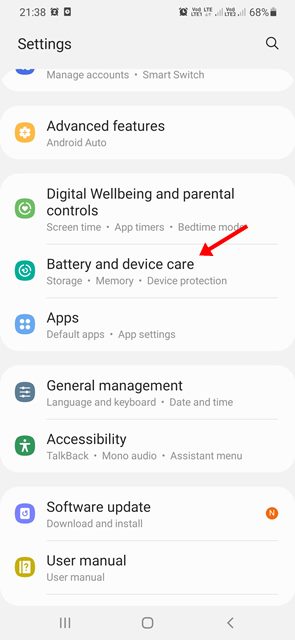
2. On the Settings app, scroll down and tap on the Battery and Device care option.
3. On the Battery and Device care page, tap on the Memory option as shown below.
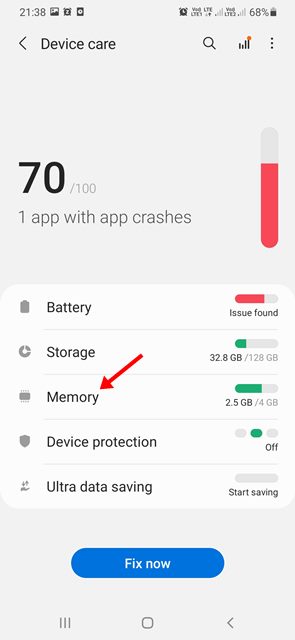
4. Now, you will be able to see the RAM usage in real-time.
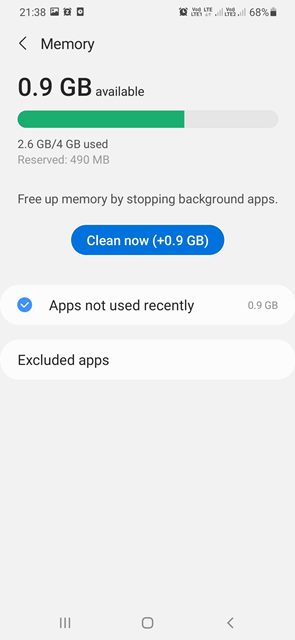
5. To free up the memory, tap on the Clean Now button, as shown in the screenshot below.
That’s it! You are done. This is how you can check RAM usage on Samsung smartphones.
Well, compared to an older version of Android, the RAM optimization has become better with Android 10. If you are facing RAM-related issues, you should periodically check the RAM usage on your Android. I hope this article helped you! Please share it with your friends also. If you have any doubts related to this, let us know in the comment box below.
The post How to Check RAM Usage in Android 10 & Above appeared first on TechViral.
ethical hacking,hacking,bangla ethical hacking,bangla hacking tutorial,bangla tutorial,bangla hacking book,ethical hacking bangla,bangla,hacking apps,ethical hacking bangla tutorial,bangla hacking,bangla hacking pdf,bangla hacking video,bangla android hacking,bangla hacking tutorials,bangla fb hacking tutorial,bangla hacking book download,learn ethical hacking,hacking ebook,hacking tools,bangla ethical hacking course, tricks,hacking,ludo king tricks,whatsapp hacking trick 2019 tricks,wifi hacking tricks,hacking tricks: secret google tricks,simple hacking tricks,whatsapp hacking tricks,tips and tricks,wifi tricks,tech tricks,redmi tricks,hacking trick paytm cash,hacking trick helo app,hacking trick of helo app,paytm cash hacking trick,wifi password hacking,paytm cash hacking trick malayalam,hacker tricks, tips and tricks,pubg mobile tips and tricks,tricks,tips,tips and tricks for pubg mobile,100 tips and tricks,pubg tips and tricks,excel tips and tricks,google tips and tricks,kitchen tips and tricks,season 2 tips and tricks,android tips and tricks,fortnite tips and tricks,godnixon tips and tricks,free fire tips and tricks,advanced tips and tricks,whatsapp tips and tricks, facebook tricks,facebook,facebook hidden tricks,facebook tips and tricks,facebook latest tricks,facebook tips,facebook new tricks,facebook messenger tricks,facebook android app tricks,fb tricks,facebook app tricks,facebook tricks and tips,facebook tricks in hindi,tricks,facebook tutorial,new facebook tricks,cool facebook tricks,facebook tricks 2016,facebook tricks 2017,facebook secret tricks,facebook new tricks 2020,blogger blogspot seo tips and tricks,blogger tricks,blogger,blogger seo tips,blogger seo tips and tricks,seo for blogger,blogger seo in hindi,blogger seo best tips for increasing visitors,blogging tips and tricks,blogger blog seo,blogger seo in urdu,adsense approval trick,blogging tips and tricks for beginners,blogging tricks,blogger tutorial,blogger tricks 2016,blogger tricks 2017 bangla,tricks,bangla tutorial,bangla magic,bangla motivational video,bangla tricks,bangla tips,all bangla tips,magic tricks,akash bangla tricks,top 10 bangla tricks,tips and tricks,all bangla trick,bangla computer tricks,computer bangla tricks,bangla magic card tricks,ms word bangla tips and tricks,bangla computer tips,trick,psychology tricks,youtube bangla,magic tricks bangla,si trick Credit techviral


