
How to Clear & Reset Microsoft Store Cache in Windows 11 (2 Methods)
Thanks to the Microsoft Store, Windows 11 users no longer have to rely on malicious or spam-filled software download sites to download software. Windows 11’s Microsoft Store offers thousands of useful apps that you can use for free.
The good thing about Microsoft Store is that it has all the apps users mostly use, such as VLC Media Player, Spotify, Netflix, etc. While Microsoft Store is convenient for downloading and installing UWP apps, some bugs frustrate many users.
While using Microsoft Store, users often run into problems like the Search bar not working, Microsoft Store closing automatically, errors, and other issues. These things usually happen when the Microsoft Store’s cache data gets corrupted.
Resetting the Microsoft Store is the best way to resolve such issues as it clears the cache and data. So, in this article, we will share a step-by-step guide on how to clear and reset Microsoft Store Cache in Windows 11.
2 Methods to Clear & Reset Microsoft Store Cache in Windows 11
We have shared two best methods to clear and reset the Microsoft Store cache; you can follow the one that feels right for you.
1) Clear & Reset Microsoft Store Using Windows 11 Settings
We will use Windows 11’s Settings app to clear & reset Microsoft Store. Here are some of the simple steps you need to follow.
1. First of all, click on the Windows 11 Start button and select Settings.
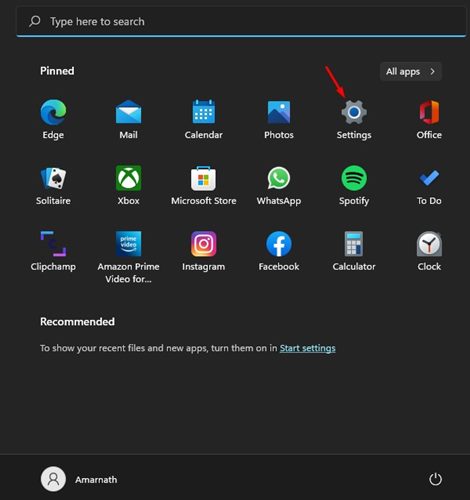
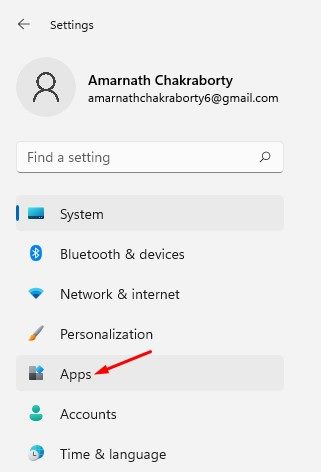
2. On the Settings app, click on the Apps below.
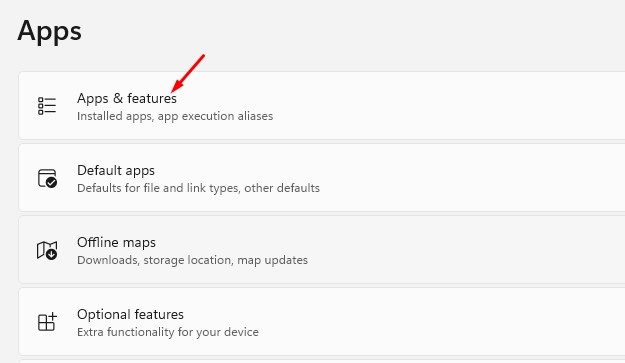
3. Click on the Apps & Features tile on the right, as shown in the screenshot below.
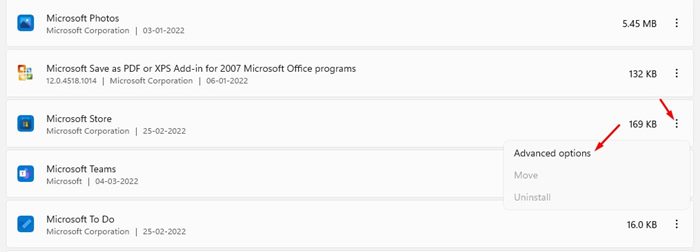
4. Under the Apps & Features page, scroll down and click on the three dots beside the Microsoft Store and select Advanced options.
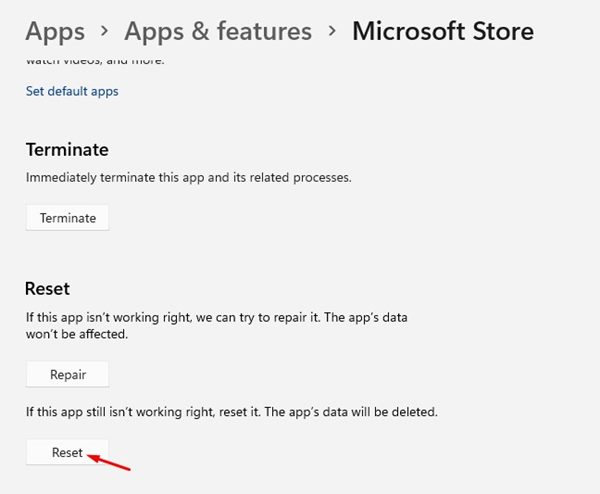
5. On the next screen, click on the Reset button as shown below.
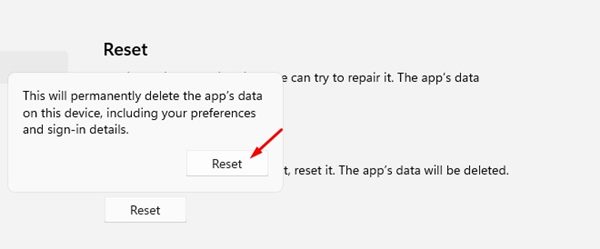
6. On the confirmation prompt, click on the Reset button again.
That’s it! You are done. This will clear and reset the Microsoft Store cache in Windows 11.
2) Clear Microsoft Store Cache via CMD
We will use the Windows 11’s Command prompt to clear the Microsoft Store’s cache in this method. Here are some of the simple steps you need to follow.
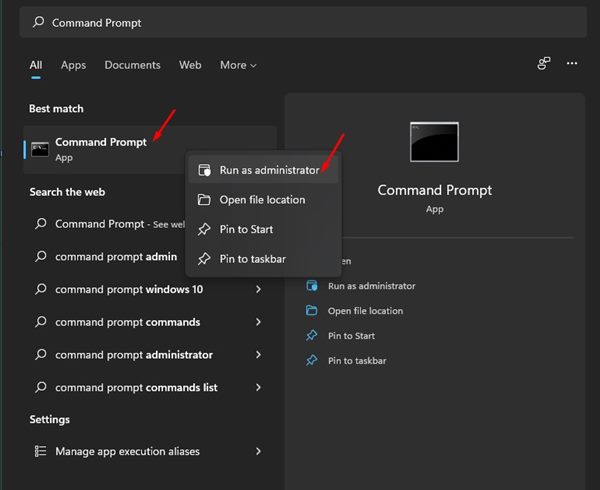
1. First of all, open Windows 11 Search and type in Command Prompt. Right-click on the Command Prompt and select Run as administrator.
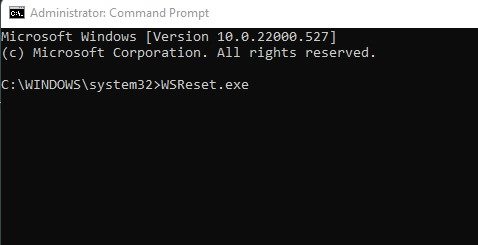
2. On the Command Prompt, enter WSReset.exe and hit the Enter button.
That’s it! You are done. This will reset the Windows Store in Windows 11.
Resetting will also clear the Microsoft Store Cache and Data. Hence, you may need to sign in with your Microsoft account again to download the Microsoft Store apps. I hope this article helped you! Please share it with your friends also. If you have any doubts about this, let us know in the comment box below.
The post How to Clear & Reset Microsoft Store Cache in Windows 11 (2 Methods) appeared first on TechViral.
ethical hacking,hacking,bangla ethical hacking,bangla hacking tutorial,bangla tutorial,bangla hacking book,ethical hacking bangla,bangla,hacking apps,ethical hacking bangla tutorial,bangla hacking,bangla hacking pdf,bangla hacking video,bangla android hacking,bangla hacking tutorials,bangla fb hacking tutorial,bangla hacking book download,learn ethical hacking,hacking ebook,hacking tools,bangla ethical hacking course, tricks,hacking,ludo king tricks,whatsapp hacking trick 2019 tricks,wifi hacking tricks,hacking tricks: secret google tricks,simple hacking tricks,whatsapp hacking tricks,tips and tricks,wifi tricks,tech tricks,redmi tricks,hacking trick paytm cash,hacking trick helo app,hacking trick of helo app,paytm cash hacking trick,wifi password hacking,paytm cash hacking trick malayalam,hacker tricks, tips and tricks,pubg mobile tips and tricks,tricks,tips,tips and tricks for pubg mobile,100 tips and tricks,pubg tips and tricks,excel tips and tricks,google tips and tricks,kitchen tips and tricks,season 2 tips and tricks,android tips and tricks,fortnite tips and tricks,godnixon tips and tricks,free fire tips and tricks,advanced tips and tricks,whatsapp tips and tricks, facebook tricks,facebook,facebook hidden tricks,facebook tips and tricks,facebook latest tricks,facebook tips,facebook new tricks,facebook messenger tricks,facebook android app tricks,fb tricks,facebook app tricks,facebook tricks and tips,facebook tricks in hindi,tricks,facebook tutorial,new facebook tricks,cool facebook tricks,facebook tricks 2016,facebook tricks 2017,facebook secret tricks,facebook new tricks 2020,blogger blogspot seo tips and tricks,blogger tricks,blogger,blogger seo tips,blogger seo tips and tricks,seo for blogger,blogger seo in hindi,blogger seo best tips for increasing visitors,blogging tips and tricks,blogger blog seo,blogger seo in urdu,adsense approval trick,blogging tips and tricks for beginners,blogging tricks,blogger tutorial,blogger tricks 2016,blogger tricks 2017 bangla,tricks,bangla tutorial,bangla magic,bangla motivational video,bangla tricks,bangla tips,all bangla tips,magic tricks,akash bangla tricks,top 10 bangla tricks,tips and tricks,all bangla trick,bangla computer tricks,computer bangla tricks,bangla magic card tricks,ms word bangla tips and tricks,bangla computer tips,trick,psychology tricks,youtube bangla,magic tricks bangla,si trick Credit techviral


