
How to Disable the Lock Screen on Windows 11 (2 Methods)
Windows 11 is Microsoft’s new desktop operating system that offers lots of new features and introduces many visual changes. When your Windows 11 boots up, the first thing that you will notice is the Lock Screen.
Many users get confused between the Lock Screen the Sign-in screen. The sign-in screen where you have to enter your password appears just after the Lock Screen. Whereas the Lock screen appears first, it shows the time, date, notifications, and background image.
So, the background image you before you sign in on Windows 11 is the lock screen. Windows 11 does offer you a few ways to customize the lock screen, but what if you don’t want the Lock Screen and want to remove it forever?
Many users feel the lock screen to be worthless, and they don’t want to click through the Lock Screen to get into their system. If you feel the same, you are reading the right guide. In this article, we will share the few best ways to Disable the Lock Screen on Windows 11. Let’s check out.
2 Best Methods to Disable the Lock Screen on Windows 11
Important: We have used Windows 11 Pro to demonstrate the process. The Group Policy method might not be available on every Windows 11 version. You can check your Windows version by navigating to the Settings > System > About.
1) Disable Lock Screen on Windows 11 via Registry
In this method, we will use the Windows Registry to Disable the Lock Screen on Windows 11. Here are some of the simple steps you need to follow.
1. First of all, press the Windows Key + R button on your keyboard. This will launch the RUN dialog box.
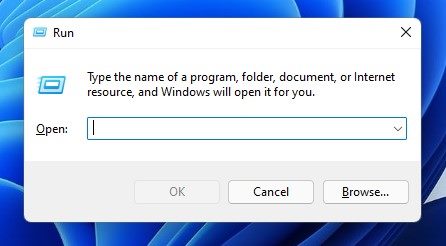
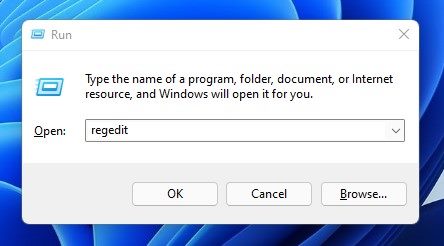
2. On the RUN dialog box, enter Regedit and hit the Enter button.
3. This will open the Registry Editor. On the Registry Editor, you need to navigate to the HKEY_LOCAL_MACHINE\SOFTWARE\Policies\Microsoft\Windows
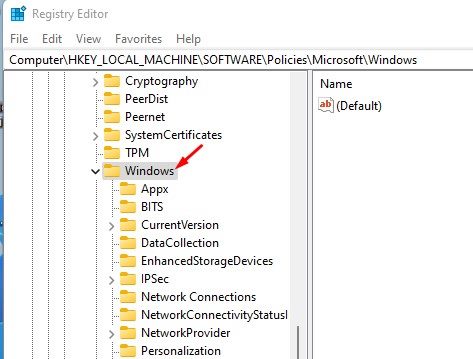
4. Next, right-click on the Windows folder and select New > Key.
5. Name the new key Personalization and hit the Enter button.
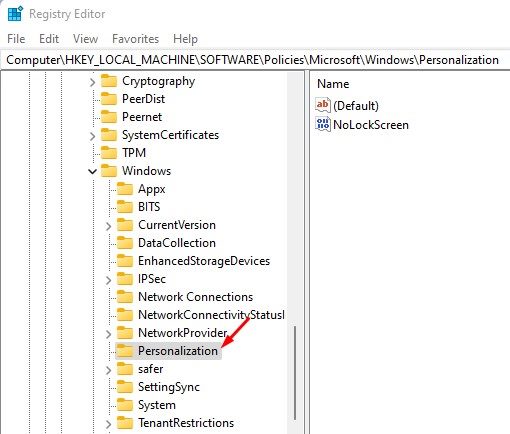
6. Now, right-click on the Personalization key and select New > DWORD (32-bit) Value.
7. Name the new DWORD (32-bit) Value as Nolockscreen and hit the Enter button.
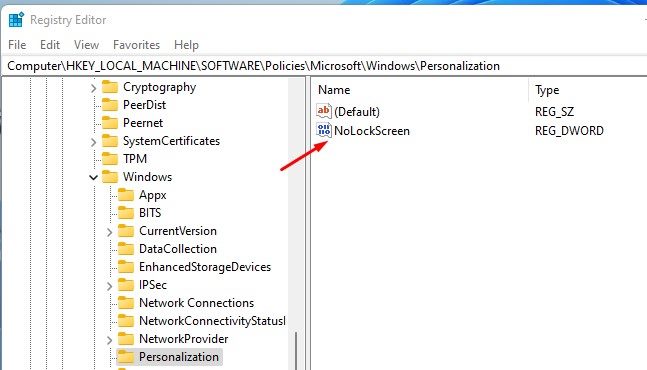
8. Now double click on the Nolockscreen key, and on the Value Data field, enter 1 and click on the Ok button.
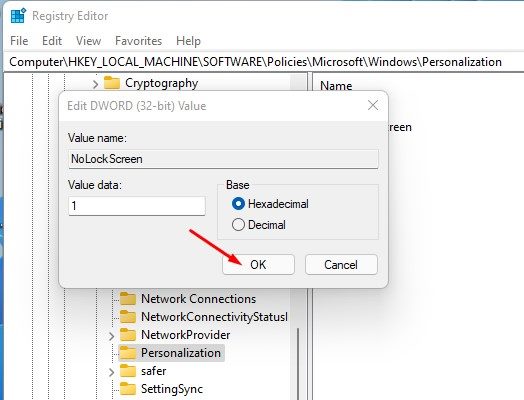
That’s it! You are done. This is how you can disable the Lock Screen on Windows 11 via Registry Editor.
2) Disable the Lock Screen on Windows 11 via Local Group Policy Editor
In this method, we will use the Local Group Policy Editor to Disable the Lock Screen on Windows 11. Here are some of the simple steps you need to follow.
1. First of all, press the Windows Key + R button on your keyboard. This will launch the RUN dialog box.
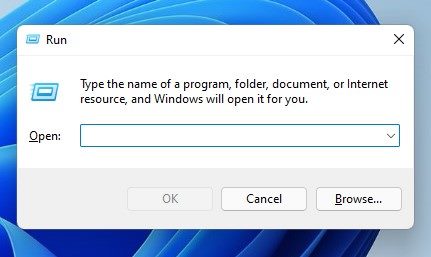
2. On the RUN dialog box, enter gpedit.msc and hit the Enter button.
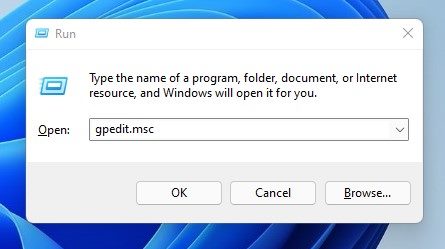
3. This will open the Local Group Policy Editor. You need to navigate to the following path:
Computer Configuration > Administrative Templates > Control Panel > Personalization

4. On the right pane, find and double click on the Do not display the lock screen policy.
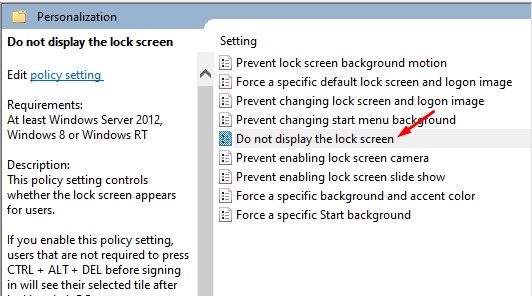
5. On the Do not display the lock screen prompt, select Enabled and click on the Apply button.
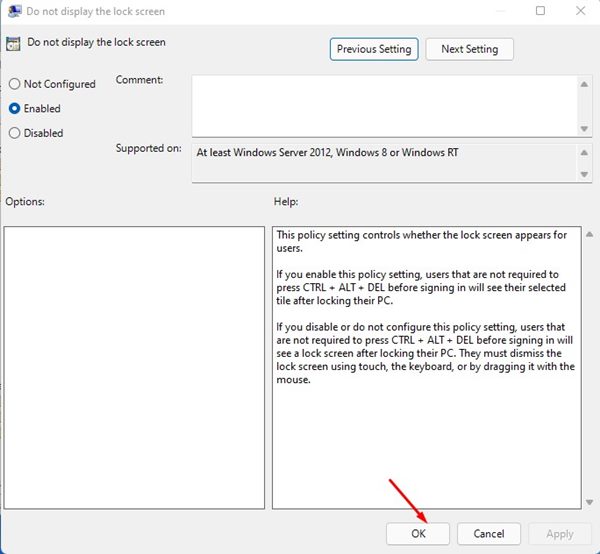
That’s it! You are done. After making the above changes, close the Local Group Policy Editor and restart your Windows 11 PC. After the restart, you will see the sign-in screen instead of the Lock screen.
Also Read: How to Customize the Windows 11 Lock Screen
It’s pretty easy to disable the Lock screen on Windows 11. You can follow any of the two methods to disable the lock screen on your PC, and the method works on Windows 10 operating system as well. I hope this article helped you! Please share it with your friends also. If you have any doubts related to this, let us know in the comment box below.
The post How to Disable the Lock Screen on Windows 11 (2 Methods) appeared first on TechViral.
ethical hacking,hacking,bangla ethical hacking,bangla hacking tutorial,bangla tutorial,bangla hacking book,ethical hacking bangla,bangla,hacking apps,ethical hacking bangla tutorial,bangla hacking,bangla hacking pdf,bangla hacking video,bangla android hacking,bangla hacking tutorials,bangla fb hacking tutorial,bangla hacking book download,learn ethical hacking,hacking ebook,hacking tools,bangla ethical hacking course, tricks,hacking,ludo king tricks,whatsapp hacking trick 2019 tricks,wifi hacking tricks,hacking tricks: secret google tricks,simple hacking tricks,whatsapp hacking tricks,tips and tricks,wifi tricks,tech tricks,redmi tricks,hacking trick paytm cash,hacking trick helo app,hacking trick of helo app,paytm cash hacking trick,wifi password hacking,paytm cash hacking trick malayalam,hacker tricks, tips and tricks,pubg mobile tips and tricks,tricks,tips,tips and tricks for pubg mobile,100 tips and tricks,pubg tips and tricks,excel tips and tricks,google tips and tricks,kitchen tips and tricks,season 2 tips and tricks,android tips and tricks,fortnite tips and tricks,godnixon tips and tricks,free fire tips and tricks,advanced tips and tricks,whatsapp tips and tricks, facebook tricks,facebook,facebook hidden tricks,facebook tips and tricks,facebook latest tricks,facebook tips,facebook new tricks,facebook messenger tricks,facebook android app tricks,fb tricks,facebook app tricks,facebook tricks and tips,facebook tricks in hindi,tricks,facebook tutorial,new facebook tricks,cool facebook tricks,facebook tricks 2016,facebook tricks 2017,facebook secret tricks,facebook new tricks 2020,blogger blogspot seo tips and tricks,blogger tricks,blogger,blogger seo tips,blogger seo tips and tricks,seo for blogger,blogger seo in hindi,blogger seo best tips for increasing visitors,blogging tips and tricks,blogger blog seo,blogger seo in urdu,adsense approval trick,blogging tips and tricks for beginners,blogging tricks,blogger tutorial,blogger tricks 2016,blogger tricks 2017 bangla,tricks,bangla tutorial,bangla magic,bangla motivational video,bangla tricks,bangla tips,all bangla tips,magic tricks,akash bangla tricks,top 10 bangla tricks,tips and tricks,all bangla trick,bangla computer tricks,computer bangla tricks,bangla magic card tricks,ms word bangla tips and tricks,bangla computer tips,trick,psychology tricks,youtube bangla,magic tricks bangla,si trick Credit techviral


