
How to Download & Install Apex Legends Mobile (Android & iOS)
Battle Royale fans might be familiar with Apex Legends game. The game came to the limelight a few years ago and soon became the fastest-growing battle royale game on the market.
According to the reports, the battle royale game – Apex Legends has been downloaded over 10 million times during the first 72 hours of its launch. Although the desktop version of Apex Legends is immensely famous, the developers have left the mobile users waiting.
Now after the months of wait, the most anticipated battle royale game – Apex Legends Mobile, has arrived. The mobile version of Apex Launched was officially launched, but it has been made available in selected countries.
Apex Legends Mobile for Android & iOS

As the game has been officially launched, you might be eager to get your hands on it. However, before you start searching for the download links, please note that the game has only been made available in selected countries.
Apex Legend’s developer Respawn has planned to test the in-game mechanism, features, and fix a few bugs before making it available to the broader global release. This means the game is still being tested and released to limited audiences.
Nonetheless, the developer has promised to release the game to all users by year’s end. In the meantime, players can rely on unofficial methods to run Apex Legends mobile in ineligible countries.
List of Countries where Apex Legends Mobile is Available
Apex Legends Mobile is currently available in just 10 countries. If you are looking for a full list of countries where Apex Legends is available, take a look at the list.
- Argentina
- Peru
- Mexico
- Indonesia
- Colombia
- Singapore
- Malaysia
- Philippines
- Australia
- New Zealand
Requirements to Run Apex Legends on Android & iOS
If you have played the PC version of Apex Legends, you might know that the game is resource hungry. The visuals of the graphics were impressive; hence they require a capable processor and a powerful graphic unit to run smoothly. Check out the minimum system requirements for Apex Legends Mobile:
Android
| Android 8.1 or above |
| Open GL 3.0 or above |
| 3 to 4GB of Storage Space |
| Minimum 3GB of RAM |
| Mid to High end processor |
iOS
| iPhone 6s or Later |
| Operating System: iOS 10.0 or above |
| Apple A9 or above |
| 3GB of Storage |
| At least 2GB of RAM |
Please note that the game is still under development, and the developers are working hard to optimize the game to run on other devices as well. So, basically, if you have a mid to high-end device, you can run Apex Legends mobile easily.
How to Download Apex Legends Mobile on Android
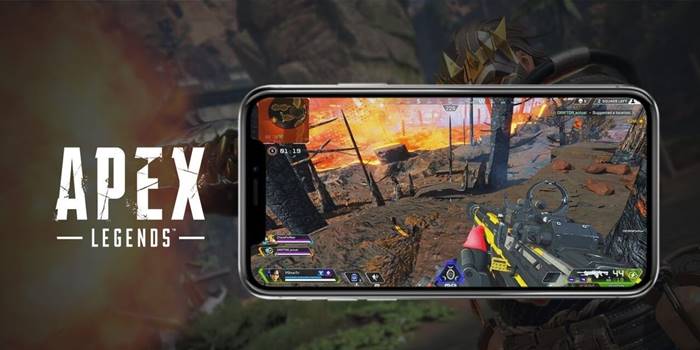
Well, if you live in a country where the developers have officially launched the Apex Legends Mobile, you can easily try out the game.
However, you will get the game only if you have pre-registered the game. If you haven’t yet pre-registered the game, you need to follow some of the steps shared below.
1. First of all, open your favorite web browser and open this Google Play Store link. You can also open it from your mobile.
2. Now tap on the Pre-Register button as shown below.
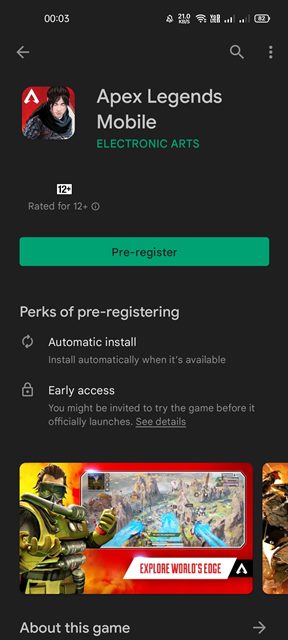
3. The game will be available to you in no time. If you have already pre-registered the game, you will see the Install button.
4. Just tap on the Install button to install the game directly on your Android device.
That’s it! You are done. This is how you can download & install Apex Legends mobile in supported countries.
Download in Unsupported Countries
If you live in unsupported countries and want to play the game, you need to rely on other ways to download & install the game. The thing you should note is Respawn stated, “The game should not be sideloaded through a third party site or direct APK download”
This simply means that sideloading the APK and OBB files won’t work in this case. The servers won’t connect you to other players. So, the remaining option is to switch to a VPN server of the supported country and change the Play Store country.
After changing the Google Play Store country to the supported location, you will be able to install the Apex Legends game on your mobile. However, the problem here is that users would face high ping issues while playing the games.
How to Download Apex Legends Mobile on iPhone
On an iPhone, you can download Apex Legends Mobile directly from the App Store. Unlike Android, Apex Legends Mobile does not require pre-registration. However, if you reside outside the supported regional launch countries, you won’t see the Apex Legends Mobile listing on the App Store.
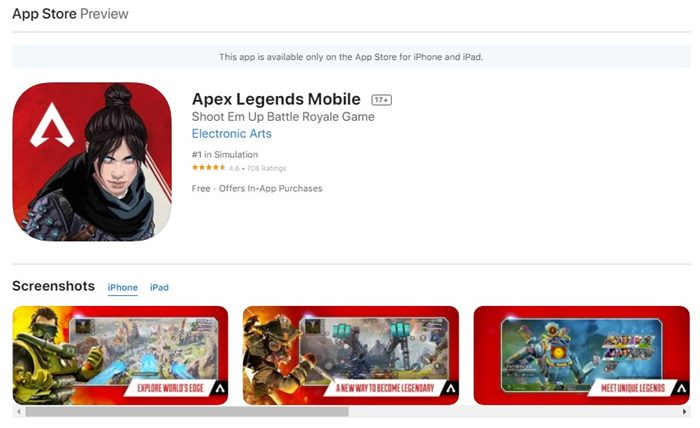
In that case, you need to change the region of your iOS device, along with the App Store region. You will be able to download the game directly from the iOS app store after changing the region to a supported country. Also, your device needs to be connected to a VPN service at all times as you download & play the game.
The APK and the OBB files were still not available. However, we will update the article when the data files are available and will provide the download link.
So, that’s all about downloading & installing Apex Legends mobile on Android & iOS. The methods we have shared require switching Google Play Store & App Store country to one of the supported locations. The process is complicated, but it works. I hope this article helped you! Please share it with your friends also. If you have any doubts related to this, let us know in the comment box below.
The post How to Download & Install Apex Legends Mobile (Android & iOS) appeared first on TechViral.
ethical hacking,hacking,bangla ethical hacking,bangla hacking tutorial,bangla tutorial,bangla hacking book,ethical hacking bangla,bangla,hacking apps,ethical hacking bangla tutorial,bangla hacking,bangla hacking pdf,bangla hacking video,bangla android hacking,bangla hacking tutorials,bangla fb hacking tutorial,bangla hacking book download,learn ethical hacking,hacking ebook,hacking tools,bangla ethical hacking course, tricks,hacking,ludo king tricks,whatsapp hacking trick 2019 tricks,wifi hacking tricks,hacking tricks: secret google tricks,simple hacking tricks,whatsapp hacking tricks,tips and tricks,wifi tricks,tech tricks,redmi tricks,hacking trick paytm cash,hacking trick helo app,hacking trick of helo app,paytm cash hacking trick,wifi password hacking,paytm cash hacking trick malayalam,hacker tricks, tips and tricks,pubg mobile tips and tricks,tricks,tips,tips and tricks for pubg mobile,100 tips and tricks,pubg tips and tricks,excel tips and tricks,google tips and tricks,kitchen tips and tricks,season 2 tips and tricks,android tips and tricks,fortnite tips and tricks,godnixon tips and tricks,free fire tips and tricks,advanced tips and tricks,whatsapp tips and tricks, facebook tricks,facebook,facebook hidden tricks,facebook tips and tricks,facebook latest tricks,facebook tips,facebook new tricks,facebook messenger tricks,facebook android app tricks,fb tricks,facebook app tricks,facebook tricks and tips,facebook tricks in hindi,tricks,facebook tutorial,new facebook tricks,cool facebook tricks,facebook tricks 2016,facebook tricks 2017,facebook secret tricks,facebook new tricks 2020,blogger blogspot seo tips and tricks,blogger tricks,blogger,blogger seo tips,blogger seo tips and tricks,seo for blogger,blogger seo in hindi,blogger seo best tips for increasing visitors,blogging tips and tricks,blogger blog seo,blogger seo in urdu,adsense approval trick,blogging tips and tricks for beginners,blogging tricks,blogger tutorial,blogger tricks 2016,blogger tricks 2017 bangla,tricks,bangla tutorial,bangla magic,bangla motivational video,bangla tricks,bangla tips,all bangla tips,magic tricks,akash bangla tricks,top 10 bangla tricks,tips and tricks,all bangla trick,bangla computer tricks,computer bangla tricks,bangla magic card tricks,ms word bangla tips and tricks,bangla computer tips,trick,psychology tricks,youtube bangla,magic tricks bangla,si trick Credit techviral


