
How to Make a Discord Server Private or Public in 2022
As of right now, Discord is the most popular cross-platform voice and text messaging service available for gamers. Compared to other gaming-specific voice & text chat options, Discord offers better features.
Discord is very popular amongst gamers, and it’s known for its simplicity. If you are a Discord user, you might know about Discord Servers. Servers on Discord were basically communities that users could join.
Once you create a Discord server, you can add different channels to it – some for text and some for voice chats. While setting up a Discord server, users were presented with two options – Private & Public Server.
Understanding the Public Server
Well, most of the servers you find on forums, websites, and social networking sites were set to Public. For example, when a Discord server is set to Public, anyone can join if they have a link to access the server.
Usually, the Public servers on Discord were centered around popular topics such as games, movies, etc. Therefore, you will find many Discord Public Servers for games and other popular topics on the internet.
Understanding the Private Server
Unlike Public Servers, which allow everyone to join and become a part of a community, Private servers were meant for a specific niche. Users can join a private server only when they have been invited by the server owner.
Private servers were meant to prevent outsiders from viewing all the channels on your servers.
Steps to Make a Discord Server Private or Public
When you create a Discord server, you get an option to make the server public or private. So, if you have missed the option, you can change the privacy later whenever you want. Here’s how to make Discord Server Private or Public.
1) How to Make Discord Server Private
If you wish to make your Discord Server Private, you need to follow some of the simple steps we have shared below. Here’s how to make Discord Server Private.
1. First of all, open Discord on your PC. You can also use the web version to make the privacy changes.
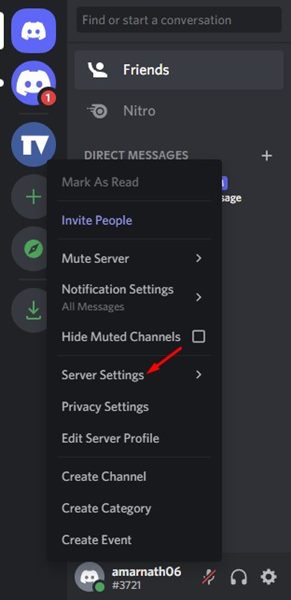
2. Now, on the left pane, right-click on your server and select Server Settings.
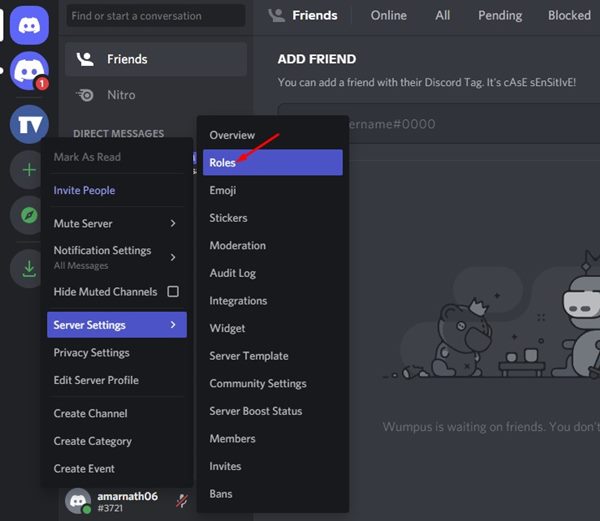
3. From the list of options, click on the Roles tab.
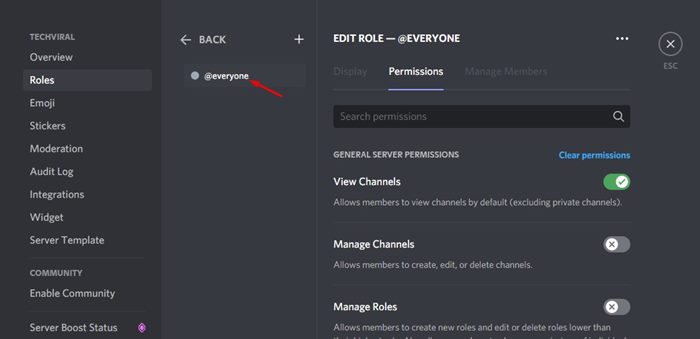
4. Now, on the right, select the @everyone.
5. On the right, you need to turn all permissions off. Alternatively, click on the Clear Permissions button.
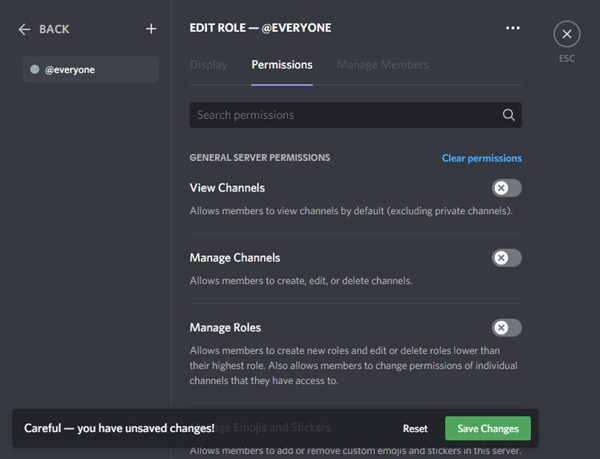
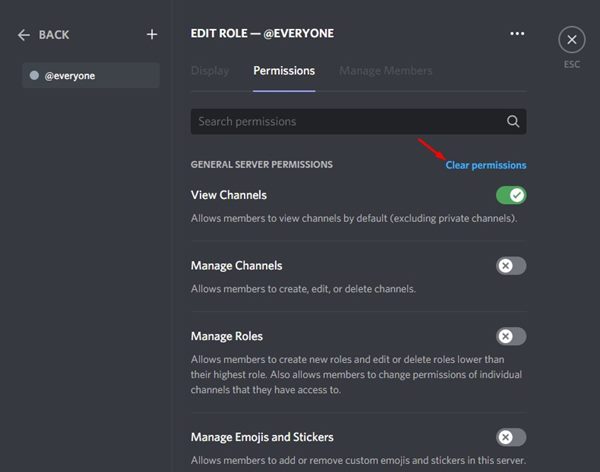
6. Once done, click on the Save Changes button.
That’s it! The Clear Role Permissions button will automatically disable all toggles for all permissions. This will make your Discord server private.
2) How to Make Discord Server Public
Discord offers you many controls that you can enable or disable to make the server public. You can even modify the Discord Server settings to make your server semi-public. Here’s how to make Discord Server public on desktop.
1. First of all, open the Discord app on your PC. Alternatively, you can also use the web version to make the privacy changes.
2. Now, on the left pane, right-click on your server and select Server Settings.
3. From the list of options, select Community Settings.
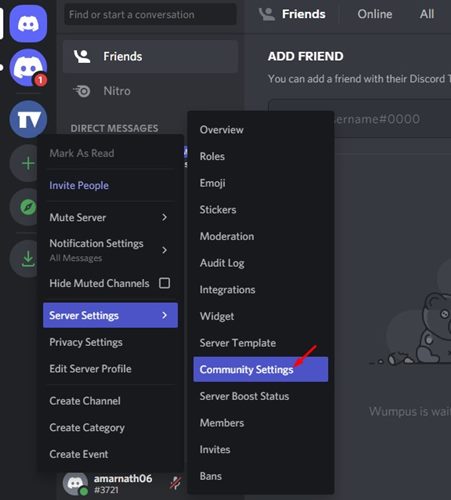
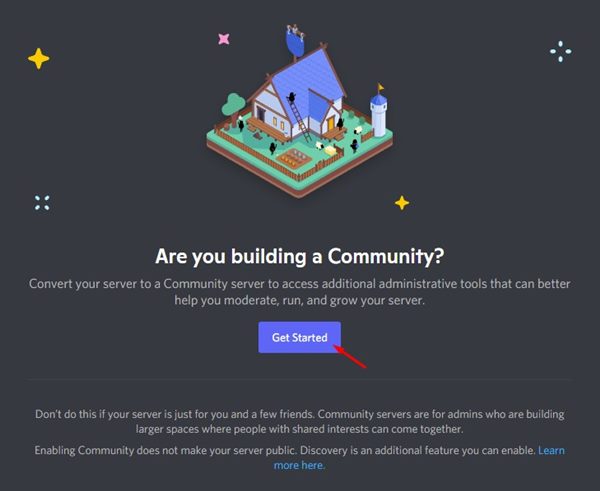
4. On the Are you building a Community prompt, click on the Get Started button.
5. Next, you just need to follow the on-screen instructions to make your Discord Server Public.
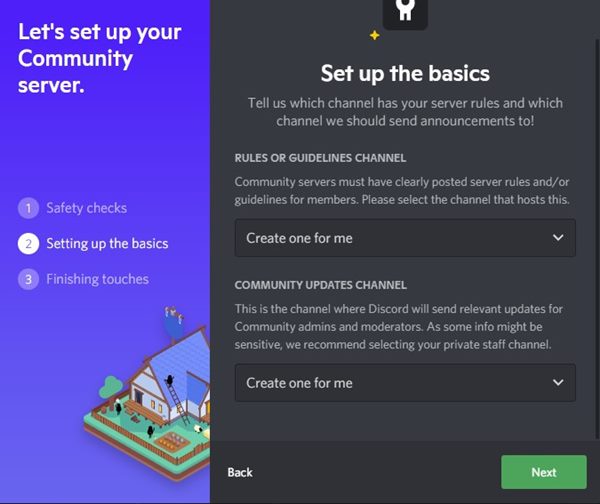
That’s it! So, this is how you can make a Discord server public or even semi-public.
It is pretty easy to make a Discord server private or public on the web version or via the desktop client. I hope this article helped you! Please share it with your friends also. Also, if you have any doubts related to this, let us know in the comment box below.
The post How to Make a Discord Server Private or Public in 2022 appeared first on TechViral.
ethical hacking,hacking,bangla ethical hacking,bangla hacking tutorial,bangla tutorial,bangla hacking book,ethical hacking bangla,bangla,hacking apps,ethical hacking bangla tutorial,bangla hacking,bangla hacking pdf,bangla hacking video,bangla android hacking,bangla hacking tutorials,bangla fb hacking tutorial,bangla hacking book download,learn ethical hacking,hacking ebook,hacking tools,bangla ethical hacking course, tricks,hacking,ludo king tricks,whatsapp hacking trick 2019 tricks,wifi hacking tricks,hacking tricks: secret google tricks,simple hacking tricks,whatsapp hacking tricks,tips and tricks,wifi tricks,tech tricks,redmi tricks,hacking trick paytm cash,hacking trick helo app,hacking trick of helo app,paytm cash hacking trick,wifi password hacking,paytm cash hacking trick malayalam,hacker tricks, tips and tricks,pubg mobile tips and tricks,tricks,tips,tips and tricks for pubg mobile,100 tips and tricks,pubg tips and tricks,excel tips and tricks,google tips and tricks,kitchen tips and tricks,season 2 tips and tricks,android tips and tricks,fortnite tips and tricks,godnixon tips and tricks,free fire tips and tricks,advanced tips and tricks,whatsapp tips and tricks, facebook tricks,facebook,facebook hidden tricks,facebook tips and tricks,facebook latest tricks,facebook tips,facebook new tricks,facebook messenger tricks,facebook android app tricks,fb tricks,facebook app tricks,facebook tricks and tips,facebook tricks in hindi,tricks,facebook tutorial,new facebook tricks,cool facebook tricks,facebook tricks 2016,facebook tricks 2017,facebook secret tricks,facebook new tricks 2020,blogger blogspot seo tips and tricks,blogger tricks,blogger,blogger seo tips,blogger seo tips and tricks,seo for blogger,blogger seo in hindi,blogger seo best tips for increasing visitors,blogging tips and tricks,blogger blog seo,blogger seo in urdu,adsense approval trick,blogging tips and tricks for beginners,blogging tricks,blogger tutorial,blogger tricks 2016,blogger tricks 2017 bangla,tricks,bangla tutorial,bangla magic,bangla motivational video,bangla tricks,bangla tips,all bangla tips,magic tricks,akash bangla tricks,top 10 bangla tricks,tips and tricks,all bangla trick,bangla computer tricks,computer bangla tricks,bangla magic card tricks,ms word bangla tips and tricks,bangla computer tips,trick,psychology tricks,youtube bangla,magic tricks bangla,si trick Credit techviral


