
How to Uninstall System Apps on Android
System apps are generally kept hidden and don’t appear on the App Drawer. They are also known as bloatware, which comes pre-installed on your Android phone. While the system apps don’t raise security or privacy issues, they can sometimes show ads. For example, the default file manager app of Realme phones shows lots of ads.
Most of the system apps on your smartphone may be left unused; hence, it makes sense to uninstall or disable them. You can’t uninstall the system apps on your Android, but you can uninstall the app updates or disable them. Disabling them is the best way to get rid of System apps on Android.
1. Disable the System App on Android
The best way to disable a system app on Android is to keep it disabled. This way, the app will be disabled, and none of its processes will run in the background. After turning off the app, you can clear the data & cache to reduce the storage consumption.
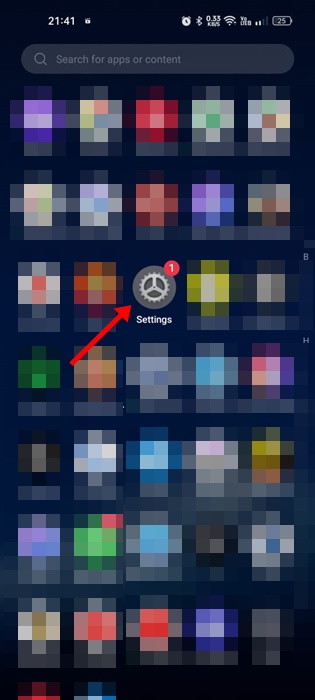
1. Launch the Settings app.
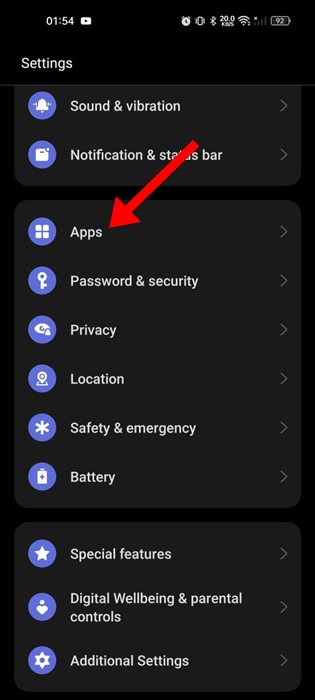
2. Tap on Apps.
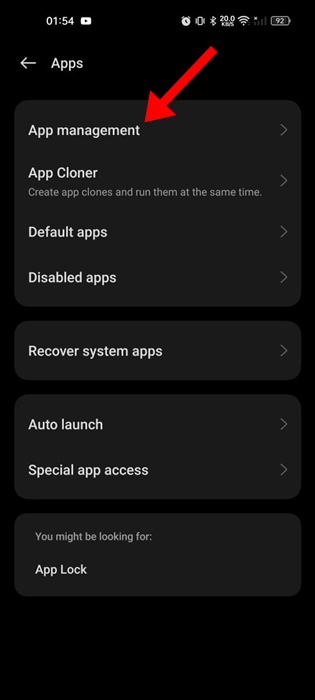
3. Tap on App Management.
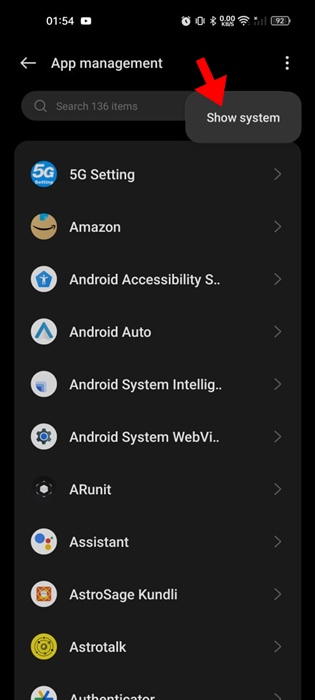
4. Tap the three dots at the top right corner and select Show System.
5. Find and tap the app that you want to disable.
6. Tap Disable.
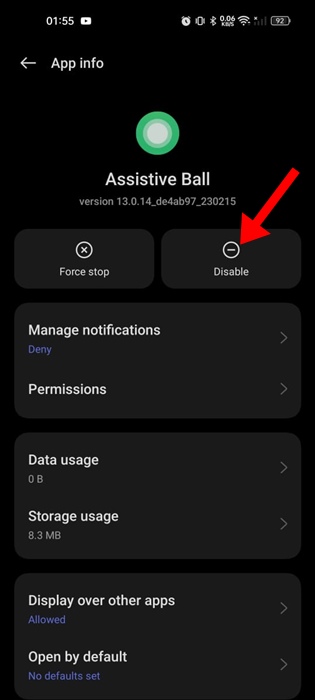
7. Tap Storage Usage.
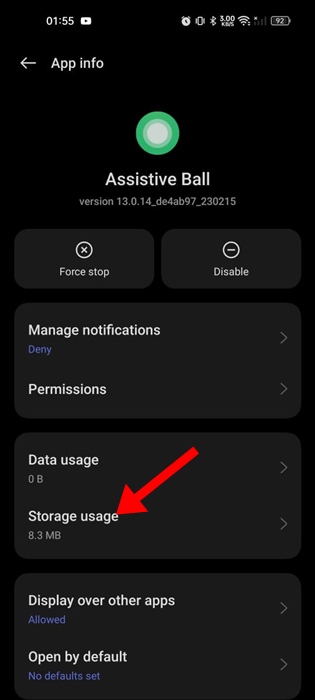
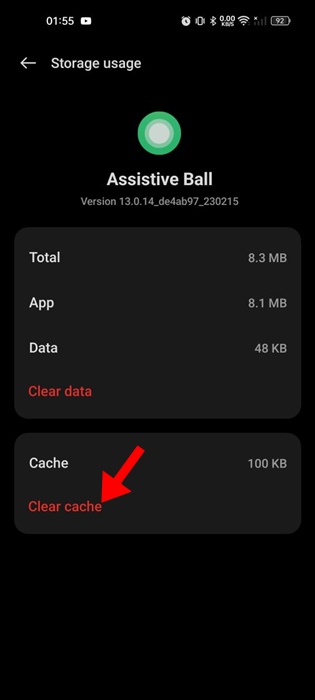
8. Tap Clear Cache and then Clear Data.
2. Uninstall the System App Updates
If you are unable to reduce the storage consumption, you can try uninstalling the app updates. Uninstalling the updates will restore the app to its factory state. You can also uninstall the app updates if an app is not functioning properly.
1. Launch the Settings app.
2. Tap Apps.
3. Tap App Management.
4. Tap the three dots at the top right corner and select Show System.
5. Find the app that you want to modify and tap on it.
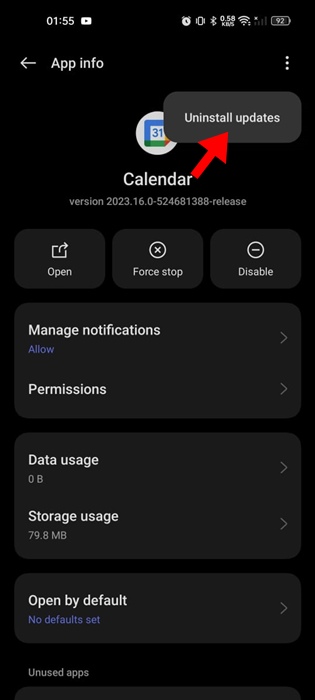
6. Tap the three dots at the top right corner and select Uninstall Updates.
3. Remove System App with the Debloater tool
The debloater tool is another great way to remove bloatware from an Android phone. However, removing system apps with the help of the Debloater tool is a bit complicated.
You must enable the Developer options on your phone, connect it to your PC using a USB cable, and then run the Debloater tool. The debloater tool will detect all system updates and allow you to uninstall them.
We have shared a detailed guide on how to remove bloatware from Android with the Debloater tool. Make sure to go through the steps we have shared in that guide.
4. Rooting Your Phone
Another way to uninstall system apps on Android is to have root access. Many third-party apps on the XDA forum or Android groups share tools for removing system apps.
Most of those apps require root access and are generally not safe to use. We don’t recommend rooting your phone because doing so will void your warranty and can get your device bricked.
These are simple methods to uninstall System apps on an Android phone. If you need more help with this topic, let us know in the comments.
The post How to Uninstall System Apps on Android appeared first on TechViral.
ethical hacking,hacking,bangla ethical hacking,bangla hacking tutorial,bangla tutorial,bangla hacking book,ethical hacking bangla,bangla,hacking apps,ethical hacking bangla tutorial,bangla hacking,bangla hacking pdf,bangla hacking video,bangla android hacking,bangla hacking tutorials,bangla fb hacking tutorial,bangla hacking book download,learn ethical hacking,hacking ebook,hacking tools,bangla ethical hacking course, tricks,hacking,ludo king tricks,whatsapp hacking trick 2019 tricks,wifi hacking tricks,hacking tricks: secret google tricks,simple hacking tricks,whatsapp hacking tricks,tips and tricks,wifi tricks,tech tricks,redmi tricks,hacking trick paytm cash,hacking trick helo app,hacking trick of helo app,paytm cash hacking trick,wifi password hacking,paytm cash hacking trick malayalam,hacker tricks, tips and tricks,pubg mobile tips and tricks,tricks,tips,tips and tricks for pubg mobile,100 tips and tricks,pubg tips and tricks,excel tips and tricks,google tips and tricks,kitchen tips and tricks,season 2 tips and tricks,android tips and tricks,fortnite tips and tricks,godnixon tips and tricks,free fire tips and tricks,advanced tips and tricks,whatsapp tips and tricks, facebook tricks,facebook,facebook hidden tricks,facebook tips and tricks,facebook latest tricks,facebook tips,facebook new tricks,facebook messenger tricks,facebook android app tricks,fb tricks,facebook app tricks,facebook tricks and tips,facebook tricks in hindi,tricks,facebook tutorial,new facebook tricks,cool facebook tricks,facebook tricks 2016,facebook tricks 2017,facebook secret tricks,facebook new tricks 2020,blogger blogspot seo tips and tricks,blogger tricks,blogger,blogger seo tips,blogger seo tips and tricks,seo for blogger,blogger seo in hindi,blogger seo best tips for increasing visitors,blogging tips and tricks,blogger blog seo,blogger seo in urdu,adsense approval trick,blogging tips and tricks for beginners,blogging tricks,blogger tutorial,blogger tricks 2016,blogger tricks 2017 bangla,tricks,bangla tutorial,bangla magic,bangla motivational video,bangla tricks,bangla tips,all bangla tips,magic tricks,akash bangla tricks,top 10 bangla tricks,tips and tricks,all bangla trick,bangla computer tricks,computer bangla tricks,bangla magic card tricks,ms word bangla tips and tricks,bangla computer tips,trick,psychology tricks,youtube bangla,magic tricks bangla,si trick Credit techviral


