
How to Fix CxUIUSvc Service High CPU & RAM Usage
Before understanding the CxUIUSvc service, you must know about Conexant. Back in 2015, laptops and a few computers used to ship with audio chips from Conexant. For the proper functioning of the audio chipset, the Conexant SmartAudio II driver was used. However, the arrival of Realtek into the industry changed everything; its audio driver supported most of the audio chipsets.
If you see the CxUIUSvc service in the Task Manager, it’s a component of the Conexant SmartAudio driver. It affects your device’s audio chipset, and you shouldn’t disable it. The CxUIUSvc service should consume little of the system’s resources, but if it does more, you should follow these methods.
1. Restart your computer

Windows automatically scans for device driver updates and installs them in the background. When the system tries to update your audio drivers, it will raise the RAM and CPU usage.
Chances are that your device recently received a Conexant SmartAudio driver update, and it’s stuck in the installation process. You can easily fix such problems by restarting your computer.
After the restart, reopen the task manager and check whether the CxUIUSvc service still raises the high CPU and RAM usage.
2. Update Your Audio Drivers
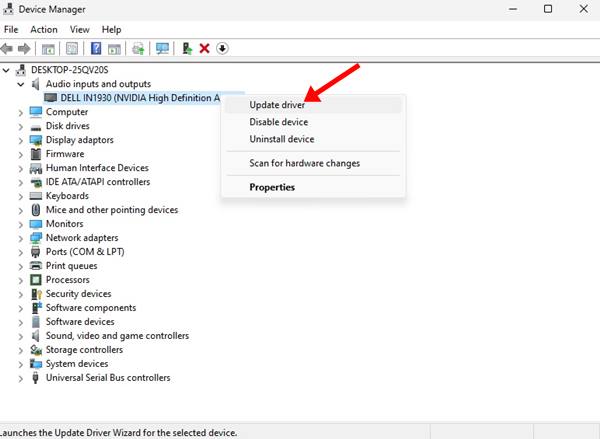
Updating Audio drivers on the Windows operating system is easy; open the Device Manager, expand the Audio section, and update your installed audio drivers.
Alternatively, you can use third-party driver updaters to update your audio drivers. There are many free third-party audio drivers available on the web that do their job pretty well. You can use such programs to update all your outdated device drivers.
3. Rollback Audio Drivers
If there’s no update available for your audio drivers, try rolling them back to their previous version. This should fix the CxUIUSvc service’s high CPU usage problem.
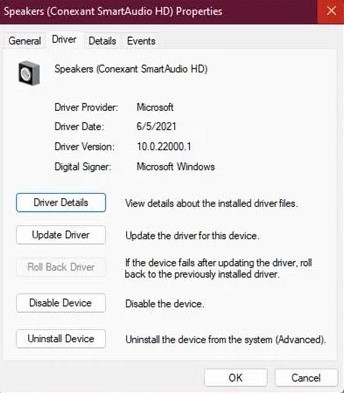
- Open Device Manager on your computer.
- Expand the Audio input and outputs.
- Right-click on your speaker driver and select Properties.
- Switch to the Driver tab and select Roll Back driver
4. Reinstall the Audio Device
If the above troubleshooting didn’t work, you can consider reinstalling the audio device from the Device Manager.
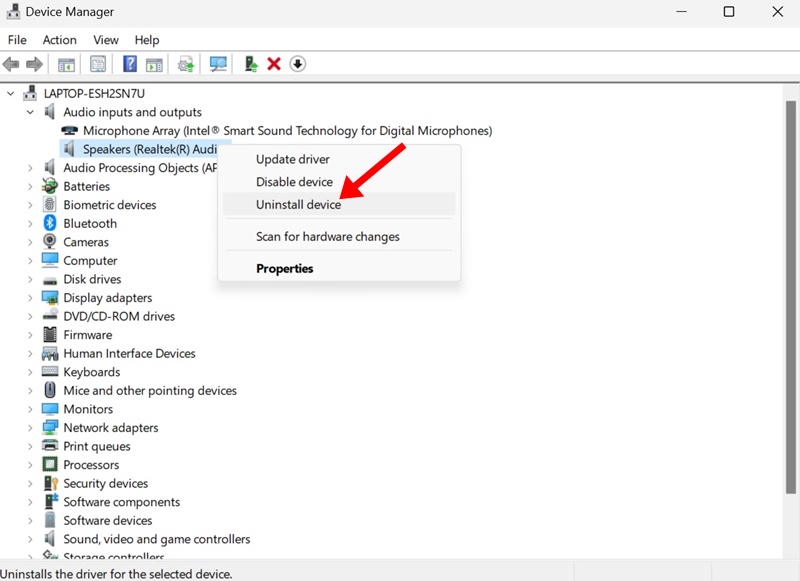
- Open the Device Manager app from the Windows Search.
- Expand the audio inputs and outputs tree.
- Select the audio device and select Uninstall Device.
- Restart your computer.
After the restart, when your PC boots, it will install the device and the compatible drivers. This should fix the CxUiUSvc service high CPU/RAM usage issue.
5. Manually Install the Conexant SmartAudio Drivers
Conexant SmartAudio HD or Conexant Audio drivers are hard to find, but you can get them from the website of your laptop’s manufacturer.
For example, if you use a Lenovo Laptop, head to Lenovo’s official website and search for Conexant Audio Drivers. You need to download the driver that is most compatible with your laptop model.
After downloading it, uninstall your existing audio driver via Device Manager and install the driver you’ve downloaded. After installing the driver manually, restart your laptop to fix the problem.
6. Disable Cxuiusvc Service
If the process still raises the CPU and RAM usage and freezes your computer, you should disable the Cxuiusvc Service. However, disabling the Cxuiusvc Service might hamper the performance of your audio devices.
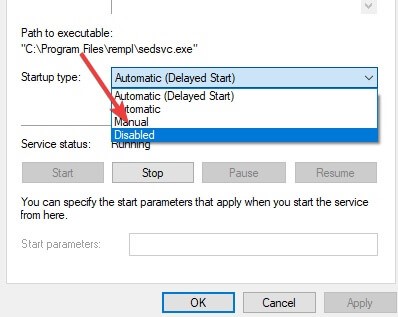
- Open Windows search and type Services.
- Open the Service app and find Cxuiusvc Service.
- Right-click on Cxuiusvc Service and select Properties.
- Select Disabled.
Once done, click on Apply and OK.
7. End Task Service from the Task Manager
If nothing worked to fix the CxUIUSvc Service on Windows, it’s time to put the service to an end via Task Manager. Open the Task Manager on your Windows PC and End Task the process. If it breaks the system or triggers an unusual problem, restart your PC.
This guide is about fixing the High CPU usage on the Cxuiusvc Service in Windows. If you need more help fixing Cxuiusvc Service’s high RAM/CPU usage, let us know in the comments.
The post How to Fix CxUIUSvc Service High CPU & RAM Usage appeared first on TechViral.
ethical hacking,hacking,bangla ethical hacking,bangla hacking tutorial,bangla tutorial,bangla hacking book,ethical hacking bangla,bangla,hacking apps,ethical hacking bangla tutorial,bangla hacking,bangla hacking pdf,bangla hacking video,bangla android hacking,bangla hacking tutorials,bangla fb hacking tutorial,bangla hacking book download,learn ethical hacking,hacking ebook,hacking tools,bangla ethical hacking course, tricks,hacking,ludo king tricks,whatsapp hacking trick 2019 tricks,wifi hacking tricks,hacking tricks: secret google tricks,simple hacking tricks,whatsapp hacking tricks,tips and tricks,wifi tricks,tech tricks,redmi tricks,hacking trick paytm cash,hacking trick helo app,hacking trick of helo app,paytm cash hacking trick,wifi password hacking,paytm cash hacking trick malayalam,hacker tricks, tips and tricks,pubg mobile tips and tricks,tricks,tips,tips and tricks for pubg mobile,100 tips and tricks,pubg tips and tricks,excel tips and tricks,google tips and tricks,kitchen tips and tricks,season 2 tips and tricks,android tips and tricks,fortnite tips and tricks,godnixon tips and tricks,free fire tips and tricks,advanced tips and tricks,whatsapp tips and tricks, facebook tricks,facebook,facebook hidden tricks,facebook tips and tricks,facebook latest tricks,facebook tips,facebook new tricks,facebook messenger tricks,facebook android app tricks,fb tricks,facebook app tricks,facebook tricks and tips,facebook tricks in hindi,tricks,facebook tutorial,new facebook tricks,cool facebook tricks,facebook tricks 2016,facebook tricks 2017,facebook secret tricks,facebook new tricks 2020,blogger blogspot seo tips and tricks,blogger tricks,blogger,blogger seo tips,blogger seo tips and tricks,seo for blogger,blogger seo in hindi,blogger seo best tips for increasing visitors,blogging tips and tricks,blogger blog seo,blogger seo in urdu,adsense approval trick,blogging tips and tricks for beginners,blogging tricks,blogger tutorial,blogger tricks 2016,blogger tricks 2017 bangla,tricks,bangla tutorial,bangla magic,bangla motivational video,bangla tricks,bangla tips,all bangla tips,magic tricks,akash bangla tricks,top 10 bangla tricks,tips and tricks,all bangla trick,bangla computer tricks,computer bangla tricks,bangla magic card tricks,ms word bangla tips and tricks,bangla computer tips,trick,psychology tricks,youtube bangla,magic tricks bangla,si trick Credit techviral


