
How to Fix Android App Updates Stuck on Pending
There could be various reasons the app updates are stuck on Pending. Maybe your phone doesn’t have an active internet connection, has limited storage space, or is experiencing Google Play Store server issues, etc. Generally, the App Updates are stuck in Pending due to internet or storage issues.
Whatever the reason is, this type of problem can be easily resolved. Here’s what you should do to resolve the problem.
1. Cancel the Ongoing Updates
The very first step you should take to fix App Updates stuck on ‘Pending’ is to cancel all ongoing updates.
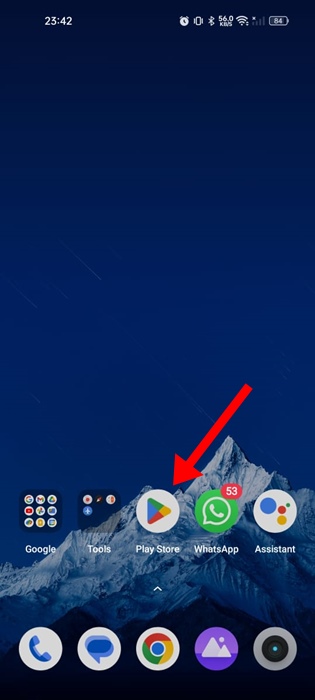
1. Launch the Google Play Store.
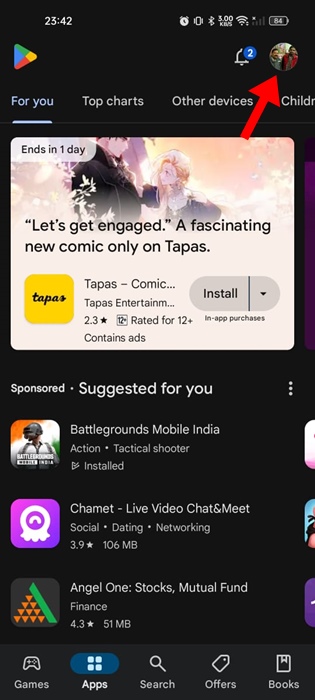
2. Tap on the profile picture.
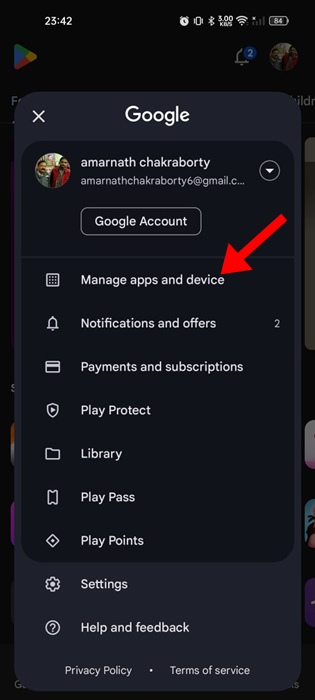
3. Select Manage apps and device.
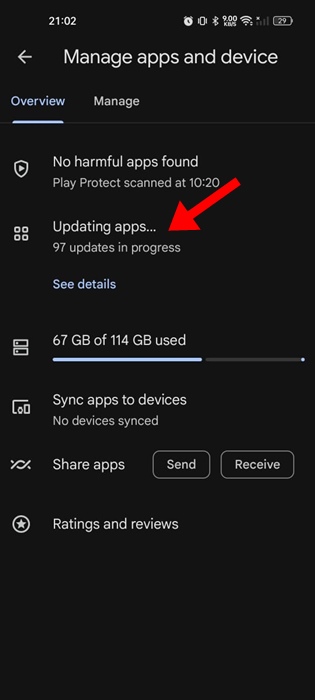
4. Tap Updating Apps.
5. Tap the Cancel All button in the top right corner.
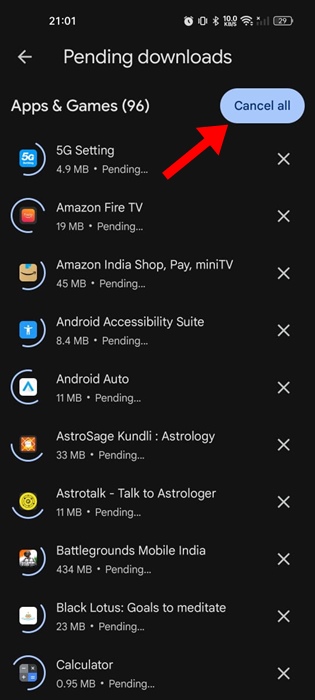
2. Update the Apps Manually
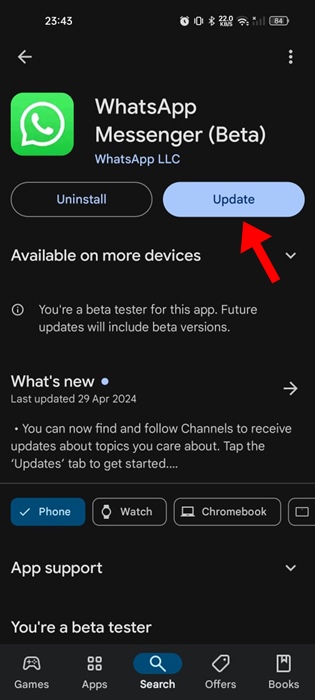
Instead of updating all apps at once, you can try updating each app manually. For example, if you want to update the WhatsApp app, search for WhatsApp on the Google Play Store and open the official app listing page.
On the official app listing page, tap on Update. You need to do the same for all Android apps or games you want to update.
3. Rule out the Internet Issues

The ‘Pending’ status on the App Updates screen may appear due to unstable or no internet connectivity.
You should check whether you have an active internet connection and it’s stable. You can also try switching to a different WiFi or mobile data.
4. Check the Storage Capacity of your Phone
If your phone doesn’t have sufficient storage space, the Google Play Store won’t be able to download new apps or updates. Hence, check your phone’s storage capacity as well.
It’s recommended to keep at least a few gigs of storage free for app downloads and installs. Open the Storage Manager on your phone and check what you can do to free up some storage space.
You can try uninstalling the apps you don’t use or deleting videos/photos/music you no longer feel necessary.
5. Check if the Play Store’s servers are down
Although rare, Google Play Store’s servers can be down for maintenance. It’s possible that the App Updates are not downloading because of server issues.
You can check this webpage to confirm whether the Google Play Store’s servers are down worldwide. If they are, you need to wait until they are restored.
6. Correct the Date & Time
Correcting the phone’s date and time settings has helped many users fix App updates stuck in the Pending status; hence, you can try doing it as well.
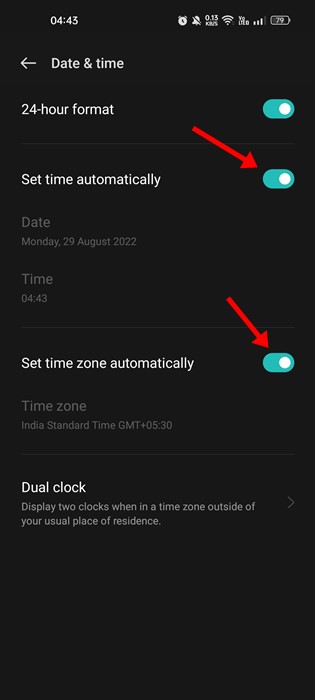
Simply go to Settings > Date & Time and turn off the toggle for Set time automatically. This should update the time based on your location.
7. Turn off the VPN and Proxy Apps
VPN and Proxy apps are supposed to unblock websites and mask your IP Address. However, sometimes, the same apps lengthen the connection time to Google Play Store’s servers, leading to download failure or updates stuck in Pending issues.
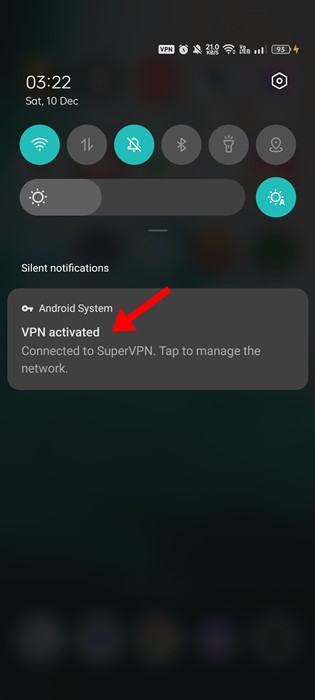
If you’re using any VPN or Proxy app on your phone, you can temporarily turn it off and check. After turning off the VPN app, open the Google Play Store and try to install the update again.
8. Clear Google Play Store & Services Cache
If nothing has worked for you until now, the next thing you can do is clear the Google Play Store and Google Play Services cache. We will have to do it to rule out the possibility of a corrupted or outdated cache.
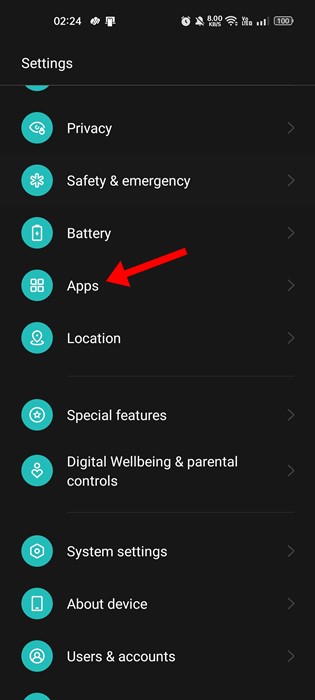
1. Launch the Settings app and tap Apps.
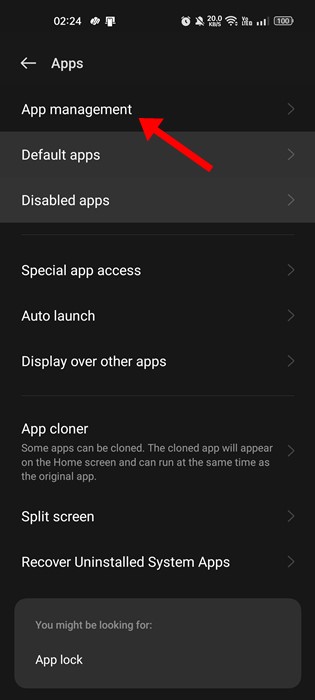
2. Tap on App Management.
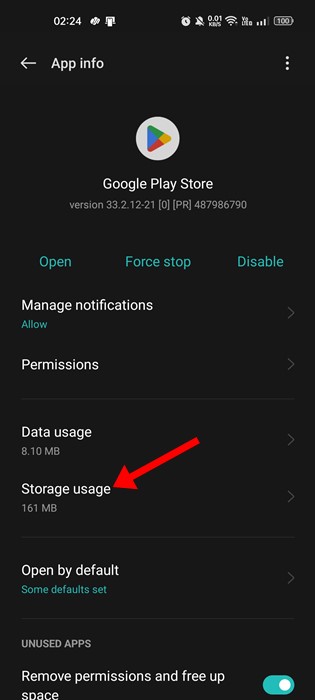
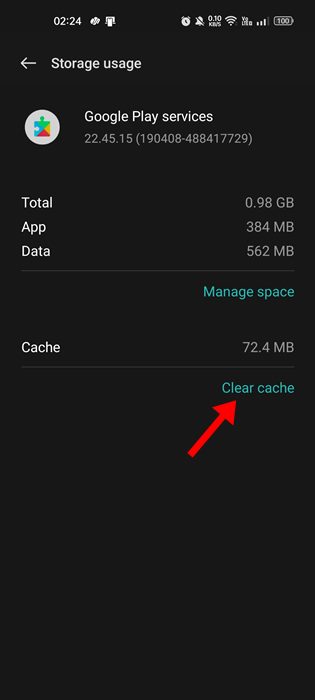
3. Tap Storage usage.
4. Tap Clear Cache.
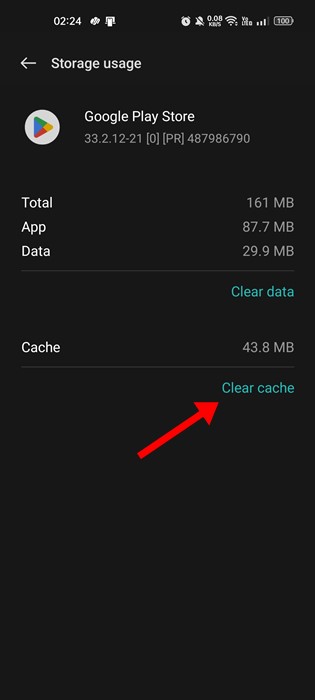
5. Find and tap Google Play Services and tap Clear Cache.
These are a few simple methods to fix App Updates stuck on Pending on the Google Play Store. If you need more help with this topic, let us know in the comments.
The post How to Fix Android App Updates Stuck on Pending appeared first on TechViral.
ethical hacking,hacking,bangla ethical hacking,bangla hacking tutorial,bangla tutorial,bangla hacking book,ethical hacking bangla,bangla,hacking apps,ethical hacking bangla tutorial,bangla hacking,bangla hacking pdf,bangla hacking video,bangla android hacking,bangla hacking tutorials,bangla fb hacking tutorial,bangla hacking book download,learn ethical hacking,hacking ebook,hacking tools,bangla ethical hacking course, tricks,hacking,ludo king tricks,whatsapp hacking trick 2019 tricks,wifi hacking tricks,hacking tricks: secret google tricks,simple hacking tricks,whatsapp hacking tricks,tips and tricks,wifi tricks,tech tricks,redmi tricks,hacking trick paytm cash,hacking trick helo app,hacking trick of helo app,paytm cash hacking trick,wifi password hacking,paytm cash hacking trick malayalam,hacker tricks, tips and tricks,pubg mobile tips and tricks,tricks,tips,tips and tricks for pubg mobile,100 tips and tricks,pubg tips and tricks,excel tips and tricks,google tips and tricks,kitchen tips and tricks,season 2 tips and tricks,android tips and tricks,fortnite tips and tricks,godnixon tips and tricks,free fire tips and tricks,advanced tips and tricks,whatsapp tips and tricks, facebook tricks,facebook,facebook hidden tricks,facebook tips and tricks,facebook latest tricks,facebook tips,facebook new tricks,facebook messenger tricks,facebook android app tricks,fb tricks,facebook app tricks,facebook tricks and tips,facebook tricks in hindi,tricks,facebook tutorial,new facebook tricks,cool facebook tricks,facebook tricks 2016,facebook tricks 2017,facebook secret tricks,facebook new tricks 2020,blogger blogspot seo tips and tricks,blogger tricks,blogger,blogger seo tips,blogger seo tips and tricks,seo for blogger,blogger seo in hindi,blogger seo best tips for increasing visitors,blogging tips and tricks,blogger blog seo,blogger seo in urdu,adsense approval trick,blogging tips and tricks for beginners,blogging tricks,blogger tutorial,blogger tricks 2016,blogger tricks 2017 bangla,tricks,bangla tutorial,bangla magic,bangla motivational video,bangla tricks,bangla tips,all bangla tips,magic tricks,akash bangla tricks,top 10 bangla tricks,tips and tricks,all bangla trick,bangla computer tricks,computer bangla tricks,bangla magic card tricks,ms word bangla tips and tricks,bangla computer tips,trick,psychology tricks,youtube bangla,magic tricks bangla,si trick Credit techviral


