
How to Fix ‘The file or Directory is Corrupted and Unreadable’
An issue with external hard drives causes this error message. It generally appears when Windows fails to read or access the drive, which could be a PenDrive, SD Card, Mobile storage device, SSD, or HDD.
Usually, people see this error while opening a file from a USB drive or SSD. The error message clearly states that the file or directory they are trying to access is corrupted or unreadable.
Certain other things can also trigger such errors on a Windows computer:
- A hard drive is corrupted.
- Virus or Malware infection.
- The external hard drive is physically damaged.
- The external hard drive was removed improperly.
- The USB Port might be damaged or not working correctly.
If you’ve encountered this error, here’s what you can do to get rid of it.
1. Restart your computer
Sometimes, the ‘File or Directory Is Corrupted and Unreadable’ error is just a result of a temporary glitch. So, before anything else, you should restart your Windows computer.
Restarting your Windows computer can eliminate such bugs and glitches.
2. Disable Your Antivirus

Antivirus programs can sometimes trigger false-positive warnings; your antivirus program likely detects the external drive as a threat. This may prevent you from accessing the files.
If you believe your external drive has no problematic files, you can temporarily disable your antivirus or antimalware program.
After turning off the antivirus tool, reaccess the file. If you don’t see the error, your antivirus program was the culprit.
3. Run the ChkDsk command
This method will use the disk check utility to fix the file or directory corrupted and unreadable error message.
1. Open File Explorer on your PC.
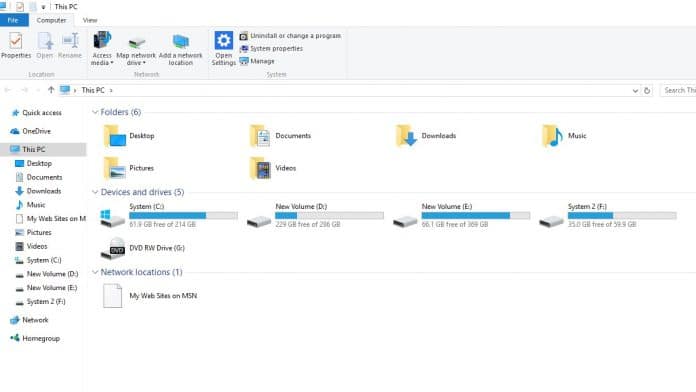
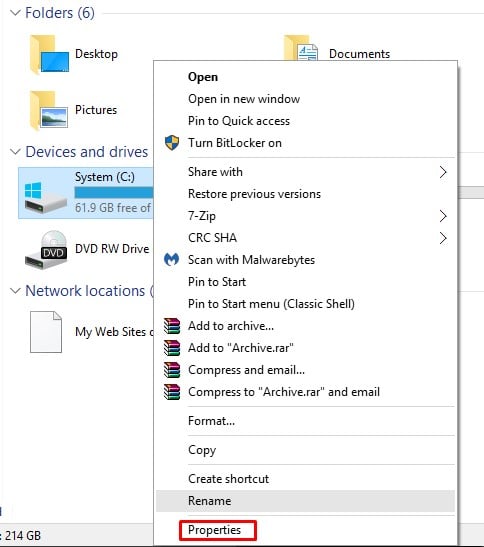
2. Right-click on the external hard drive and select Properties.
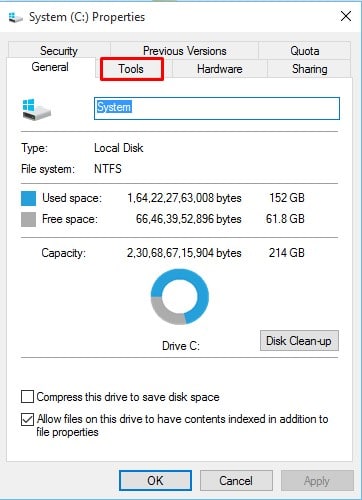
3. Click on Tools.
4. Click on Check under Error-checking.
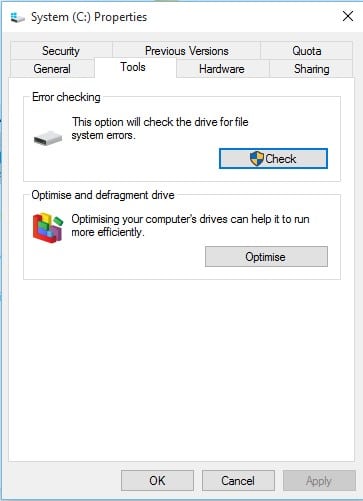
5. Click on the Scan Drive.
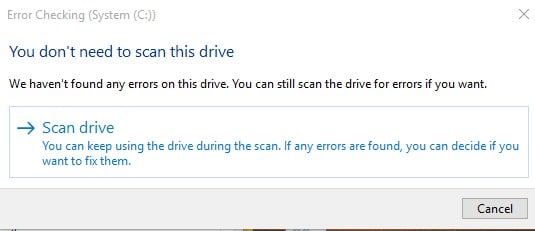
6. Wait for a few seconds until the scan completes.
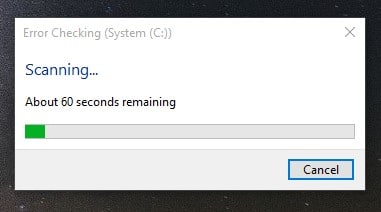
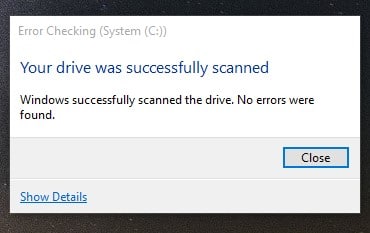
7. Once you have completed the process, you will see a success message. Click the ‘Close’ button to close the utility.
4. Running chkdsk from the command prompt
If you cannot implement the above method, follow this one. This method runs the disk check utility from the command prompt.
1. Right-click the Windows icon and select Command Prompt (Admin).
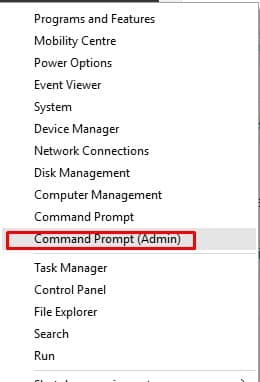
2. On the command prompt window, enter the command chkdsk /r d:
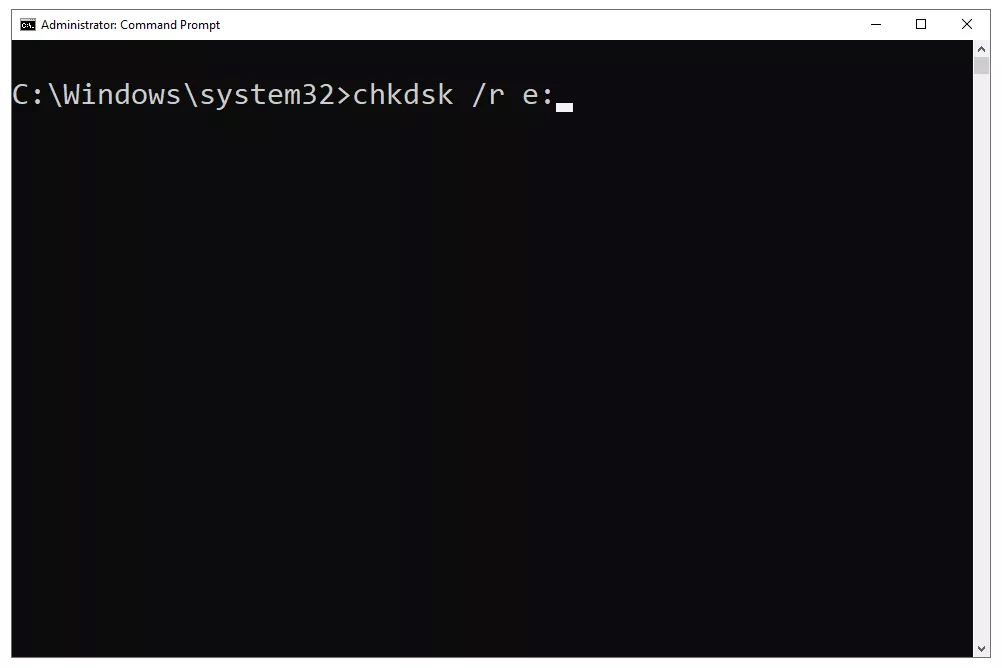
Note: Make sure to replace the last letter with a letter of the drive displaying the error.
3. Wait for a few seconds until the scan completes. Once done, restart your PC.
5. Use Malware Removal Programs
As already stated, this error message also appears due to malware attacks. Therefore, you should scan the entire drive with a reliable security solution.
We recommend you use Malwarebytes to scan the drive. For those who don’t know, Malwarebytes is a leading malware scanner that follows the most updated list of malware and viruses.
This article is about fixing the ‘The file or directory is corrupted and unreadable’ error message. If you need more help on this topic, let us know in the comments.
The post How to Fix ‘The file or Directory is Corrupted and Unreadable’ appeared first on TechViral.
ethical hacking,hacking,bangla ethical hacking,bangla hacking tutorial,bangla tutorial,bangla hacking book,ethical hacking bangla,bangla,hacking apps,ethical hacking bangla tutorial,bangla hacking,bangla hacking pdf,bangla hacking video,bangla android hacking,bangla hacking tutorials,bangla fb hacking tutorial,bangla hacking book download,learn ethical hacking,hacking ebook,hacking tools,bangla ethical hacking course, tricks,hacking,ludo king tricks,whatsapp hacking trick 2019 tricks,wifi hacking tricks,hacking tricks: secret google tricks,simple hacking tricks,whatsapp hacking tricks,tips and tricks,wifi tricks,tech tricks,redmi tricks,hacking trick paytm cash,hacking trick helo app,hacking trick of helo app,paytm cash hacking trick,wifi password hacking,paytm cash hacking trick malayalam,hacker tricks, tips and tricks,pubg mobile tips and tricks,tricks,tips,tips and tricks for pubg mobile,100 tips and tricks,pubg tips and tricks,excel tips and tricks,google tips and tricks,kitchen tips and tricks,season 2 tips and tricks,android tips and tricks,fortnite tips and tricks,godnixon tips and tricks,free fire tips and tricks,advanced tips and tricks,whatsapp tips and tricks, facebook tricks,facebook,facebook hidden tricks,facebook tips and tricks,facebook latest tricks,facebook tips,facebook new tricks,facebook messenger tricks,facebook android app tricks,fb tricks,facebook app tricks,facebook tricks and tips,facebook tricks in hindi,tricks,facebook tutorial,new facebook tricks,cool facebook tricks,facebook tricks 2016,facebook tricks 2017,facebook secret tricks,facebook new tricks 2020,blogger blogspot seo tips and tricks,blogger tricks,blogger,blogger seo tips,blogger seo tips and tricks,seo for blogger,blogger seo in hindi,blogger seo best tips for increasing visitors,blogging tips and tricks,blogger blog seo,blogger seo in urdu,adsense approval trick,blogging tips and tricks for beginners,blogging tricks,blogger tutorial,blogger tricks 2016,blogger tricks 2017 bangla,tricks,bangla tutorial,bangla magic,bangla motivational video,bangla tricks,bangla tips,all bangla tips,magic tricks,akash bangla tricks,top 10 bangla tricks,tips and tricks,all bangla trick,bangla computer tricks,computer bangla tricks,bangla magic card tricks,ms word bangla tips and tricks,bangla computer tips,trick,psychology tricks,youtube bangla,magic tricks bangla,si trick Credit techviral


