
How to Fix Vibration Not Working on Android
Vibration on Android may fail to function for these reasons:
- Vibration is turned off on your phone.
- The Vibration Intensity is set too low.
- The Do Not Disturb Mode is enabled.
- The phone is in Silent Mode
- Software Problems
- The vibration motor is damaged.
These are some key reasons why your phone’s vibration is not working. If it isn’t working, here’s what you should do.
1. Turn off the Silent Mode

Silent Mode silences all sound and vibration. It’s possible that your phone is in silent mode and not vibrating as it should.
Open the Sound Settings of your Android phone and check if Silent mode is enabled. If it is, disable it to resolve the problem.
2. Disable the Do Not Disturb Mode
Do Not Disturb is another sound mode you should disable on your phone to keep the vibration working.
1. Launch the Settings app and tap Sound & Vibration.
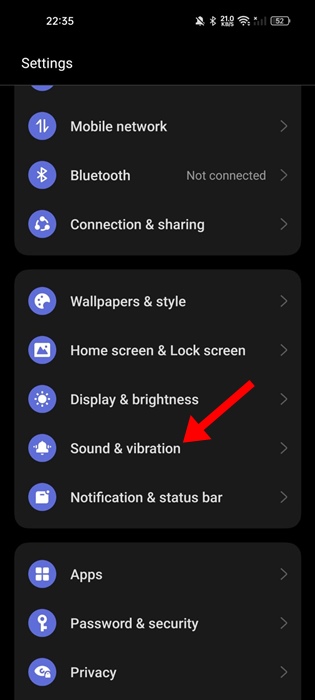
2. Tap Do Not Disturb.

3. Turn off the Do Not Disturb toggle.

3. Check the Vibration Settings of your Phone
Your phone may or may not vibrate even when the sound is enabled. You should check the vibration settings of your phone.
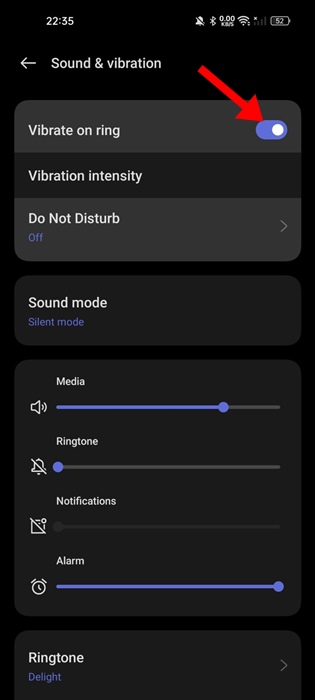
1. Launch the Settings app.
2. Tap Sound and Vibration.
3. Enable the toggle for Vibrate on Ring.
4. Restart your Phone
System-level bugs & glitches can sometimes prevent the Vibration motor from functioning properly. You can eliminate such bugs & glitches by restarting your phone.
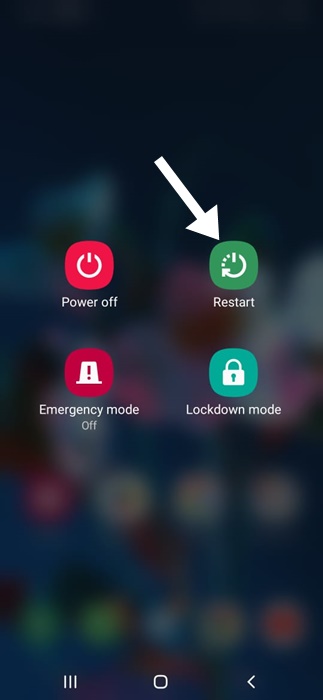
To restart your Android phone, long-press the Power button to bring up the Power Menu. On the Power menu, select Restart. After the restart, check whether your phone vibrates.
5. Test the Vibration Motor of your phone
If your phone is still not vibrating, you need to check whether your phone’s Vibration Motor is functioning properly.
1. Open the dialer app on your phone.
2. Dial *#06*# and press the call button. You can also try *#0*# if the previous one isn’t working.

3. A menu will appear on the screen. Tap on Vibration. Your phone’s screen will go black and will vibrate.

4. If your phone doesn’t vibrate, the vibration motor is faulty. You need to get the Vibration motor checked by a technician.
6. Update your Android OS
Sometimes, software issues can cause problems with your phone’s vibration. The best way to deal with software issues is to install all pending software updates.
Yes, a factory reset is also an option, but you should try this first.
1. Launch the Settings app.
2. Tap About Device.
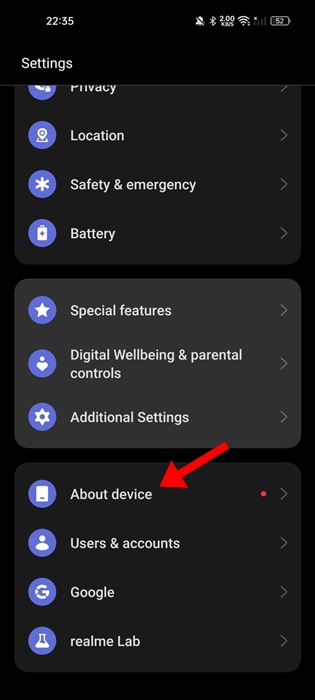
3. Tap Check for Updates or View Updates.

4. If any updates are available, download & install them.

These are some working methods to fix the vibration not working on an Android phone. If you need more help on this topic, let us know in the comments.
The post How to Fix Vibration Not Working on Android appeared first on TechViral.
ethical hacking,hacking,bangla ethical hacking,bangla hacking tutorial,bangla tutorial,bangla hacking book,ethical hacking bangla,bangla,hacking apps,ethical hacking bangla tutorial,bangla hacking,bangla hacking pdf,bangla hacking video,bangla android hacking,bangla hacking tutorials,bangla fb hacking tutorial,bangla hacking book download,learn ethical hacking,hacking ebook,hacking tools,bangla ethical hacking course, tricks,hacking,ludo king tricks,whatsapp hacking trick 2019 tricks,wifi hacking tricks,hacking tricks: secret google tricks,simple hacking tricks,whatsapp hacking tricks,tips and tricks,wifi tricks,tech tricks,redmi tricks,hacking trick paytm cash,hacking trick helo app,hacking trick of helo app,paytm cash hacking trick,wifi password hacking,paytm cash hacking trick malayalam,hacker tricks, tips and tricks,pubg mobile tips and tricks,tricks,tips,tips and tricks for pubg mobile,100 tips and tricks,pubg tips and tricks,excel tips and tricks,google tips and tricks,kitchen tips and tricks,season 2 tips and tricks,android tips and tricks,fortnite tips and tricks,godnixon tips and tricks,free fire tips and tricks,advanced tips and tricks,whatsapp tips and tricks, facebook tricks,facebook,facebook hidden tricks,facebook tips and tricks,facebook latest tricks,facebook tips,facebook new tricks,facebook messenger tricks,facebook android app tricks,fb tricks,facebook app tricks,facebook tricks and tips,facebook tricks in hindi,tricks,facebook tutorial,new facebook tricks,cool facebook tricks,facebook tricks 2016,facebook tricks 2017,facebook secret tricks,facebook new tricks 2020,blogger blogspot seo tips and tricks,blogger tricks,blogger,blogger seo tips,blogger seo tips and tricks,seo for blogger,blogger seo in hindi,blogger seo best tips for increasing visitors,blogging tips and tricks,blogger blog seo,blogger seo in urdu,adsense approval trick,blogging tips and tricks for beginners,blogging tricks,blogger tutorial,blogger tricks 2016,blogger tricks 2017 bangla,tricks,bangla tutorial,bangla magic,bangla motivational video,bangla tricks,bangla tips,all bangla tips,magic tricks,akash bangla tricks,top 10 bangla tricks,tips and tricks,all bangla trick,bangla computer tricks,computer bangla tricks,bangla magic card tricks,ms word bangla tips and tricks,bangla computer tips,trick,psychology tricks,youtube bangla,magic tricks bangla,si trick Credit techviral


