
iPhone Stuck on Verifying Update? Try these 5 Fixes
Usually, the ‘Verifying Update’ process takes a few seconds or minutes to complete, but if it’s taking longer, your iPhone could be stuck in the process. The process may get stuck for several reasons, such as an Apple Server issue, software bugs, glitches, unstable internet, or insufficient storage space.
Now that you know why your iPhone is stuck on the ‘Verifying Update’ screen, it’s time to troubleshoot it.
1. Check Apple’s System Status
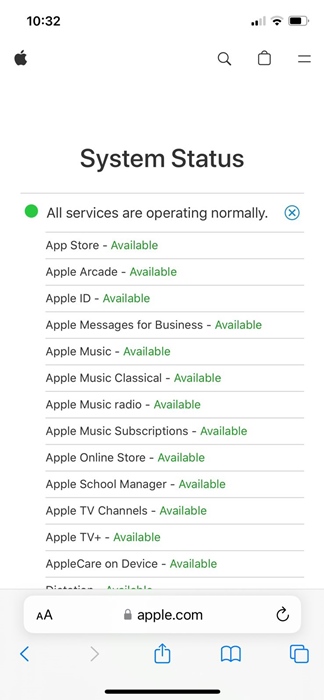
Like all web services, Apple’s official servers are often down for maintenance; when they are, iOS updates may encounter problems verifying or installing them.
Visit this webpage and check the System Status for iOS services. If any essential services are down, you need to wait it out.
2. Hard Restart iPhone
If you can’t get past the ‘Verifying Update’ screen on your iPhone, don’t panic. A hard reset of the iPhone could be the perfect solution.
1. Press & release the Volume Up button on your iPhone
2. Press & release the Volume Down button on your iPhone.
3. Press & hold the Side/Power button until the Apple Logo appears.
3. Delete the iOS Update
Once you get past the ‘Verifying Update’ screen, you must delete the iOS update first.
1. Launch the Settings app.
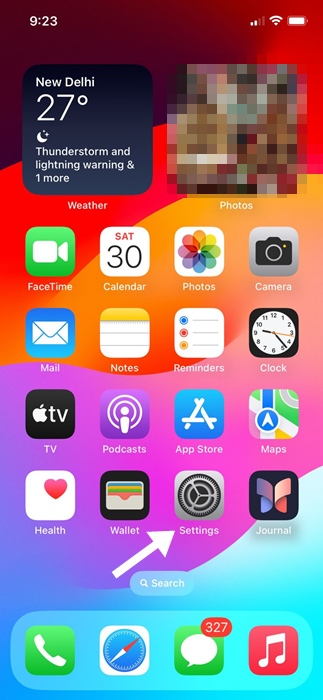
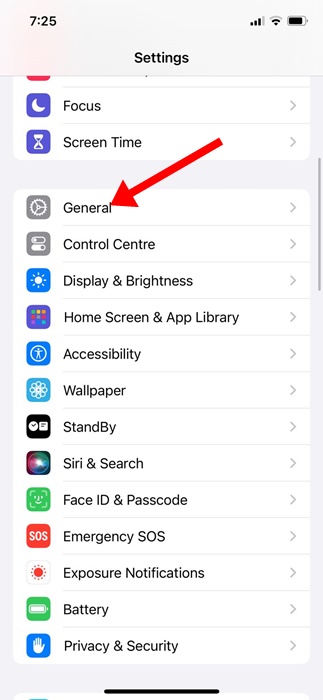
2. Tap General.
3. Tap iPhone Storage.
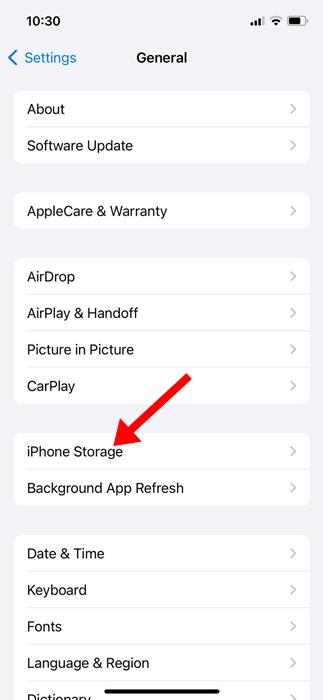
4. Find the iOS update in the list.
5. Select the iOS update and tap Delete Update. (Not all iOS versions will have this option).
4. Launch the iPhone Update tool again
After deleting the previously downloaded update, you should try to install the pending iOS updates again.
1. Make sure to connect your iPhone to a stable WiFi network.
2. Open the Settings app.
3. Scroll down and tap General.
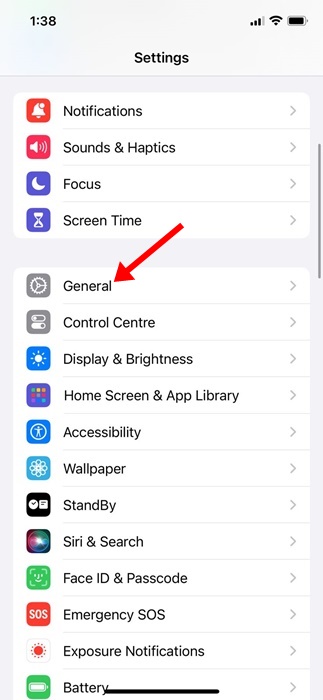
4. Tap Software Update.
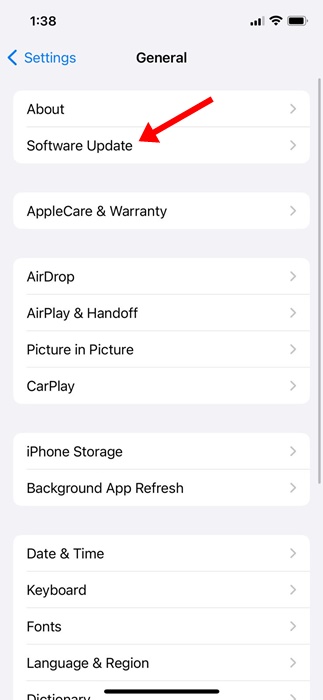
You will now be able to see the pending updates. Re-download and install the latest updates on your iPhone.
5. Reset the Network Settings on your iPhone
To avoid getting the ‘Verifying Update’ screen again, resetting the Network Settings on your iPhone is recommended. Incorrect Network Settings or no internet are the leading causes of iPhones being stuck on the ‘Verifying Update’ screen; hence, you should reset your iPhone’s network settings.
Remember that resetting the Network settings will remove the saved WiFi network, Bluetooth devices, and every other manual setting you’ve made to the network.
1. Launch Settings.
2. Tap General.
3. Tap Transfer or Reset iPhone.
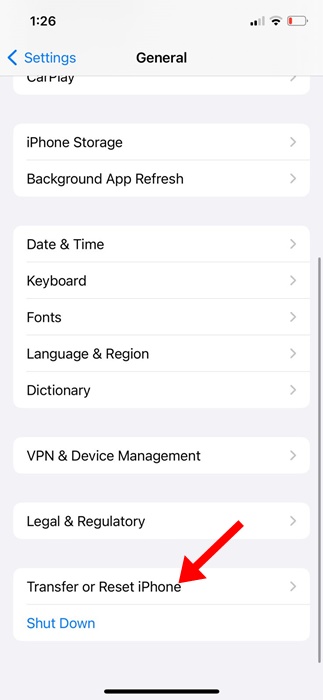
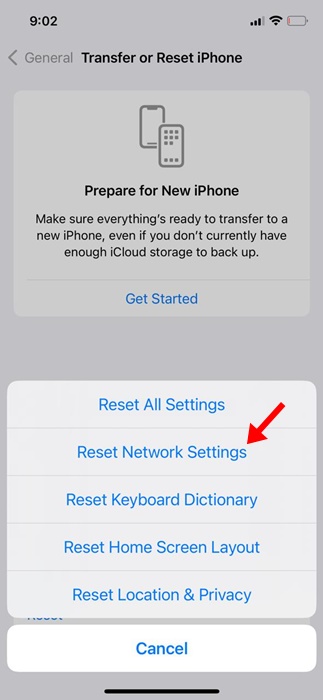
4. Tap Reset.
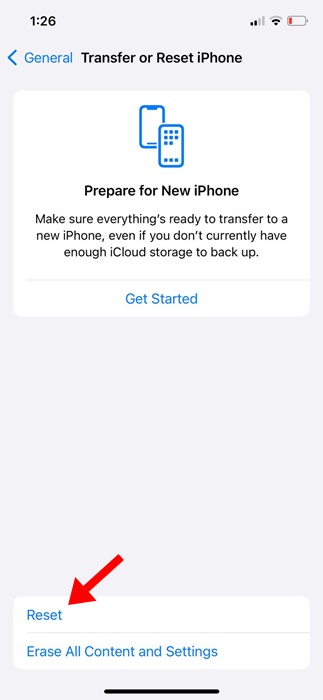
5. Select Reset Network Settings.
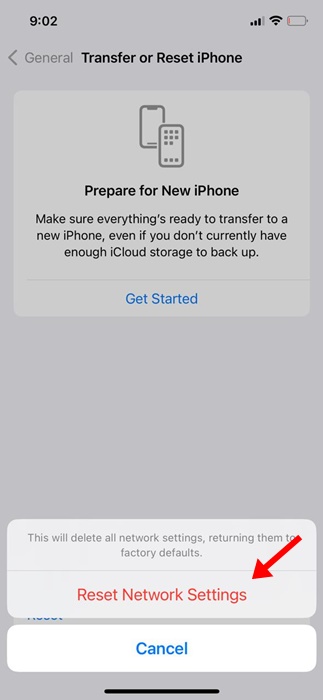
6. Tap on Reset Network Settings on the confirmation prompt.
These are a few simple methods to fix iPhones stuck on ‘Verifying Update’ and won’t turn off the screen. Let us know if you need more help in fixing iPhone update problems.
The post iPhone Stuck on Verifying Update? Try these 5 Fixes appeared first on TechViral.
ethical hacking,hacking,bangla ethical hacking,bangla hacking tutorial,bangla tutorial,bangla hacking book,ethical hacking bangla,bangla,hacking apps,ethical hacking bangla tutorial,bangla hacking,bangla hacking pdf,bangla hacking video,bangla android hacking,bangla hacking tutorials,bangla fb hacking tutorial,bangla hacking book download,learn ethical hacking,hacking ebook,hacking tools,bangla ethical hacking course, tricks,hacking,ludo king tricks,whatsapp hacking trick 2019 tricks,wifi hacking tricks,hacking tricks: secret google tricks,simple hacking tricks,whatsapp hacking tricks,tips and tricks,wifi tricks,tech tricks,redmi tricks,hacking trick paytm cash,hacking trick helo app,hacking trick of helo app,paytm cash hacking trick,wifi password hacking,paytm cash hacking trick malayalam,hacker tricks, tips and tricks,pubg mobile tips and tricks,tricks,tips,tips and tricks for pubg mobile,100 tips and tricks,pubg tips and tricks,excel tips and tricks,google tips and tricks,kitchen tips and tricks,season 2 tips and tricks,android tips and tricks,fortnite tips and tricks,godnixon tips and tricks,free fire tips and tricks,advanced tips and tricks,whatsapp tips and tricks, facebook tricks,facebook,facebook hidden tricks,facebook tips and tricks,facebook latest tricks,facebook tips,facebook new tricks,facebook messenger tricks,facebook android app tricks,fb tricks,facebook app tricks,facebook tricks and tips,facebook tricks in hindi,tricks,facebook tutorial,new facebook tricks,cool facebook tricks,facebook tricks 2016,facebook tricks 2017,facebook secret tricks,facebook new tricks 2020,blogger blogspot seo tips and tricks,blogger tricks,blogger,blogger seo tips,blogger seo tips and tricks,seo for blogger,blogger seo in hindi,blogger seo best tips for increasing visitors,blogging tips and tricks,blogger blog seo,blogger seo in urdu,adsense approval trick,blogging tips and tricks for beginners,blogging tricks,blogger tutorial,blogger tricks 2016,blogger tricks 2017 bangla,tricks,bangla tutorial,bangla magic,bangla motivational video,bangla tricks,bangla tips,all bangla tips,magic tricks,akash bangla tricks,top 10 bangla tricks,tips and tricks,all bangla trick,bangla computer tricks,computer bangla tricks,bangla magic card tricks,ms word bangla tips and tricks,bangla computer tips,trick,psychology tricks,youtube bangla,magic tricks bangla,si trick Credit techviral


