
What is Desktop Window Manager (dwm.exe) and What it does?
Desktop Window Manager (DWM) is a legitimate Windows process by Microsoft. It’s responsible for creating the graphical user interface and allows Windows to use the visual effects. Due to the DWM, you can see the 3D animations, taskbar thumbnails, desktop themes and wallpapers, and transparency effects.
How is the Desktop Window Manager Important?
The role of DWM on Windows is to composite each program’s buffer to display all the Windows as a single desktop image. Let’s understand this in detail. Apps don’t display Windows directly on your screen; instead, they write data to different buffers of Windows Memory.
The role of DWM is to composite those buffers to display all the windows as a single desktop image.
Why does DWM use so much RAM & CPU?
The Desktop Window Manager process should consume a small portion of your RAM. However, if you think it’s consuming more of your CPU and RAM resources, you can try these fixes.
1. Turn Off the Visual Effects
From the Performance Options, you can turn off unnecessary visual effects. This will free up RAM and CPU resources and reduce battery consumption.
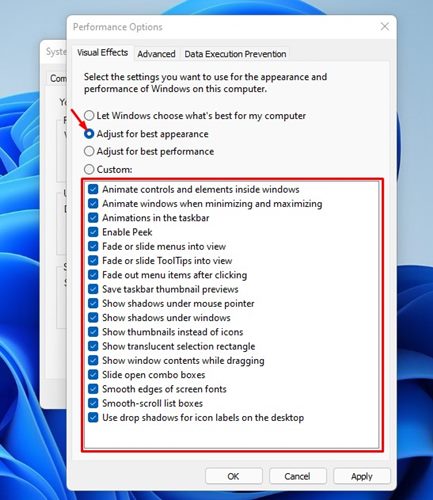
We have already shared a detailed guide on how to disable visual effects on Windows 11. Make sure to go through that guide to know the steps.
2. Turn off the Transparency Effects
Another thing you should do to fix DWM.exe high CPU & RAM is to turn off the Transparency effects. You can also try setting a static image as a desktop background.
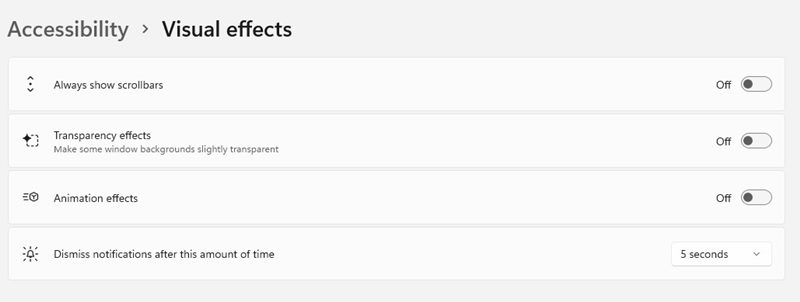
- Right-click on your desktop and select Personalize.
- Select Themes and choose Windows.
- Open Settings and switch to Accessibility.
- Click Visual Effects.
- Turn off the toggle for the Transparency effect.
3. Update Your Graphics Drivers
Outdated graphics drivers are another reason for high CPU and RAM usage on the Windows operating system. You can fix this problem by updating your graphics driver.
1. Type Device Manager in Windows 11 Search and open it.
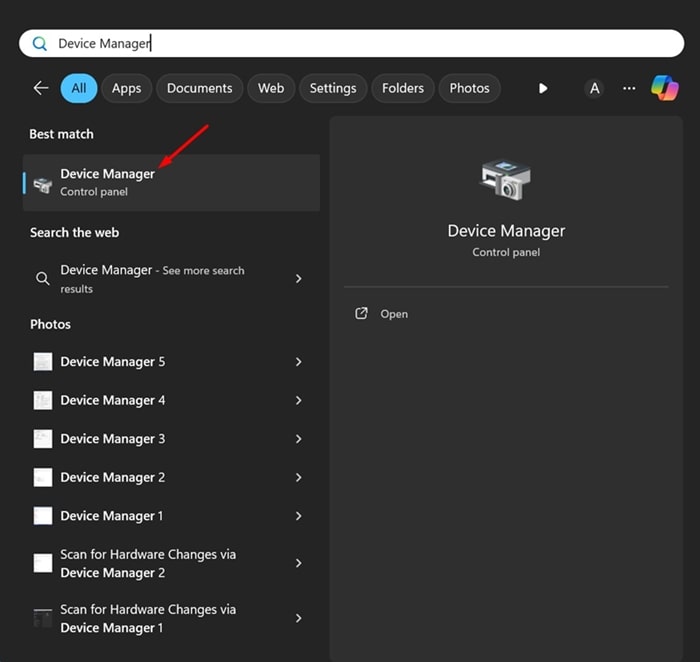
2. Expand the Display Adapters.
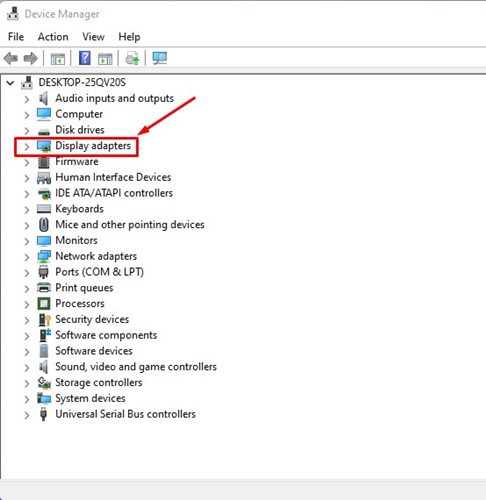
3. Right-click on your graphics driver and select Update driver.

4. Select Search automatically for the driver.
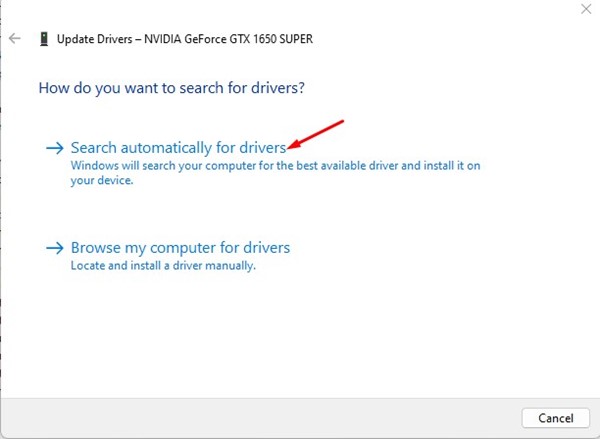
Follow the on-screen instructions to complete the graphics driver update.
4. Update your Windows Operating System
Like the graphics driver, you need to update your Windows operating system.
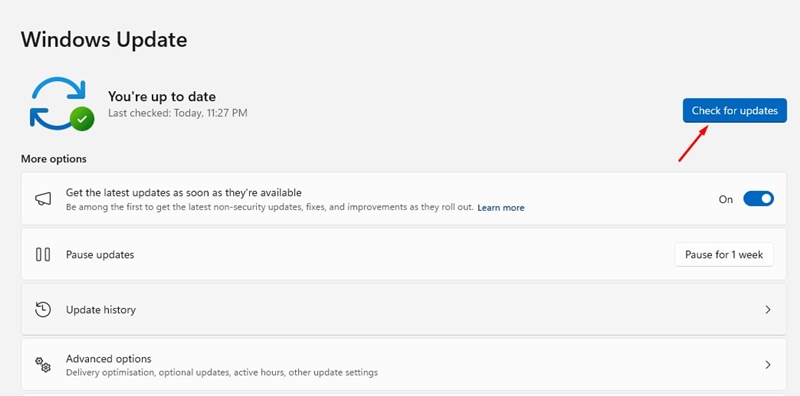
- Click on Windows Search and select Settings.
- Switch to Windows Update.
- Click the Check for Update.
Can Desktop Window Manager Be a Malware?
The Desktop Window Manager is a legitimate process that has nothing to do with security threats. It’s not a virus or malware. However, if you often download files from the internet, especially if you’re a torrent user, you should run a full PC scan to rule out the possibility of DWM being malware.
You can confirm whether the Desktop Window Manager is malware in disguise by checking its file location. Right-click on the dwm.exe process in the Task Manager and select Open File Location.
The original file location for the process is C:\Windows\System32; if it’s there, you don’t need to worry about anything.
This guide explains what dwm.exe is, or the Desktop Window Manager, and what it does. If you need more help on this topic, let us know in the comments.
The post What is Desktop Window Manager (dwm.exe) and What it does? appeared first on TechViral.
ethical hacking,hacking,bangla ethical hacking,bangla hacking tutorial,bangla tutorial,bangla hacking book,ethical hacking bangla,bangla,hacking apps,ethical hacking bangla tutorial,bangla hacking,bangla hacking pdf,bangla hacking video,bangla android hacking,bangla hacking tutorials,bangla fb hacking tutorial,bangla hacking book download,learn ethical hacking,hacking ebook,hacking tools,bangla ethical hacking course, tricks,hacking,ludo king tricks,whatsapp hacking trick 2019 tricks,wifi hacking tricks,hacking tricks: secret google tricks,simple hacking tricks,whatsapp hacking tricks,tips and tricks,wifi tricks,tech tricks,redmi tricks,hacking trick paytm cash,hacking trick helo app,hacking trick of helo app,paytm cash hacking trick,wifi password hacking,paytm cash hacking trick malayalam,hacker tricks, tips and tricks,pubg mobile tips and tricks,tricks,tips,tips and tricks for pubg mobile,100 tips and tricks,pubg tips and tricks,excel tips and tricks,google tips and tricks,kitchen tips and tricks,season 2 tips and tricks,android tips and tricks,fortnite tips and tricks,godnixon tips and tricks,free fire tips and tricks,advanced tips and tricks,whatsapp tips and tricks, facebook tricks,facebook,facebook hidden tricks,facebook tips and tricks,facebook latest tricks,facebook tips,facebook new tricks,facebook messenger tricks,facebook android app tricks,fb tricks,facebook app tricks,facebook tricks and tips,facebook tricks in hindi,tricks,facebook tutorial,new facebook tricks,cool facebook tricks,facebook tricks 2016,facebook tricks 2017,facebook secret tricks,facebook new tricks 2020,blogger blogspot seo tips and tricks,blogger tricks,blogger,blogger seo tips,blogger seo tips and tricks,seo for blogger,blogger seo in hindi,blogger seo best tips for increasing visitors,blogging tips and tricks,blogger blog seo,blogger seo in urdu,adsense approval trick,blogging tips and tricks for beginners,blogging tricks,blogger tutorial,blogger tricks 2016,blogger tricks 2017 bangla,tricks,bangla tutorial,bangla magic,bangla motivational video,bangla tricks,bangla tips,all bangla tips,magic tricks,akash bangla tricks,top 10 bangla tricks,tips and tricks,all bangla trick,bangla computer tricks,computer bangla tricks,bangla magic card tricks,ms word bangla tips and tricks,bangla computer tips,trick,psychology tricks,youtube bangla,magic tricks bangla,si trick Credit techviral


