
Fix ‘Your device ran into a problem and couldn’t be repaired’ Error
The ‘Your device ran into a problem and couldn’t be repaired’ error generally appears when the Startup Repair fails. If you’ve seen the same screen, here’s what you should do to fix it.
1. Run the Startup Repair Manually
Even if the first attempt failed, you should run the Startup Repair again. Here are the correct steps to run it.
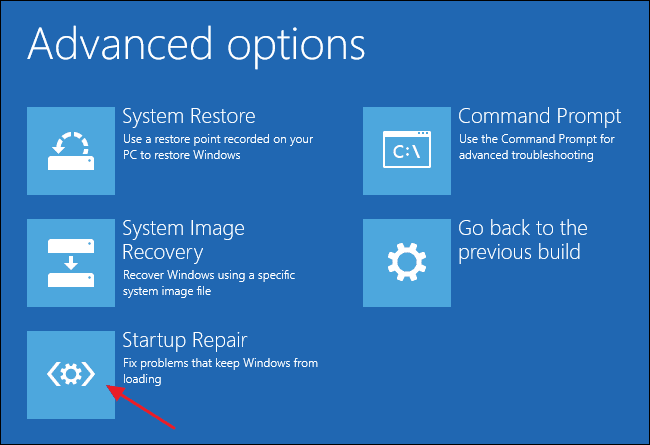
- Force shut down your PC 3 or 4 times to enter the Recovery Mode.
- On the Troubleshoot screen, select Advanced Options.
- On the Advanced Options, select Startup Repair.
This will run the Startup Repair. This will run and resolve all boot problems.
2. Run the Check Disk Utility
File system errors, bad sectors, and data corruption are other reasons for this problem. Hence, you should run the Check Disk utility as well.
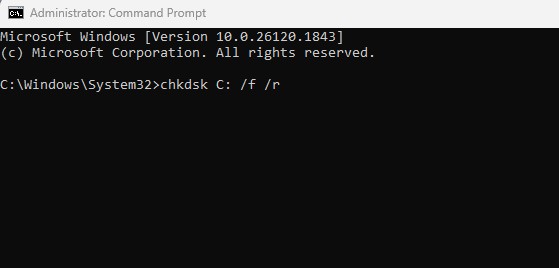
- Move to the Advanced Options in Recovery Mode.
- Then, select Command Prompt.
- On the Command Prompt, enter this command: chkdsk C: /f /r
You should wait until the scan completes. Once completed, restart your device.
3. Run the System File Checker Utility
To rule out the possibility of system file corruption, you should run the SFC command in Recovery Mode.
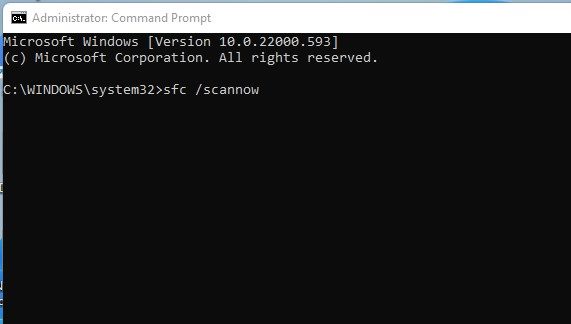
- Enter the recovery mode and navigate to the Advanced Options.
- On the Advanced Options, select Command Prompt.
- Then, type this command and press Enter: sfc /scannow
4. Wait for a few seconds for the scan to complete. Once completed, restart your PC.
4. Use System Restore
For many Reddit users, using the system restore option is helpful. Basically, you will have to use a restore point recovered on your PC to restore Windows.
- In Recovery Mode, move to the Advanced options.
- Next, select System Restore.
- Select a restore point before the problem.
Then, follow the instructions to complete the system restore.
5. Run Windows in Safe Mode
You will have to restart your PC, then boot into the Windows Recovery Environment. Once you boot into the WinRE, follow these simple steps to fix the error.
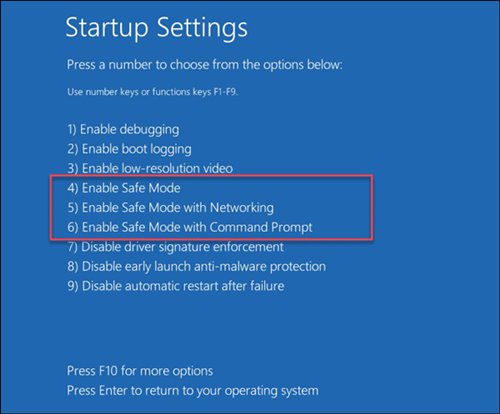
- Navigate to Troubleshoot > Advanced Options > Startup Settings > Restart.
- Press F5 or F3 and select Safe Mode with Networking.
This will boot your Windows, and you may see the ‘Finishing Updates’ screen. This may be the reason you got the ‘Device ran into a problem and couldn’t be repaired.’ error.
These are the 5 working ways to fix the ‘Device ran into a problem and couldn’t be repaired’ error message. If you need more help fixing this problem, let us know in the comments.
The post Fix ‘Your device ran into a problem and couldn’t be repaired’ Error appeared first on TechViral.
ethical hacking,hacking,bangla ethical hacking,bangla hacking tutorial,bangla tutorial,bangla hacking book,ethical hacking bangla,bangla,hacking apps,ethical hacking bangla tutorial,bangla hacking,bangla hacking pdf,bangla hacking video,bangla android hacking,bangla hacking tutorials,bangla fb hacking tutorial,bangla hacking book download,learn ethical hacking,hacking ebook,hacking tools,bangla ethical hacking course, tricks,hacking,ludo king tricks,whatsapp hacking trick 2019 tricks,wifi hacking tricks,hacking tricks: secret google tricks,simple hacking tricks,whatsapp hacking tricks,tips and tricks,wifi tricks,tech tricks,redmi tricks,hacking trick paytm cash,hacking trick helo app,hacking trick of helo app,paytm cash hacking trick,wifi password hacking,paytm cash hacking trick malayalam,hacker tricks, tips and tricks,pubg mobile tips and tricks,tricks,tips,tips and tricks for pubg mobile,100 tips and tricks,pubg tips and tricks,excel tips and tricks,google tips and tricks,kitchen tips and tricks,season 2 tips and tricks,android tips and tricks,fortnite tips and tricks,godnixon tips and tricks,free fire tips and tricks,advanced tips and tricks,whatsapp tips and tricks, facebook tricks,facebook,facebook hidden tricks,facebook tips and tricks,facebook latest tricks,facebook tips,facebook new tricks,facebook messenger tricks,facebook android app tricks,fb tricks,facebook app tricks,facebook tricks and tips,facebook tricks in hindi,tricks,facebook tutorial,new facebook tricks,cool facebook tricks,facebook tricks 2016,facebook tricks 2017,facebook secret tricks,facebook new tricks 2020,blogger blogspot seo tips and tricks,blogger tricks,blogger,blogger seo tips,blogger seo tips and tricks,seo for blogger,blogger seo in hindi,blogger seo best tips for increasing visitors,blogging tips and tricks,blogger blog seo,blogger seo in urdu,adsense approval trick,blogging tips and tricks for beginners,blogging tricks,blogger tutorial,blogger tricks 2016,blogger tricks 2017 bangla,tricks,bangla tutorial,bangla magic,bangla motivational video,bangla tricks,bangla tips,all bangla tips,magic tricks,akash bangla tricks,top 10 bangla tricks,tips and tricks,all bangla trick,bangla computer tricks,computer bangla tricks,bangla magic card tricks,ms word bangla tips and tricks,bangla computer tips,trick,psychology tricks,youtube bangla,magic tricks bangla,si trick Credit techviral


