
Alarm Didn’t Go Off on Android? 8 Best Ways to Fix it
Android’s alarm clock may fail to work for various reasons, such as incorrect date and time settings or problematic app files. If you have been dealing with the same problem, or the alarm didn’t go off on Android, here’s what you should do.
1. Restart your Phone
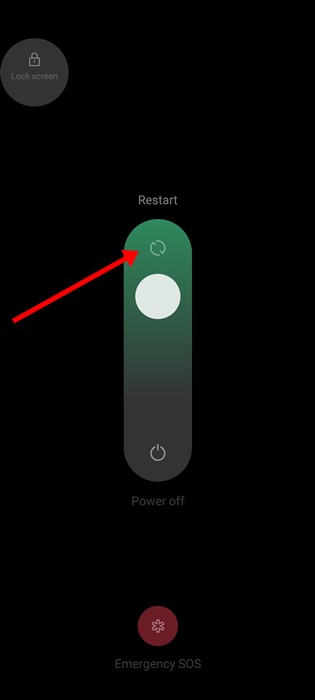
Restarting will eliminate all apps & processes that may prevent the Alarm from functioning properly. It will also clear the RAM, giving a boost in performance. To restart your Android phone, long-press on the Power Menu and select Restart. After the restart, set the Alarm again.
2. Check the Alarm Volume and Ringtone
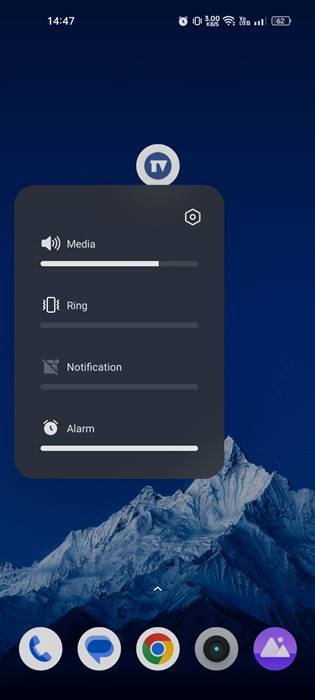
By default, the Alarm is set to go off even when the phone is silent. However, you may have accidentally lowered the volume level; hence, the Alarm is ringing, but you can’t hear it. Even if the Alarm Volume is high, check the Alarm tune. If you are a heavy sleeper, you should pick a louder Alarm tune.
You can control the volume for Media, Ringtone, Notification, Alarms, etc, through the Volume Slider that appears after pressing the physical volume button of your phone. Press the volume key of your phone and set the volume slider for Alarms to maximum.
3. Check your phone’s Do Not Disturb Settings
Generally, the DND mode doesn’t change the settings for Alarms, but there’s still an option to silence them. If you use a third-party alarm clock app, DND mode will likely prevent it from ringing on your device. Here’s how to check it.
1. Open Settings.
2. Tap on Sound & vibration.
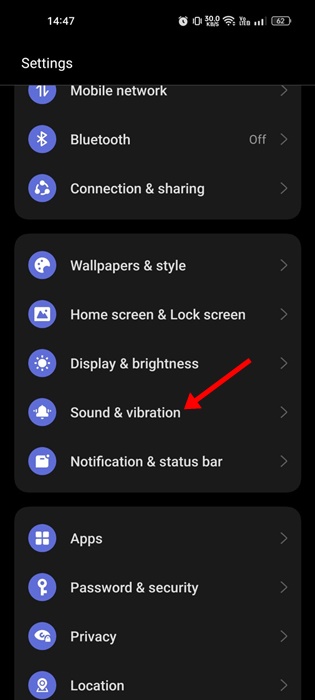
3. Select Do Not Disturb.
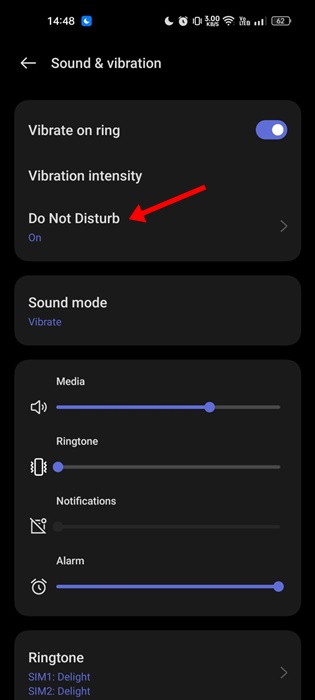
4. On the Do Not Disturb screen, tap on the Apps under Exceptions.
5. Find your Alarm clock app and make sure it’s allowed to play sound on your phone.
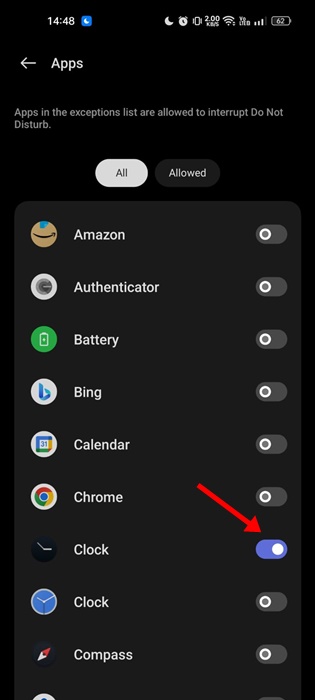
4. Check the Clock Alerts on your Phone
On selected Android smartphones, there’s an option known as Clock Alerts or Notification Alerts that lets users silence alarms when the system sound is off. If this feature is enabled on your smartphone, the Alarms will vibrate instead of making a sound.
You will usually find this option in the Apps > Clock > Clock Settings. In the Clock Settings, look at the Alerts section and turn off the ‘Silence alarms when system sound is off’ toggle. The steps to finding this option may vary depending on your phone’s skin. You can also check your smartphone’s Notification settings to find the ‘Silence alarms when system sound is off’ option.
5. Clear the Clock App Cache & Storage Data
Outdated or corrupted Clock app cache and data trigger problems like the Alarm not going off on Android. You should clear the Clock app cache and storage data.
1. Open Settings.
2. Tap on Apps.
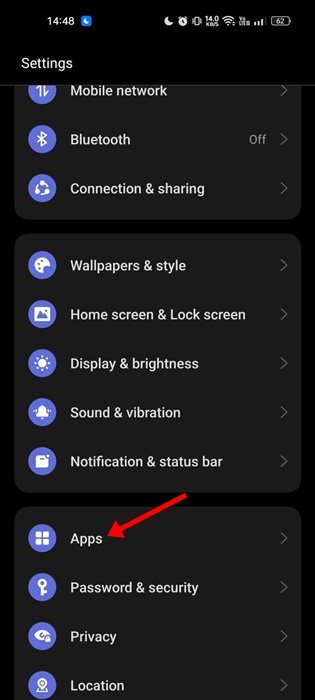
3. Tap on App Management.
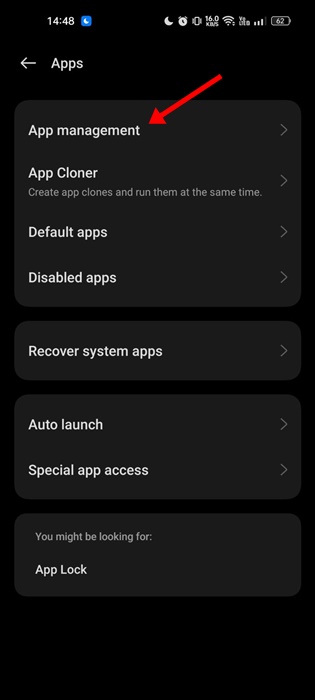
4. Find the Clock app on your phone and tap on it.

5. Tap on Storage Usage.
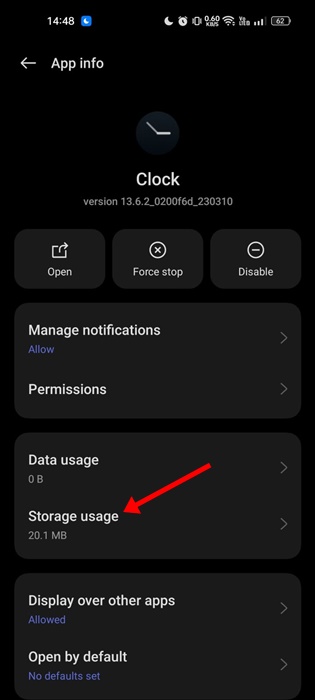
6. Tap on the Clear Cache button & Clear Data.
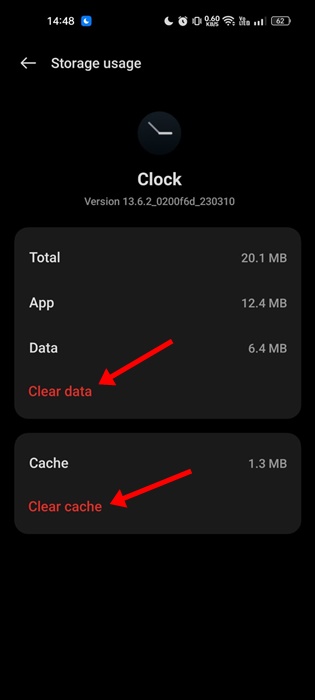
After making the changes, open the Clock app again. You will need to recreate all your Alarms.
6. Uninstall any other Clock or Alarm App

Many Android users have reported an Alarm not working issue after installing multiple Alarm Clock apps. The problem appears when multiple Alarm/Clock apps start interfering with each other’s functionality.
While this isn’t a sure-shot fix to the problem, a few users have claimed to resolve the issue by uninstalling third-party Alarm apps; you can also try doing it.
7. Reset the App Preferences
Resetting the app preferences will reset all app settings on your phone to their default.
1. Open the Settings app.
2. Scroll down and tap on Additional Settings.
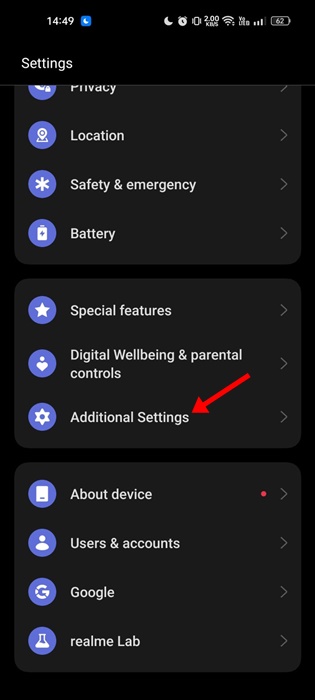
3. Tap on Back up and reset.

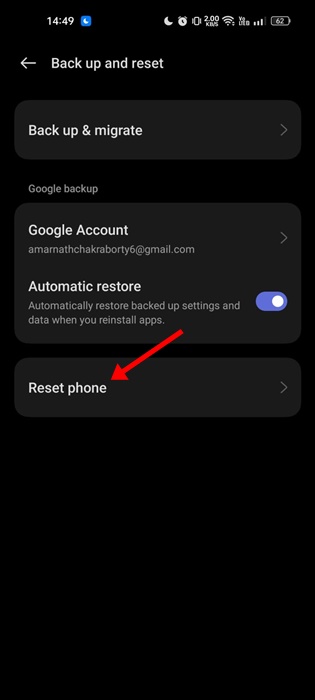
4. Tap on Reset phone.
5. Tap on Reset all settings.
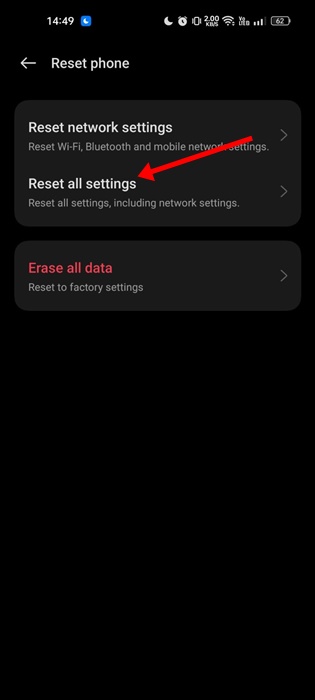
You will now be asked to confirm your action. Enter your lock screen password to start the System Reset process.
8. Use a Third-Party Alarm Clock App
If the Alarm doesn’t go off even after following all methods, you can download an alarm clock that offers more features than your existing ones.
Check out the list of the best alarm clock apps for Android. To avoid security and privacy issues, make sure to download an Alarm clock app with positive reviews and that comes from a trusted developer.
This guide is about how to fix the Android Alarm that didn’t go off issue. Let us know which method worked for you to fix the Alarm not working issue on Android.
The post Alarm Didn’t Go Off on Android? 8 Best Ways to Fix it appeared first on TechViral.
ethical hacking,hacking,bangla ethical hacking,bangla hacking tutorial,bangla tutorial,bangla hacking book,ethical hacking bangla,bangla,hacking apps,ethical hacking bangla tutorial,bangla hacking,bangla hacking pdf,bangla hacking video,bangla android hacking,bangla hacking tutorials,bangla fb hacking tutorial,bangla hacking book download,learn ethical hacking,hacking ebook,hacking tools,bangla ethical hacking course, tricks,hacking,ludo king tricks,whatsapp hacking trick 2019 tricks,wifi hacking tricks,hacking tricks: secret google tricks,simple hacking tricks,whatsapp hacking tricks,tips and tricks,wifi tricks,tech tricks,redmi tricks,hacking trick paytm cash,hacking trick helo app,hacking trick of helo app,paytm cash hacking trick,wifi password hacking,paytm cash hacking trick malayalam,hacker tricks, tips and tricks,pubg mobile tips and tricks,tricks,tips,tips and tricks for pubg mobile,100 tips and tricks,pubg tips and tricks,excel tips and tricks,google tips and tricks,kitchen tips and tricks,season 2 tips and tricks,android tips and tricks,fortnite tips and tricks,godnixon tips and tricks,free fire tips and tricks,advanced tips and tricks,whatsapp tips and tricks, facebook tricks,facebook,facebook hidden tricks,facebook tips and tricks,facebook latest tricks,facebook tips,facebook new tricks,facebook messenger tricks,facebook android app tricks,fb tricks,facebook app tricks,facebook tricks and tips,facebook tricks in hindi,tricks,facebook tutorial,new facebook tricks,cool facebook tricks,facebook tricks 2016,facebook tricks 2017,facebook secret tricks,facebook new tricks 2020,blogger blogspot seo tips and tricks,blogger tricks,blogger,blogger seo tips,blogger seo tips and tricks,seo for blogger,blogger seo in hindi,blogger seo best tips for increasing visitors,blogging tips and tricks,blogger blog seo,blogger seo in urdu,adsense approval trick,blogging tips and tricks for beginners,blogging tricks,blogger tutorial,blogger tricks 2016,blogger tricks 2017 bangla,tricks,bangla tutorial,bangla magic,bangla motivational video,bangla tricks,bangla tips,all bangla tips,magic tricks,akash bangla tricks,top 10 bangla tricks,tips and tricks,all bangla trick,bangla computer tricks,computer bangla tricks,bangla magic card tricks,ms word bangla tips and tricks,bangla computer tips,trick,psychology tricks,youtube bangla,magic tricks bangla,si trick Credit techviral


