
How to Fix Settings Blank or Missing on Windows 11
It can be frustrating when the Windows 11 Settings app appears blank or refuses to open. So, why does this happen? Well, there are various reasons behind this problem, and we need to find and troubleshoot the most likely problems.
If Windows Settings is Blank or Missing, here’s what you should immediately do to fix the problem.
1. Restart the Windows Explorer Process
Windows Explorer is responsible for handling the graphical interface of your PC. If it malfunctions, it can lead to the Settings app going black issue. Hence, you should restart the Windows Explorer Process from the Task Manager.
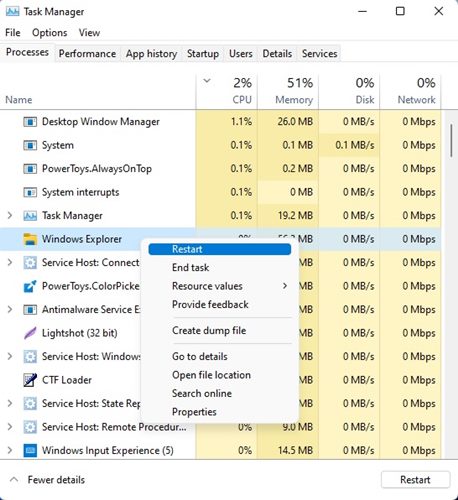
- Open Task Manager from the Windows Search.
- Find Windows Explorer. Right-click on it and select Restart.
- The display will go black for a second. This confirms that the restart is done.
Now check whether the Settings app still shows the black screen.
2. Restart your PC
If restarting the Windows Explorer didn’t help, you should restart your PC.
Restart will remove the bugs & glitches that may be conflicting with the Settings app of your PC.
Open the Windows Start Menu, click the Power button, and select Restart.
3. Register your settings from the PowerShell
If the Settings app still appears blank after the restart, you need to re-register your Settings via PowerShell. Here’s what you need to do.
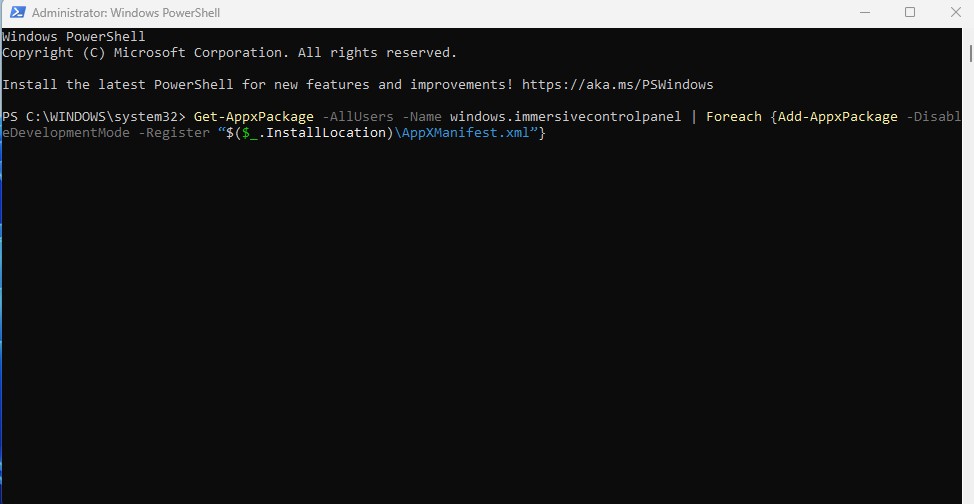
- Open PowerShell with admin rights.
- When PowerShell opens, execute this command:
Get-AppxPackage -AllUsers -Name windows.immersivecontrolpanel | Foreach {Add-AppxPackage -DisableDevelopmentMode -Register “$($_.InstallLocation)\AppXManifest.xml”}
Once done, restart your PC to apply the changes. This should fix the problem you’re facing.
4. Run SFC scan
System file corruption is one of the prominent reasons for the Settings blank or missing problem. You should run the SFC scan to fix corrupted system files.
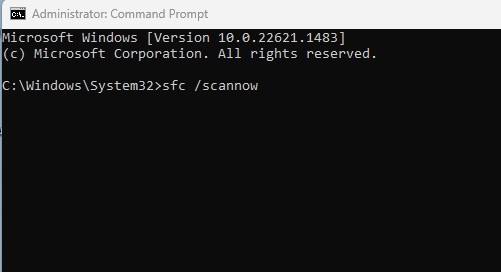
- Open Command Prompt with admin rights.
- When the Command Prompt opens, type sfc /scannow and press Enter.
- Now wait until the scan completes.
If the scan returns with an error, you should run the DISM scan.
5. Run the DISM scan
If the SFC scan returns with an error or can’t fix the corrupted files, you should run the DISM scan.
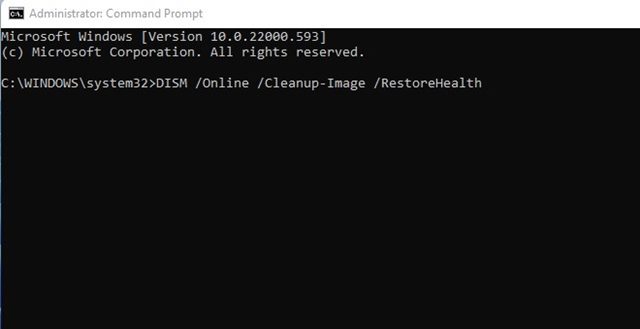
- Open Command Prompt with admin rights.
- When the command prompt opens, execute this command and press Enter.
DISM.exe /Online /Cleanup-image /RestoreHealth
This command should fix the problem.
These are the best ways to fix the Settings app appearing blank or missing. If you need more help in fixing this problem, let us know in the comments. Also, if you find this guide helpful, share it with your friends.
The post How to Fix Settings Blank or Missing on Windows 11 appeared first on TechViral.
ethical hacking,hacking,bangla ethical hacking,bangla hacking tutorial,bangla tutorial,bangla hacking book,ethical hacking bangla,bangla,hacking apps,ethical hacking bangla tutorial,bangla hacking,bangla hacking pdf,bangla hacking video,bangla android hacking,bangla hacking tutorials,bangla fb hacking tutorial,bangla hacking book download,learn ethical hacking,hacking ebook,hacking tools,bangla ethical hacking course, tricks,hacking,ludo king tricks,whatsapp hacking trick 2019 tricks,wifi hacking tricks,hacking tricks: secret google tricks,simple hacking tricks,whatsapp hacking tricks,tips and tricks,wifi tricks,tech tricks,redmi tricks,hacking trick paytm cash,hacking trick helo app,hacking trick of helo app,paytm cash hacking trick,wifi password hacking,paytm cash hacking trick malayalam,hacker tricks, tips and tricks,pubg mobile tips and tricks,tricks,tips,tips and tricks for pubg mobile,100 tips and tricks,pubg tips and tricks,excel tips and tricks,google tips and tricks,kitchen tips and tricks,season 2 tips and tricks,android tips and tricks,fortnite tips and tricks,godnixon tips and tricks,free fire tips and tricks,advanced tips and tricks,whatsapp tips and tricks, facebook tricks,facebook,facebook hidden tricks,facebook tips and tricks,facebook latest tricks,facebook tips,facebook new tricks,facebook messenger tricks,facebook android app tricks,fb tricks,facebook app tricks,facebook tricks and tips,facebook tricks in hindi,tricks,facebook tutorial,new facebook tricks,cool facebook tricks,facebook tricks 2016,facebook tricks 2017,facebook secret tricks,facebook new tricks 2020,blogger blogspot seo tips and tricks,blogger tricks,blogger,blogger seo tips,blogger seo tips and tricks,seo for blogger,blogger seo in hindi,blogger seo best tips for increasing visitors,blogging tips and tricks,blogger blog seo,blogger seo in urdu,adsense approval trick,blogging tips and tricks for beginners,blogging tricks,blogger tutorial,blogger tricks 2016,blogger tricks 2017 bangla,tricks,bangla tutorial,bangla magic,bangla motivational video,bangla tricks,bangla tips,all bangla tips,magic tricks,akash bangla tricks,top 10 bangla tricks,tips and tricks,all bangla trick,bangla computer tricks,computer bangla tricks,bangla magic card tricks,ms word bangla tips and tricks,bangla computer tips,trick,psychology tricks,youtube bangla,magic tricks bangla,si trick Credit techviral


