
7 Best Ways to Fix ‘TPM Device Not Detected’ Error Message
TPM offers hardware-level protection and encrypts disks using Windows features like BitLocker, Windows Hello PIN, etc. For proper security, TPM 1.2 or 2.0 is mandatory on Windows 11; without it, you can’t install the operating system. Now that you know what TPM is, here’s how you can fix the ‘TPM Device Not Detected’ error message.
1. Make sure your motherboard has a TPM Chip
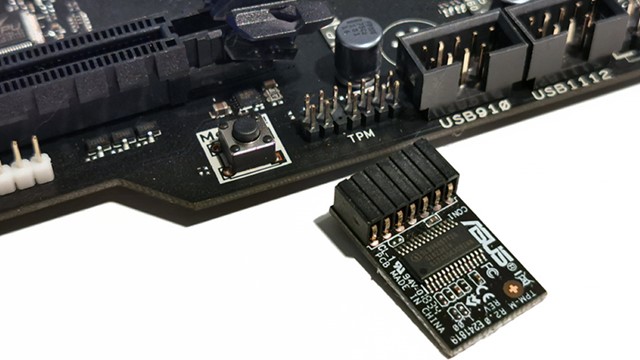
TPM device not detected error message can mean that your motherboard doesn’t have it. If TPM is not available, you can’t do anything.
It’s recommended to look up your motherboard & CPU online to see if it has TPM 2.0 listed as an official part of device specifications.
2. Check if TPM is Enabled in BIOS
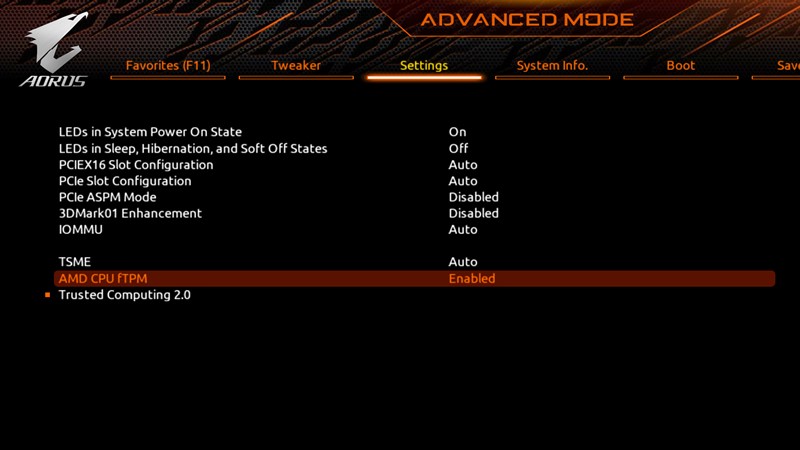
If TPM is available on your PC but you still get the error, check if it is enabled in the BIOS. If it is not enabled, you can enable it to fix the error message. Enabling TPM from a BIOS/UEFI isn’t very easy because the BIOS differs depending on the motherboard’s brand and model.
Watch some YouTube videos or check the motherboard manual for instructions on how to do this. If you don’t want to watch a video or read the motherboard manual, check out our guide on how to enable TPM 2.0 on a Windows PC.
3. Update BIOS or UEFI
If the TPM is already enabled on the BIOS or UEFI, but you still get the error, you should update the BIOS or UEFI. However, updating the BIOS could be difficult, especially if you lack technical knowledge.
The safest way to update your BIOS is to disable the BitLocker device encryption, visit the OEM website, and download the latest BIOS firmware for your PC. Once downloaded, run the installer file and follow the on-screen instructions.
Another option is to take your PC or laptop to the nearest service center and ask them to update the BIOS. This is the safest way to update the BIOS/UEFI firmware.
4. Reinstall the TPM Driver
If the TPM 2.0 shows up in your Device Manager, you can reinstall the TPM driver.
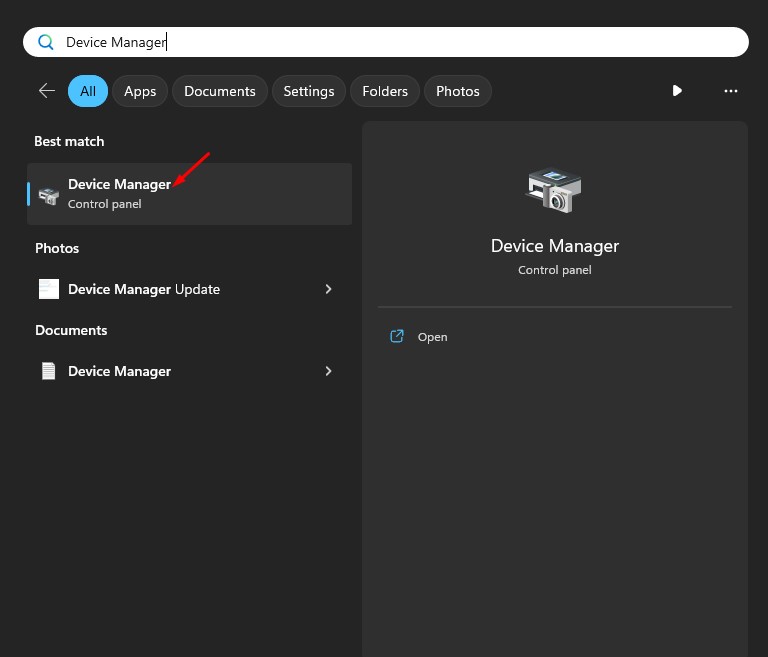
1. Open Device Manager from the Windows Search.
2. Expand Security Devices.
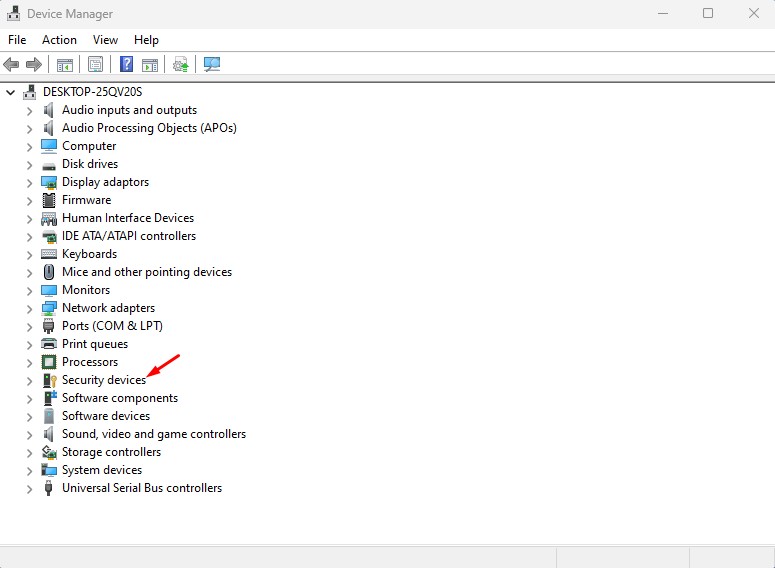
3. Right-click on the Trusted Platform Module and select Uninstall Device.
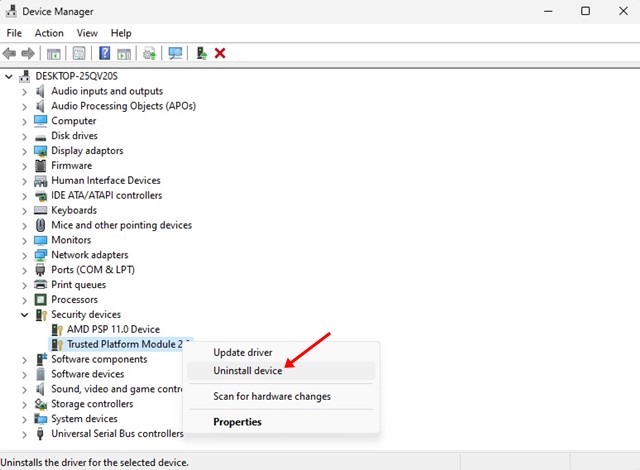
4. Click on Uninstall.
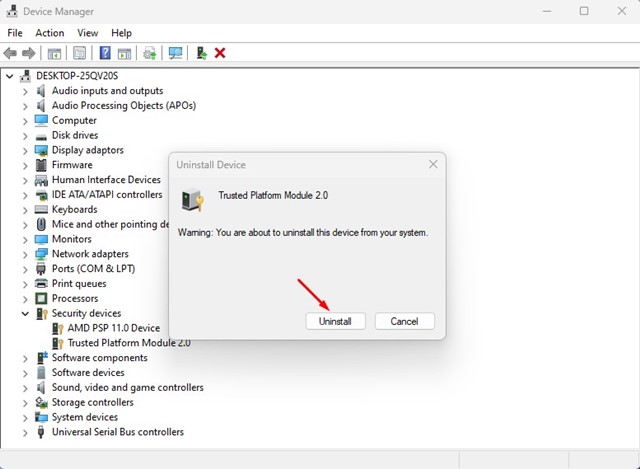
5. Once the TPM driver is uninstalled, restart your computer.
5. Unplug the Battery/CMOS
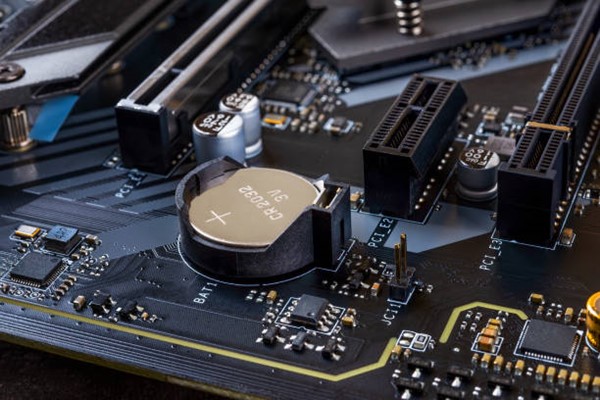
This is a very common solution for resetting the PC BIOS. If you have a laptop, you can power down the device and remove the battery.
If you have a desktop computer, you need to open the CPU cabinet and remove the CMOS. For those unaware, CMOS is the term for the memory on a computer motherboard that stores the BIOS settings.
Removing the CMOS battery removes all BIOS settings. So, you can try removing the CMOS battery (only if you have technical knowledge) to reset the BIOS settings to default.
6. Bypass the Windows 11 TPM Requirements
There’s a way to bypass Windows 11’s TPM Requirement; you must use several third-party apps. You must check out our guide – How to Bypass Windows 11 TPM Requirement, to explore all available options.
Another easier method is to create a Bootable USB drive with the Rufus utility. Rufus provides an option to remove the Secure Boot and TPM 2.0 requirements. To bypass the Windows 11 requirements using Rufus, check out this guide: How to Create a Bootable USB to Bypass Windows 11 Restrictions.
7. Contact Technical Support
If your motherboard has a TPM chip and the BIOS settings are correct, you should seek technical help. You can contact a nearby technician to have them fix the issue, or you can contact your PC or laptop manufacturer for help.
This guide is about fixing the ‘TPM Device Not Detected’ error. If your PC has a TPM chip and you’ve followed all methods, the issue was likely already fixed. Please let us know which method worked for you to fix the Windows 11 TPM error.
The post 7 Best Ways to Fix ‘TPM Device Not Detected’ Error Message appeared first on TechViral.
ethical hacking,hacking,bangla ethical hacking,bangla hacking tutorial,bangla tutorial,bangla hacking book,ethical hacking bangla,bangla,hacking apps,ethical hacking bangla tutorial,bangla hacking,bangla hacking pdf,bangla hacking video,bangla android hacking,bangla hacking tutorials,bangla fb hacking tutorial,bangla hacking book download,learn ethical hacking,hacking ebook,hacking tools,bangla ethical hacking course, tricks,hacking,ludo king tricks,whatsapp hacking trick 2019 tricks,wifi hacking tricks,hacking tricks: secret google tricks,simple hacking tricks,whatsapp hacking tricks,tips and tricks,wifi tricks,tech tricks,redmi tricks,hacking trick paytm cash,hacking trick helo app,hacking trick of helo app,paytm cash hacking trick,wifi password hacking,paytm cash hacking trick malayalam,hacker tricks, tips and tricks,pubg mobile tips and tricks,tricks,tips,tips and tricks for pubg mobile,100 tips and tricks,pubg tips and tricks,excel tips and tricks,google tips and tricks,kitchen tips and tricks,season 2 tips and tricks,android tips and tricks,fortnite tips and tricks,godnixon tips and tricks,free fire tips and tricks,advanced tips and tricks,whatsapp tips and tricks, facebook tricks,facebook,facebook hidden tricks,facebook tips and tricks,facebook latest tricks,facebook tips,facebook new tricks,facebook messenger tricks,facebook android app tricks,fb tricks,facebook app tricks,facebook tricks and tips,facebook tricks in hindi,tricks,facebook tutorial,new facebook tricks,cool facebook tricks,facebook tricks 2016,facebook tricks 2017,facebook secret tricks,facebook new tricks 2020,blogger blogspot seo tips and tricks,blogger tricks,blogger,blogger seo tips,blogger seo tips and tricks,seo for blogger,blogger seo in hindi,blogger seo best tips for increasing visitors,blogging tips and tricks,blogger blog seo,blogger seo in urdu,adsense approval trick,blogging tips and tricks for beginners,blogging tricks,blogger tutorial,blogger tricks 2016,blogger tricks 2017 bangla,tricks,bangla tutorial,bangla magic,bangla motivational video,bangla tricks,bangla tips,all bangla tips,magic tricks,akash bangla tricks,top 10 bangla tricks,tips and tricks,all bangla trick,bangla computer tricks,computer bangla tricks,bangla magic card tricks,ms word bangla tips and tricks,bangla computer tips,trick,psychology tricks,youtube bangla,magic tricks bangla,si trick Credit techviral


