
How to Fix DISM Error 0x800f0915 in Windows 11
Windows 11 gives us many ways to troubleshoot problems. For example, the System File Checker utility can fix corrupt system files; the disk check utility fixes drive-related problems; and the DISM command-line tool is used to service, repair, and manage operating system images and system files.
When the sfc /scannow command fails to fix specific problems, the DISM command-line tool is used. However, recently a few users have been facing Error 0x800f0915 while running the DISM /Online /Cleanup-Image /RestoreHealth function.
If you have been trying to fix Windows problems but can’t due to DISM Error 0x800f0915, here’s what you should immediately do.
Why does the DISM Error 0x800f0915 occur?
While repairing the System image or files, DISM tries to grab the replacement files either from Windows Update or from the repair source. However, if the required files are not available, it shows you the error.
The DISM Error 0x800f0915 generally appears due to inactive internet, incorrect repair source selection, a corrupted Windows ISO file, a system-level bug, or a glitch. If you get this error, here’s what you should do to fix it.
1. Check your internet
DISM requires downloading the required repair files. If there’s no internet, the process will fail and will trigger an error.
So, before trying the advanced troubleshooting, you need to check whether your device is connected to the internet. Try opening a few websites in your web browser and check whether the internet is working properly or not.
2. Use a Matching Windows ISO
If you’re using a Windows ISO file as the repair source, make sure it matches your current Windows Edition, version/build, language, and architecture. If they don’t match, DISM will show you the error.
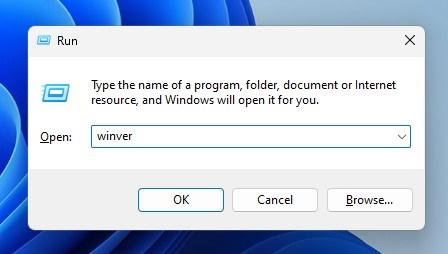
Press the Windows Key + R, type winver, and check your Windows version and build. Then download the matching Windows ISO from Microsoft and mount it.
The ISO file that you’ve mounted may have either install.wim or install.esd, you need to select the correct image index for your Windows Edition.
3. Run StartComponentCleanup
Well, many Windows users have claimed to fix DISM Error 0x800f0915 by cleaning up the Windows Component Store. You can try doing it as well.
Launch the Command Prompt with admin rights and execute the given command:
DISM.exe /Online /Cleanup-Image /StartComponentCleanup
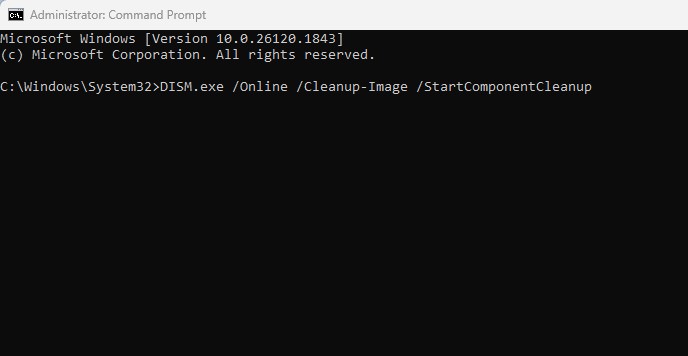
Wait for the process to complete. Once done, you can now execute the command that’s showing you the error.
4. In-Place Upgrade Windows 11
If you still get the error, you should consider performing an in-place upgrade.
To perform an in-place upgrade, you should download the latest Windows Installation media, mount the ISO file, and then run Setup.exe. Select ‘Keep personal files and apps‘ and complete the upgrade process.
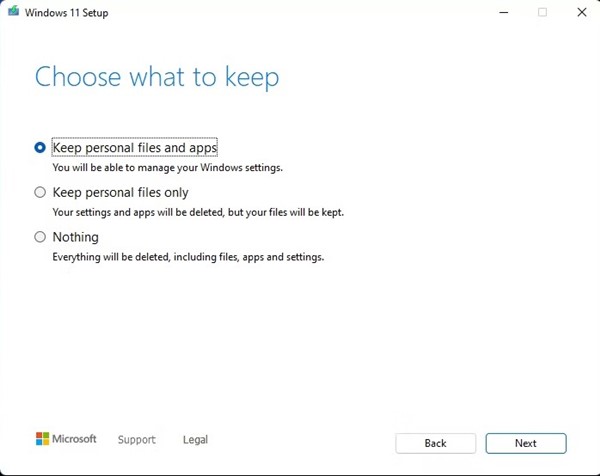
This will reinstall Windows, but will keep your personal files, apps, and settings. Once the upgrade is complete, you can run the DISM command if needed.
These are the best methods to fix DISM Error 0x800f0915. If you need more help with this topic, let us know in the comments. Also, if you find this guide helpful, share it with your friends.
The post How to Fix DISM Error 0x800f0915 in Windows 11 appeared first on TechViral.
ethical hacking,hacking,bangla ethical hacking,bangla hacking tutorial,bangla tutorial,bangla hacking book,ethical hacking bangla,bangla,hacking apps,ethical hacking bangla tutorial,bangla hacking,bangla hacking pdf,bangla hacking video,bangla android hacking,bangla hacking tutorials,bangla fb hacking tutorial,bangla hacking book download,learn ethical hacking,hacking ebook,hacking tools,bangla ethical hacking course, tricks,hacking,ludo king tricks,whatsapp hacking trick 2019 tricks,wifi hacking tricks,hacking tricks: secret google tricks,simple hacking tricks,whatsapp hacking tricks,tips and tricks,wifi tricks,tech tricks,redmi tricks,hacking trick paytm cash,hacking trick helo app,hacking trick of helo app,paytm cash hacking trick,wifi password hacking,paytm cash hacking trick malayalam,hacker tricks, tips and tricks,pubg mobile tips and tricks,tricks,tips,tips and tricks for pubg mobile,100 tips and tricks,pubg tips and tricks,excel tips and tricks,google tips and tricks,kitchen tips and tricks,season 2 tips and tricks,android tips and tricks,fortnite tips and tricks,godnixon tips and tricks,free fire tips and tricks,advanced tips and tricks,whatsapp tips and tricks, facebook tricks,facebook,facebook hidden tricks,facebook tips and tricks,facebook latest tricks,facebook tips,facebook new tricks,facebook messenger tricks,facebook android app tricks,fb tricks,facebook app tricks,facebook tricks and tips,facebook tricks in hindi,tricks,facebook tutorial,new facebook tricks,cool facebook tricks,facebook tricks 2016,facebook tricks 2017,facebook secret tricks,facebook new tricks 2020,blogger blogspot seo tips and tricks,blogger tricks,blogger,blogger seo tips,blogger seo tips and tricks,seo for blogger,blogger seo in hindi,blogger seo best tips for increasing visitors,blogging tips and tricks,blogger blog seo,blogger seo in urdu,adsense approval trick,blogging tips and tricks for beginners,blogging tricks,blogger tutorial,blogger tricks 2016,blogger tricks 2017 bangla,tricks,bangla tutorial,bangla magic,bangla motivational video,bangla tricks,bangla tips,all bangla tips,magic tricks,akash bangla tricks,top 10 bangla tricks,tips and tricks,all bangla trick,bangla computer tricks,computer bangla tricks,bangla magic card tricks,ms word bangla tips and tricks,bangla computer tips,trick,psychology tricks,youtube bangla,magic tricks bangla,si trick Credit techviral


