
What is CCXProcess.exe? How to Disable it
CCXProcess.exe stands for Creative Cloud Experience and is an important process run by Adobe programs. The process is supposed to launch automatically on Startup, as it is responsible for providing features for the Adobe Programs you are using.
You will find the CCXProcess executable file at C:\Program Files (x86)\Adobe\Adobe Creative Cloud Experience.
What Does CCXProcess.exe Do?
CCXProcess.exe is a client that helps manage Adobe Creative Cloud applications & your Adobe subscriptions.
The role of this process is to support Adobe Creative Cloud apps to provide important content like templates & filters. It’s set to start automatically when your PC starts, which is why you see it more often in your Task Manager.
Is CCXProcess.exe safe?
Yes, CCXProcess.exe is 100% safe and legitimate Adobe software that runs silently in the background. However, if you see this process on the Task Manager without any Adobe software, you must check its legitimacy.
Windows users can also notice two CCXProcess.exe on the Task Manager. If you notice this, your PC is possibly infected with malware or a virus. So, you must run a full antimalware scan with a reliable security tool like Malwarebytes.
Should I disable CCXProcess?
CCXProcess is very important for the proper functioning of Adobe Programs, but not for the operating system. Disabling the CCXProcess.exe will cause problems in Adobe Programs like Photoshop, Lightroom, etc., but it won’t affect your device’s performance.
You can also disable the CCXProcess when you’re not actively using the Adobe CC client or any Adobe Programs. Launching any Adobe programs later will also launch the Adobe Creative Cloud & CCXProcess again.
How to Disable Adobe CCXProcess (Windows)
Although CCXProcess.exe is legitimate and safe, if you have a low-end computer, the wise decision should be to keep this process disabled.
1. Disable CCXProcess.exe from the Task Manager
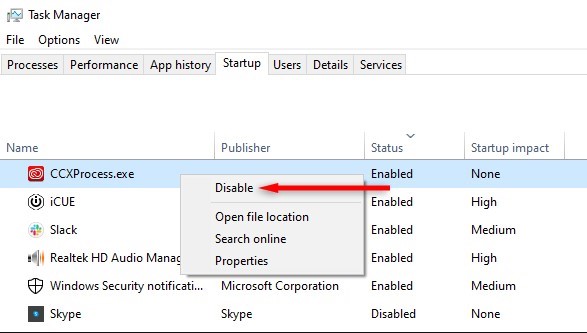
- Click on Windows Search & type Task Manager.
- Open the Task Manager app. Next, switch to the Startup tab at the top.
- Find CCXProcess.exe, right-click on it, and select Disable.
After making the changes, restart your computer.
2. Disable CCXProcess From the Registry Editor
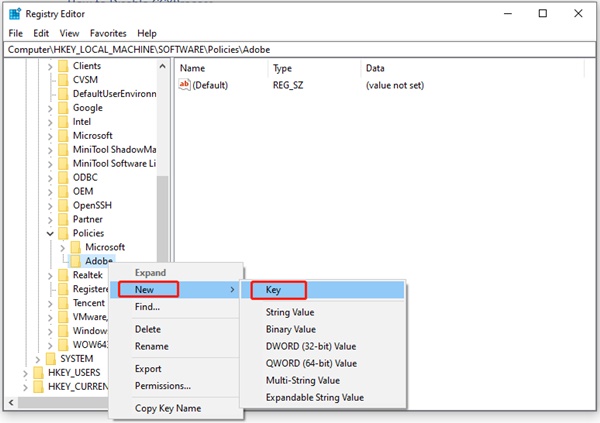
- Type Registry Editor in the Windows 11 Search. Open the Registry Editor app.
- Navigate to this path in the Registry Editor:
HKEY_LOCAL_MACHINE\SOFTWARE\Policies\Adobe
- Right-click on Adobe and select New > Key.
- Name the new key as CCXNew.
- Right-click on the right side and select New > DWORD (32-bit) Value.
- Name the new DWORD key as Disabled.
- Double-click on the Disabled DWORD and set 0 in the Value Data field.
- Click on OK.
Close the Registry Editor & restart your computer. This should disable the CCXProcess on your computer.
3. Disable CCXProcess from the Adobe Creative Cloud Client
If you already use an Adobe product, the Adobe Creative Cloud client will be installed on your computer. You need to change the Adobe Creative Cloud Client to disable CCXProcess.exe.
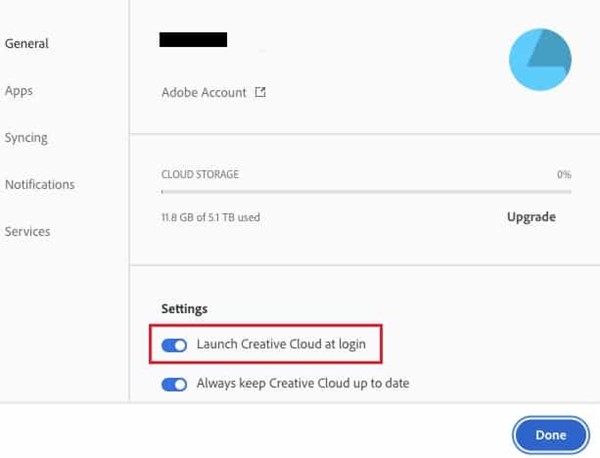
- Launch Adobe Creative Cloud Client.
- Click on your profile icon at the top right & select Preferences.
- Switch to the General tab on the left side.
- On the right side, scroll down to the Settings section.
- Disable the toggle for Launch Creative Cloud at Login.
After making the changes, click the Done button. Then, restart your Windows PC.
4. Uninstall the Adobe CC App
Adobe CC or Adobe Creative Cloud is a client app that runs the CCXProcess on your computer. You need to open the Control Panel & find the Adobe CC App. Right-click on the Adobe CC app and select Uninstall.
If you can’t find the Adobe CC app, uninstall the Adobe software you use, like Photoshop, Illustrator, Lightroom, etc.
Once the program is uninstalled, restart your Windows PC. You won’t see the CCXProcess.exe in the Task Manager again.
How to Disable CCXProcess on Mac?
Like Windows operating systems, CCXProcess can also appear in macOS’s Activity Monitor. If you have a MAC and want to remove CCXProcess from the Activity Monitor, follow these steps.
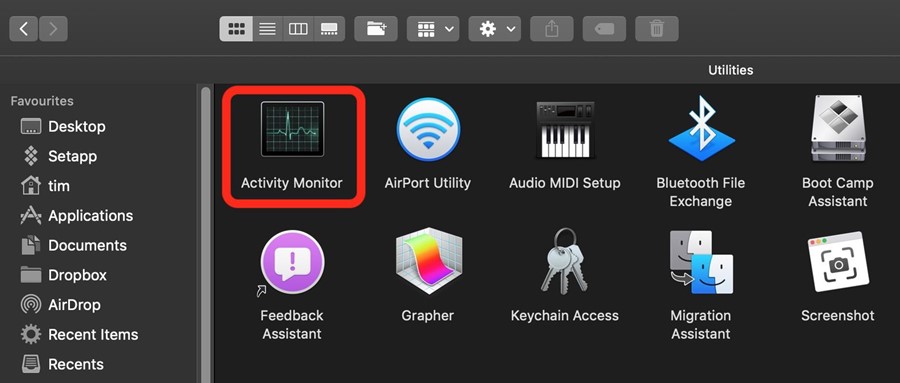
- Open Finder & select Applications.
- Now select Utilities.
- Launch the Activity Monitor.
- Search for CCXProcess in the Activity Monitor.
- Double-click on the CCXProcess & select Quit.
This guide explains what CCXProcess is and whether it’s safe to disable it. We have also shared the steps to disable it from the Task Manager on Windows and macOS.
The post What is CCXProcess.exe? How to Disable it appeared first on TechViral.
ethical hacking,hacking,bangla ethical hacking,bangla hacking tutorial,bangla tutorial,bangla hacking book,ethical hacking bangla,bangla,hacking apps,ethical hacking bangla tutorial,bangla hacking,bangla hacking pdf,bangla hacking video,bangla android hacking,bangla hacking tutorials,bangla fb hacking tutorial,bangla hacking book download,learn ethical hacking,hacking ebook,hacking tools,bangla ethical hacking course, tricks,hacking,ludo king tricks,whatsapp hacking trick 2019 tricks,wifi hacking tricks,hacking tricks: secret google tricks,simple hacking tricks,whatsapp hacking tricks,tips and tricks,wifi tricks,tech tricks,redmi tricks,hacking trick paytm cash,hacking trick helo app,hacking trick of helo app,paytm cash hacking trick,wifi password hacking,paytm cash hacking trick malayalam,hacker tricks, tips and tricks,pubg mobile tips and tricks,tricks,tips,tips and tricks for pubg mobile,100 tips and tricks,pubg tips and tricks,excel tips and tricks,google tips and tricks,kitchen tips and tricks,season 2 tips and tricks,android tips and tricks,fortnite tips and tricks,godnixon tips and tricks,free fire tips and tricks,advanced tips and tricks,whatsapp tips and tricks, facebook tricks,facebook,facebook hidden tricks,facebook tips and tricks,facebook latest tricks,facebook tips,facebook new tricks,facebook messenger tricks,facebook android app tricks,fb tricks,facebook app tricks,facebook tricks and tips,facebook tricks in hindi,tricks,facebook tutorial,new facebook tricks,cool facebook tricks,facebook tricks 2016,facebook tricks 2017,facebook secret tricks,facebook new tricks 2020,blogger blogspot seo tips and tricks,blogger tricks,blogger,blogger seo tips,blogger seo tips and tricks,seo for blogger,blogger seo in hindi,blogger seo best tips for increasing visitors,blogging tips and tricks,blogger blog seo,blogger seo in urdu,adsense approval trick,blogging tips and tricks for beginners,blogging tricks,blogger tutorial,blogger tricks 2016,blogger tricks 2017 bangla,tricks,bangla tutorial,bangla magic,bangla motivational video,bangla tricks,bangla tips,all bangla tips,magic tricks,akash bangla tricks,top 10 bangla tricks,tips and tricks,all bangla trick,bangla computer tricks,computer bangla tricks,bangla magic card tricks,ms word bangla tips and tricks,bangla computer tips,trick,psychology tricks,youtube bangla,magic tricks bangla,si trick Credit techviral


