
Windows Search Displays Black Screen? Try these 5 Fixes
Windows users have been facing a weird problem recently. According to the users, after a restart, whenever they open Windows Search, it just shows blank. The icons, search options, everything goes missing.
Nobody knows why it’s happening, but it’s not something that affects the functionality of Windows. Anyways, if the blank Windows Search screen is troubling you, here’s what you should do to fix it.
1. Restart the Windows Explorer
Windows Explorer handles the graphical part of the operating system. So, you should restart the Windows Explorer process from the Task Manager.
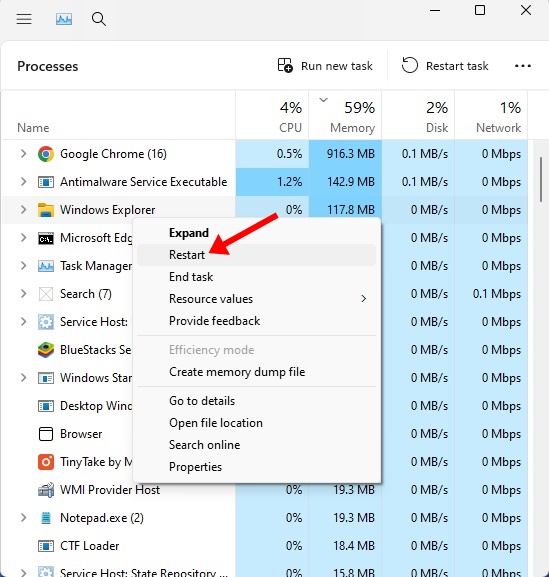
- Open Task Manager on your PC. Right-click on the Taskbar, select Task Manager.
- Move to the Processes tab.
- Find Windows Explorer.
- Right-click on it and select Restart.
The desktop screen will go blank for a second and return.
2. Restart the Windows Search Service
If the Search Service is experiencing a problem, the Windows Search bar will be stuck. Here’s how you can fix it.
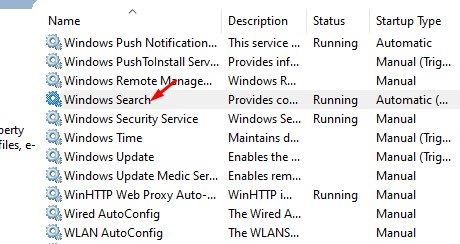
- Press Windows Key + R. In the RUN box, type services.msc and press Enter.
- In the Services window, find Windows Search.
- Right-click on it and select Restart.
Close the Windows Services window and check Windows Search.
3. Restart the SearchHost.exe file
SearchHost.exe is a very important process for the functioning of Windows Search. You should restart it as well.
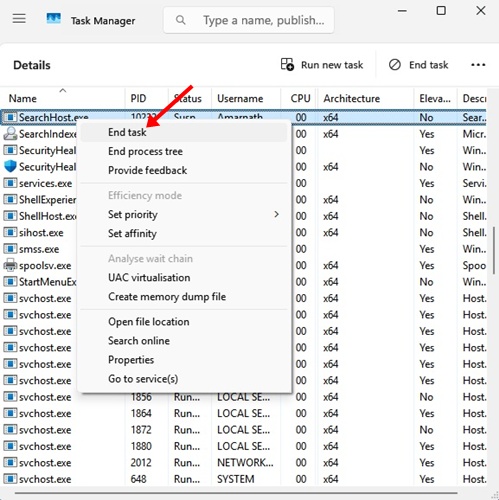
- Right-click on the Taskbar and select Task Manager.
- Switch to the Details tab.
- Find SearchHost.exe
- Right-click on it and select End Task.
Windows will restart SearchHost.exe once you open the Windows Search.
4. Disable Web Search from the Settings (Windows 10)
In this method, you will have to disable the Web Search from the Permissions & History Settings. Here’s what you need to do.
- Open Settings on Windows 11.
- Navigate to Permissions & History.
- Scroll down to Web Search and disable it.
It will disable Microsoft Bing, but it will fix the Windows Search bar.
On Windows 11:
Windows 11 users need to disable Bing search results by executing a command in the command prompt. Here’s what needs to be done.
- Right-click on the Windows Start button and select Terminal (Admin).
- Then, paste the given command and press Enter:
reg add HKCU\Software\Policies\Microsoft\Windows\Explorer /v DisableSearchBoxSuggestions /t REG_DWORD /d 1 /f
5. Update Windows 11
Sometimes, the search bar not functioning or appearing blank is just a result of a bug. It’s possible that you’re using a problematic version of Windows 11, and an update could fix that.
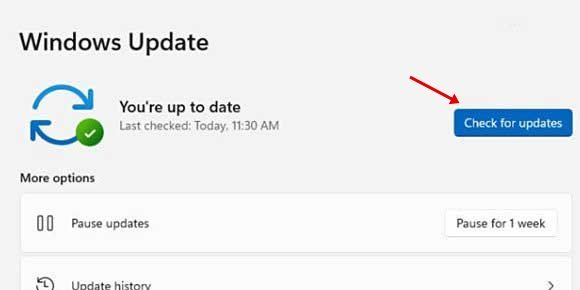
You need to head to Settings > Windows Updates and click Check for Updates on the right side.
If any updates are available, make sure to download & install them.
These are the best ways to fix the Windows 11 Search box opens up blank issue. If you need more help in troubleshooting this problem, let us know in the comments.
The post Windows Search Displays Black Screen? Try these 5 Fixes appeared first on TechViral.
ethical hacking,hacking,bangla ethical hacking,bangla hacking tutorial,bangla tutorial,bangla hacking book,ethical hacking bangla,bangla,hacking apps,ethical hacking bangla tutorial,bangla hacking,bangla hacking pdf,bangla hacking video,bangla android hacking,bangla hacking tutorials,bangla fb hacking tutorial,bangla hacking book download,learn ethical hacking,hacking ebook,hacking tools,bangla ethical hacking course, tricks,hacking,ludo king tricks,whatsapp hacking trick 2019 tricks,wifi hacking tricks,hacking tricks: secret google tricks,simple hacking tricks,whatsapp hacking tricks,tips and tricks,wifi tricks,tech tricks,redmi tricks,hacking trick paytm cash,hacking trick helo app,hacking trick of helo app,paytm cash hacking trick,wifi password hacking,paytm cash hacking trick malayalam,hacker tricks, tips and tricks,pubg mobile tips and tricks,tricks,tips,tips and tricks for pubg mobile,100 tips and tricks,pubg tips and tricks,excel tips and tricks,google tips and tricks,kitchen tips and tricks,season 2 tips and tricks,android tips and tricks,fortnite tips and tricks,godnixon tips and tricks,free fire tips and tricks,advanced tips and tricks,whatsapp tips and tricks, facebook tricks,facebook,facebook hidden tricks,facebook tips and tricks,facebook latest tricks,facebook tips,facebook new tricks,facebook messenger tricks,facebook android app tricks,fb tricks,facebook app tricks,facebook tricks and tips,facebook tricks in hindi,tricks,facebook tutorial,new facebook tricks,cool facebook tricks,facebook tricks 2016,facebook tricks 2017,facebook secret tricks,facebook new tricks 2020,blogger blogspot seo tips and tricks,blogger tricks,blogger,blogger seo tips,blogger seo tips and tricks,seo for blogger,blogger seo in hindi,blogger seo best tips for increasing visitors,blogging tips and tricks,blogger blog seo,blogger seo in urdu,adsense approval trick,blogging tips and tricks for beginners,blogging tricks,blogger tutorial,blogger tricks 2016,blogger tricks 2017 bangla,tricks,bangla tutorial,bangla magic,bangla motivational video,bangla tricks,bangla tips,all bangla tips,magic tricks,akash bangla tricks,top 10 bangla tricks,tips and tricks,all bangla trick,bangla computer tricks,computer bangla tricks,bangla magic card tricks,ms word bangla tips and tricks,bangla computer tips,trick,psychology tricks,youtube bangla,magic tricks bangla,si trick Credit techviral


