
How to Enable the Smart Downloads Feature on Netflix
Being the most popular video streaming service, Netflix offers you endless hours of video content. Additionally, Netflix offers many unique features that are not found on any other streaming site or app.
If you are an active Netflix user, you might know it allows you to download video content for offline playback. However, the feature that most users don’t know about is Smart Downloads.
Smart Downloads on Netflix is not a new feature, but many users don’t know how to enable and use it. Hence, in this article, we will discuss the Smart Downloads feature and how to enable it on Netflix.
What is Smart Downloads on Netflix?
Well, the Smart Downloads feature on Netflix is introduced for users who live in areas with expensive data plays or unstable internet connections. Unstable or slow internet connectivity can interrupt the download and force users to re-download the video content again from the start.
To deal with such issues, Netflix introduced the Smart Downloads feature. It’s a simple feature that automatically deletes the downloaded episodes you have watched and then downloads the next episode.
So, if you have enabled the feature on your Netflix account, when you finish watching a downloaded episode, Smart Downloads will delete it and automatically download the next episodes. There’s no manual work involved here; the process is fully automated.
Steps to Enable Smart Downloads on Netflix
It’s pretty easy to enable Smart Downloads on Netflix mobile app. Here’s how to enable smart downloads on Netflix.
1. First of all, open the Netflix app on your Android or iOS device.
2. Now, select your profile.
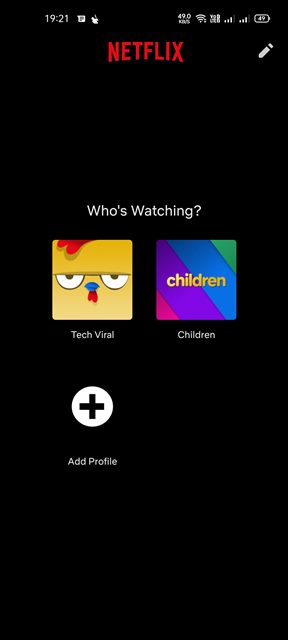
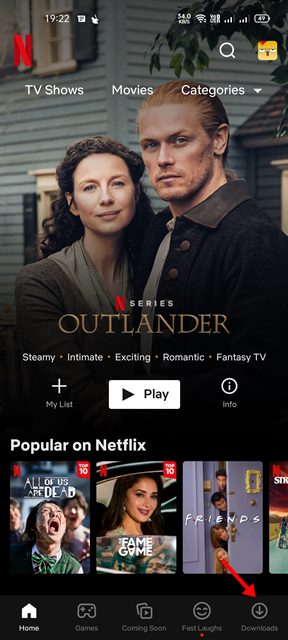
3. Now, tap on the Downloads icon on the bottom of the screen, as shown in the screenshot below.
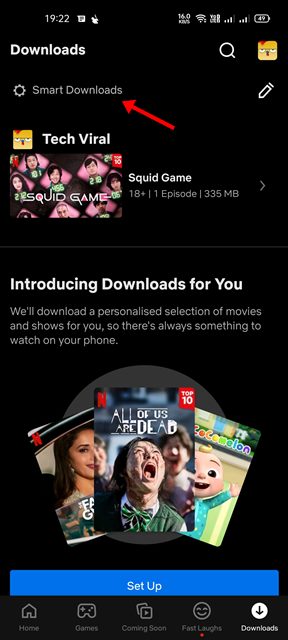
4. On the Downloads page, tap on the Smart Downloads option.
5. On the Smart Downloads screen, enable the toggle for Download Next Episode.
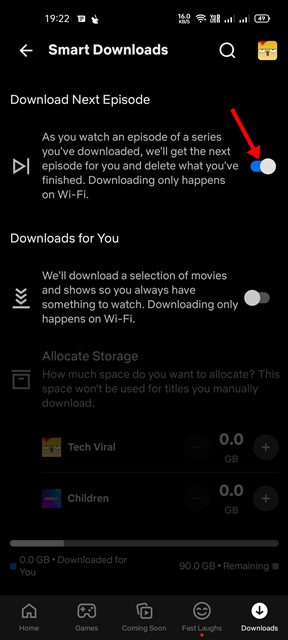
That’s it! You are done. If you wish to disable the feature, you need to disable the toggle for Download Next Episode.
Enable Smart Downloads on Netflix Desktop App
If you are using the Netflix app on your Windows 10 or Windows 11, you need to follow a different method. Here’s what you need to do.
- First of all, open the Netflix app on your desktop.
- Next, click on the three dots and select Settings.
- Now find the Smart Downloads option.
- You need to use the toggle button to enable or disable the Smart Downloads feature.
This is how you can enable or disable Smart Downloads on the Netflix app for Windows 10 or Windows 11.
Also Read: How to Save Netflix Downloads to an SD Card on Android
Smart Downloads is indeed a great feature as it automatically downloads the next episodes for you. I hope this article helped you! Please share it with your friends also. If you have any doubts related to this, let us know in the comment box below.
The post How to Enable the Smart Downloads Feature on Netflix appeared first on TechViral.
ethical hacking,hacking,bangla ethical hacking,bangla hacking tutorial,bangla tutorial,bangla hacking book,ethical hacking bangla,bangla,hacking apps,ethical hacking bangla tutorial,bangla hacking,bangla hacking pdf,bangla hacking video,bangla android hacking,bangla hacking tutorials,bangla fb hacking tutorial,bangla hacking book download,learn ethical hacking,hacking ebook,hacking tools,bangla ethical hacking course, tricks,hacking,ludo king tricks,whatsapp hacking trick 2019 tricks,wifi hacking tricks,hacking tricks: secret google tricks,simple hacking tricks,whatsapp hacking tricks,tips and tricks,wifi tricks,tech tricks,redmi tricks,hacking trick paytm cash,hacking trick helo app,hacking trick of helo app,paytm cash hacking trick,wifi password hacking,paytm cash hacking trick malayalam,hacker tricks, tips and tricks,pubg mobile tips and tricks,tricks,tips,tips and tricks for pubg mobile,100 tips and tricks,pubg tips and tricks,excel tips and tricks,google tips and tricks,kitchen tips and tricks,season 2 tips and tricks,android tips and tricks,fortnite tips and tricks,godnixon tips and tricks,free fire tips and tricks,advanced tips and tricks,whatsapp tips and tricks, facebook tricks,facebook,facebook hidden tricks,facebook tips and tricks,facebook latest tricks,facebook tips,facebook new tricks,facebook messenger tricks,facebook android app tricks,fb tricks,facebook app tricks,facebook tricks and tips,facebook tricks in hindi,tricks,facebook tutorial,new facebook tricks,cool facebook tricks,facebook tricks 2016,facebook tricks 2017,facebook secret tricks,facebook new tricks 2020,blogger blogspot seo tips and tricks,blogger tricks,blogger,blogger seo tips,blogger seo tips and tricks,seo for blogger,blogger seo in hindi,blogger seo best tips for increasing visitors,blogging tips and tricks,blogger blog seo,blogger seo in urdu,adsense approval trick,blogging tips and tricks for beginners,blogging tricks,blogger tutorial,blogger tricks 2016,blogger tricks 2017 bangla,tricks,bangla tutorial,bangla magic,bangla motivational video,bangla tricks,bangla tips,all bangla tips,magic tricks,akash bangla tricks,top 10 bangla tricks,tips and tricks,all bangla trick,bangla computer tricks,computer bangla tricks,bangla magic card tricks,ms word bangla tips and tricks,bangla computer tips,trick,psychology tricks,youtube bangla,magic tricks bangla,si trick Credit techviral


