
How to Record a Zoom Meeting in 2022
During the COVID-19 pandemic, many video conferencing services have recorded massive growth. Video conferencing or meeting services have become an essential productivity tool for communication and collaboration.
If we have to pick the best video conferencing or meeting service, we will pick Zoom. Zoom is a video conference service that allows people to remotely host or participate in online meetings.
Compared to other video conferencing services, Zoom offers many valuable features to its users, such as screen sharing, high-quality audio, and more. Although Zoom meeting is mainly used for business meetings & conferencing purposes, it can be used for personal one-on-one video chats with family and friends.
If you are a student or an employee and often have to attend a meeting on Zoom, at some point, you might want to record the Zoom meetings. Hence, in this article, we will share a step-by-step guide on recording a Zoom meeting. Let’s check out.
Types of Recording Options
If you are an active Zoom user, you might know that the video conferencing service provides you with two different types of video recording options – Local and Cloud. The Local option is available for every user, and the Cloud one is limited to premium accounts only.
There’s a massive difference between local and cloud recording. Local one saves your video on your system, whereas the cloud recording saves the recording to Zoom’s server.
Things to know before Recording a Zoom Meeting
There are a few things that you should know before you record a Zoom meeting. First, if you are a participant, you can’t record the Zoom meeting.
Only the host of the Zoom session can record the meeting. However, you can ask your host to permit you to record the screen.
If you are a host and want to permit a participant to record the session, you must click on the Participants button > More. Next to the Participant’s name, select the Allow Record option. Similarly, to revoke the permission, right-click on the participant’s name and select Forbid Record.
Steps To Record a Zoom Meeting
It’s pretty easy to record a Zoom Meeting, especially on the desktop operating system. You need to follow some of the simple steps we have shared below.
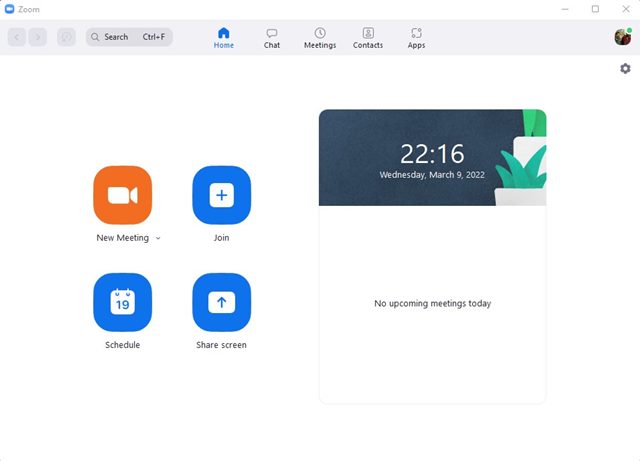
1. First of all, open the Zoom desktop client on your PC and sign in to your Zoom account.
2. Now, you need to host a new meeting or join an existing one as a host.
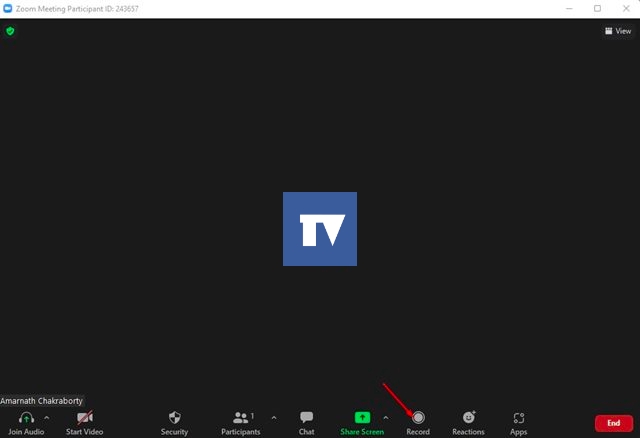
3. Now, click on the Record button during the meeting, as shown in the screenshot below.
4. If you have a Zoom premium account, you will get an option to select between Local and Cloud recording.
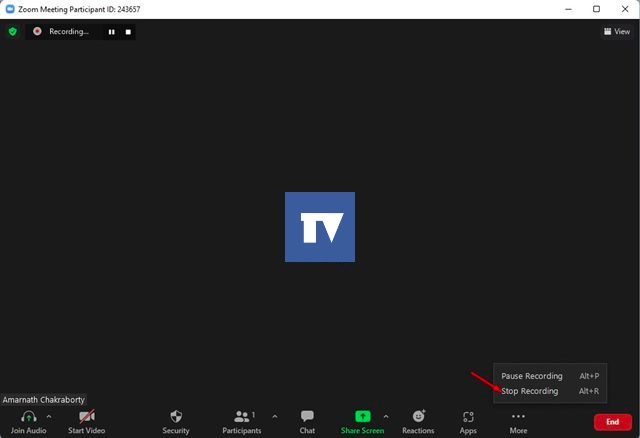
5. To stop the recording, click on the Stop button, as shown in the screenshot below. Or else, click on the More button and select Stop Recording.
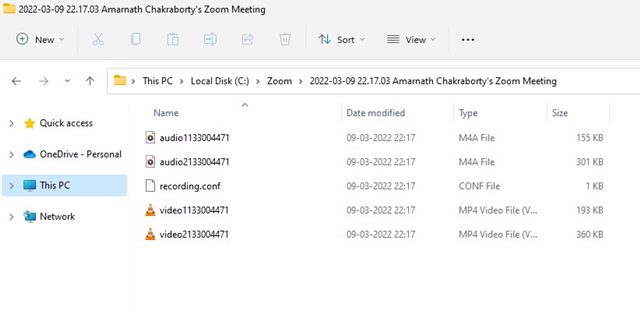
6. As you stop the recording, the clip will be saved to the C: Drive > Zoom folder on your system. You can open that folder to view the recording.
7. If you have picked the cloud recording option, visit zoom.us and log in with your account. Then, open the Recording tab to view the saved recordings.
How to Record a Zoom Meeting without permission
If you are a participant and the host is not allowing you to record the Zoom Meeting, you need to look for other ways to record a screen.
To record a Zoom meeting without permission, you need to utilize third-party screen recording softwares. As of now, there are many screen recording softwares available for Windows PC; you can use any of them to record your entire screen.
If you are going for a premium screen recorder, make sure that the screen recorder supports audio.
It’s pretty easy to record a Zoom meeting, provided you have the permission. I hope this article helped you! Please share it with your friends also. If you have any doubts about this, let us know in the comment box below.
The post How to Record a Zoom Meeting in 2022 appeared first on TechViral.
ethical hacking,hacking,bangla ethical hacking,bangla hacking tutorial,bangla tutorial,bangla hacking book,ethical hacking bangla,bangla,hacking apps,ethical hacking bangla tutorial,bangla hacking,bangla hacking pdf,bangla hacking video,bangla android hacking,bangla hacking tutorials,bangla fb hacking tutorial,bangla hacking book download,learn ethical hacking,hacking ebook,hacking tools,bangla ethical hacking course, tricks,hacking,ludo king tricks,whatsapp hacking trick 2019 tricks,wifi hacking tricks,hacking tricks: secret google tricks,simple hacking tricks,whatsapp hacking tricks,tips and tricks,wifi tricks,tech tricks,redmi tricks,hacking trick paytm cash,hacking trick helo app,hacking trick of helo app,paytm cash hacking trick,wifi password hacking,paytm cash hacking trick malayalam,hacker tricks, tips and tricks,pubg mobile tips and tricks,tricks,tips,tips and tricks for pubg mobile,100 tips and tricks,pubg tips and tricks,excel tips and tricks,google tips and tricks,kitchen tips and tricks,season 2 tips and tricks,android tips and tricks,fortnite tips and tricks,godnixon tips and tricks,free fire tips and tricks,advanced tips and tricks,whatsapp tips and tricks, facebook tricks,facebook,facebook hidden tricks,facebook tips and tricks,facebook latest tricks,facebook tips,facebook new tricks,facebook messenger tricks,facebook android app tricks,fb tricks,facebook app tricks,facebook tricks and tips,facebook tricks in hindi,tricks,facebook tutorial,new facebook tricks,cool facebook tricks,facebook tricks 2016,facebook tricks 2017,facebook secret tricks,facebook new tricks 2020,blogger blogspot seo tips and tricks,blogger tricks,blogger,blogger seo tips,blogger seo tips and tricks,seo for blogger,blogger seo in hindi,blogger seo best tips for increasing visitors,blogging tips and tricks,blogger blog seo,blogger seo in urdu,adsense approval trick,blogging tips and tricks for beginners,blogging tricks,blogger tutorial,blogger tricks 2016,blogger tricks 2017 bangla,tricks,bangla tutorial,bangla magic,bangla motivational video,bangla tricks,bangla tips,all bangla tips,magic tricks,akash bangla tricks,top 10 bangla tricks,tips and tricks,all bangla trick,bangla computer tricks,computer bangla tricks,bangla magic card tricks,ms word bangla tips and tricks,bangla computer tips,trick,psychology tricks,youtube bangla,magic tricks bangla,si trick Credit techviral


