
How to Fix Green Screen Problem While Watching Videos
The green screen often appears due to outdated graphics card drivers, unsupported Flash players, malicious apps, video corruption, interrupted downloads, or a damaged GPU. If you’re experiencing a green screen problem while watching videos, here’s what you can do to fix it.
1. Restart Your Device

It doesn’t matter whether you are watching a video on a smartphone or computer; a simple restart can fix most of the problems, including the green screen problem.
Before trying the next methods, restart your device. If the problem persists after restarting, follow the next methods.
2. Disable Hardware Acceleration in Chrome
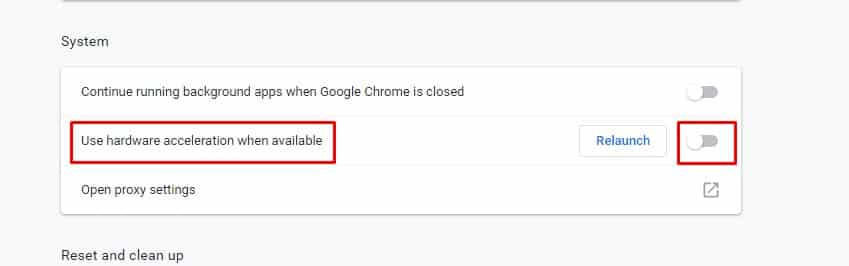
Hardware Acceleration uses your device’s GPU to speed up the process while freeing up the CPU load. The feature is meant to utilize the computer’s GPU to speed up some functions of the software running on the CPU alone.
Hardware acceleration often creates problems, such as Green Screens. If you experience this in online videos, you need to turn it off. To turn off the hardware acceleration on the Chrome browser, check out this article.
3. Update Your Graphics Card driver
The green screen problem might appear due to corrupted or outdated graphics card drivers. So, you need to update your graphics card driver.
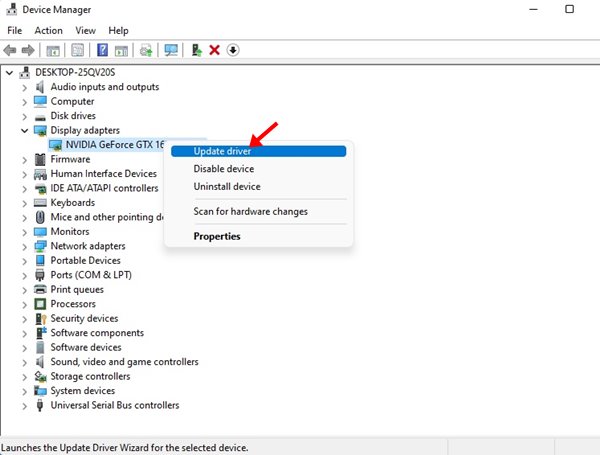
- Right-click on My Computer and select Properties.
- On the System page, click on Device Manager.
- Click on the Display drivers.
- Right-click on the graphic driver and select Update driver software.
- Select Search automatically for updated driver software.
- Once updated, restart your PC.
After restarting, play the video again. The green screen should disappear. If it still appears, follow the next method.
4. Run the Troubleshooter
If you still get the green screen, you must run the troubleshooter. Here’s what you should do.
- Open the Settings app on your PC
- Click on Update & Security.
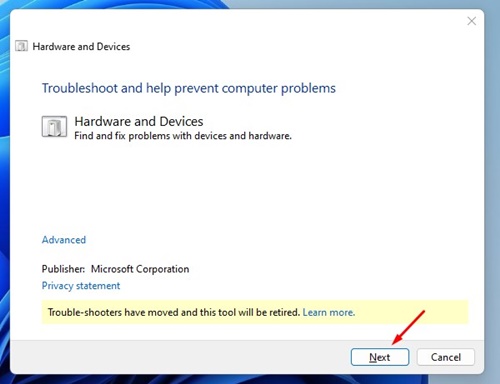
- Click on Troubleshoot > Hardware and Devices.
- Click on the Run the troubleshooter.
- Wait until the process is complete.
- Restart your PC.
5. Disable the Graphics Performance for Chrome
Windows has a feature that allows you to select which CPU an app can use. If you have added Google Chrome to use your GPU, it may show you the green screen problem. The feature is not optimized properly and can present you with some problems. So, it’s best to turn off graphics performance on Windows to resolve the green screen issue.
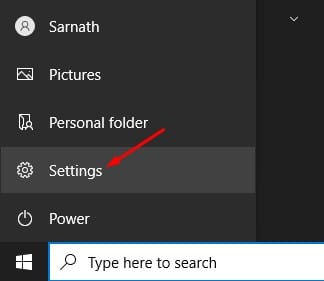
1. Click on the Windows Start button and select Settings.
2. Select System.
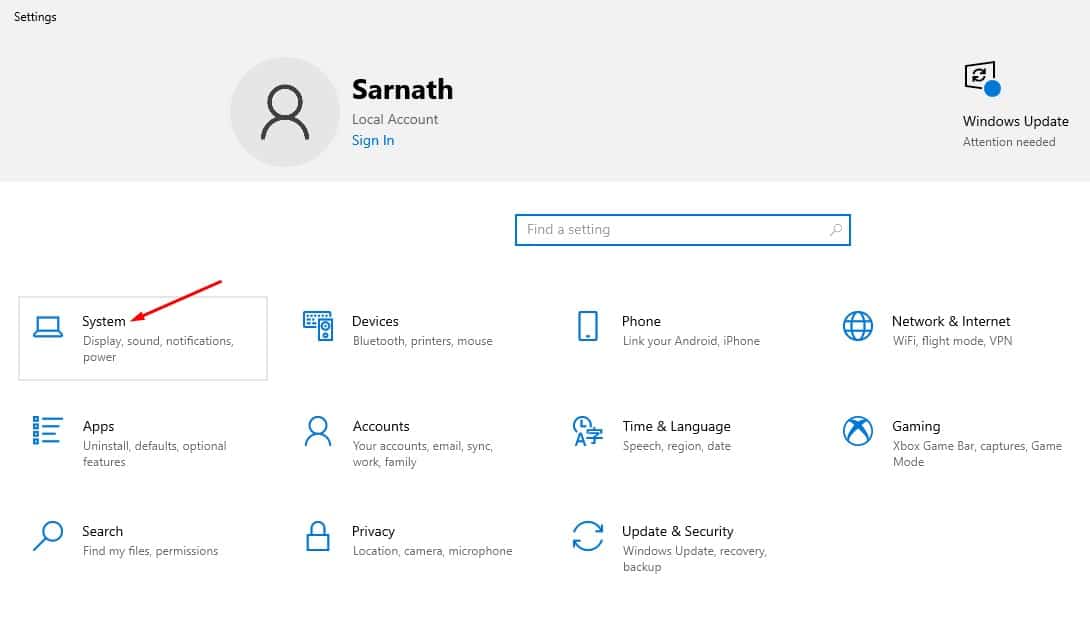
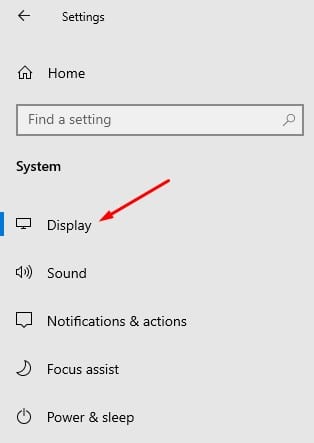
3. Switch to the Display tab on the left side.
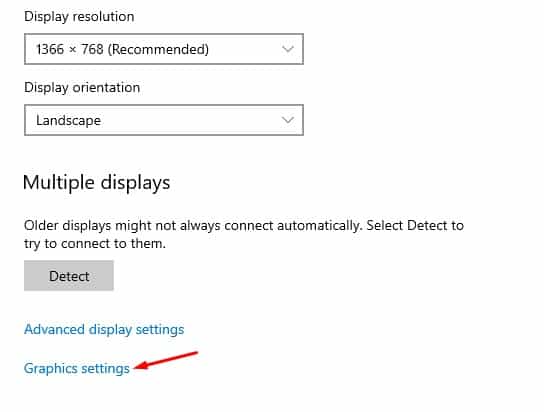
4. Scroll down to the Multiple Displays section and click on the Graphics settings.
5. Find Google Chrome and click Remove.
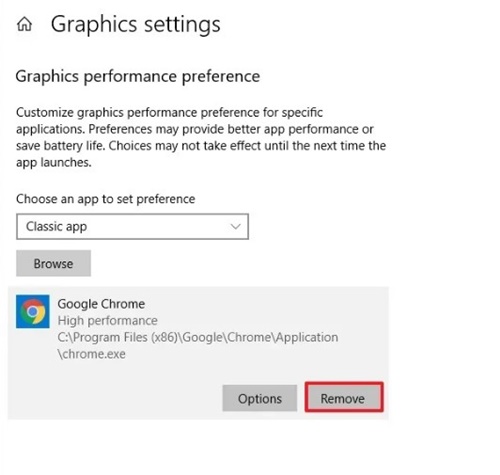
After making the changes, restart your computer. After the restart, play the video again. This time, you won’t face the green screen problem.
6. Download the Video and Watch
If you still get the green screen issue while watching videos on different websites, it’s best to download and watch the video.
Popular PC media players like VLC can play the videos regardless of the file format. You can use the online video downloaders websites to download videos on your computer.
After downloading the videos, play them with media player apps like VLC Media Player or Media Player Classic.
7. Other factors that can trigger Green Screen Issue
If you often get green screen problems, you must check out a few basic things. These little things can often trigger green screen issues on the computer.
- Damaged GPU Unit.
- Problem with the Display/Monitor.
- Third-party graphics management software.
These are the best methods for fixing the Green Screen Problem when viewing videos. If you need more help on this topic, let us know in the comments.
The post How to Fix Green Screen Problem While Watching Videos appeared first on TechViral.
ethical hacking,hacking,bangla ethical hacking,bangla hacking tutorial,bangla tutorial,bangla hacking book,ethical hacking bangla,bangla,hacking apps,ethical hacking bangla tutorial,bangla hacking,bangla hacking pdf,bangla hacking video,bangla android hacking,bangla hacking tutorials,bangla fb hacking tutorial,bangla hacking book download,learn ethical hacking,hacking ebook,hacking tools,bangla ethical hacking course, tricks,hacking,ludo king tricks,whatsapp hacking trick 2019 tricks,wifi hacking tricks,hacking tricks: secret google tricks,simple hacking tricks,whatsapp hacking tricks,tips and tricks,wifi tricks,tech tricks,redmi tricks,hacking trick paytm cash,hacking trick helo app,hacking trick of helo app,paytm cash hacking trick,wifi password hacking,paytm cash hacking trick malayalam,hacker tricks, tips and tricks,pubg mobile tips and tricks,tricks,tips,tips and tricks for pubg mobile,100 tips and tricks,pubg tips and tricks,excel tips and tricks,google tips and tricks,kitchen tips and tricks,season 2 tips and tricks,android tips and tricks,fortnite tips and tricks,godnixon tips and tricks,free fire tips and tricks,advanced tips and tricks,whatsapp tips and tricks, facebook tricks,facebook,facebook hidden tricks,facebook tips and tricks,facebook latest tricks,facebook tips,facebook new tricks,facebook messenger tricks,facebook android app tricks,fb tricks,facebook app tricks,facebook tricks and tips,facebook tricks in hindi,tricks,facebook tutorial,new facebook tricks,cool facebook tricks,facebook tricks 2016,facebook tricks 2017,facebook secret tricks,facebook new tricks 2020,blogger blogspot seo tips and tricks,blogger tricks,blogger,blogger seo tips,blogger seo tips and tricks,seo for blogger,blogger seo in hindi,blogger seo best tips for increasing visitors,blogging tips and tricks,blogger blog seo,blogger seo in urdu,adsense approval trick,blogging tips and tricks for beginners,blogging tricks,blogger tutorial,blogger tricks 2016,blogger tricks 2017 bangla,tricks,bangla tutorial,bangla magic,bangla motivational video,bangla tricks,bangla tips,all bangla tips,magic tricks,akash bangla tricks,top 10 bangla tricks,tips and tricks,all bangla trick,bangla computer tricks,computer bangla tricks,bangla magic card tricks,ms word bangla tips and tricks,bangla computer tips,trick,psychology tricks,youtube bangla,magic tricks bangla,si trick Credit techviral


