
How to Prevent Users from Getting Insider Preview Builds in Windows 11
Although joining the Windows Insider Program on Windows 11 is easy, it is not for everyone. Windows Insider Program users often report stability issues after installing new updates.
Since insider builds are not as stable as the release versions, users might face many bugs. For this reason, many users want to leave the Windows Insider Program. If you don’t want to leave the Windows Insider Program, you can make several changes to your group policy and registry to prevent Windows Insider Preview Build updates.
If your computer is used by more than one person in your family, you can follow this guide to prevent them from getting Insider Preview Builds.
1. Using Local Group Policy
In this method, we will use the Local Group Policy Editor to stop users from getting Windows Insider Preview build updates.
1. Press the Windows Key + R on your keyboard. This will open the RUN dialog box; type in gpedit.msc, and press Enter.
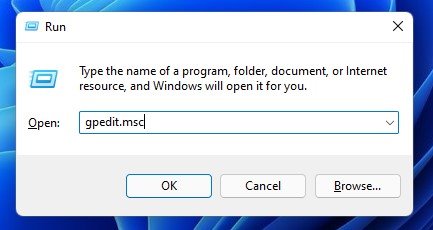
2. On the Local Group Policy Editor, navigate to the following path:
Computer Configuration --> Administrative Templates --> Windows Components --> Data Collection and Preview Builds
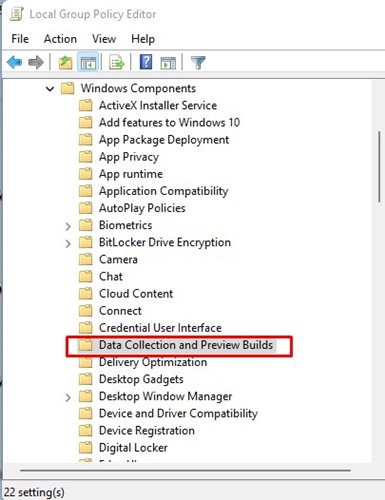
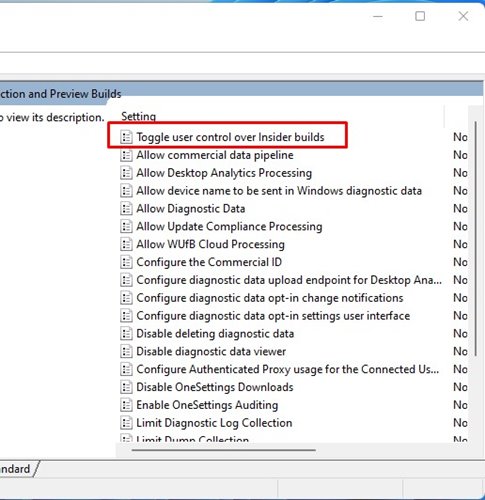
3. On the right pane, find and double-click the Toggle user control over Insider builds Policy.
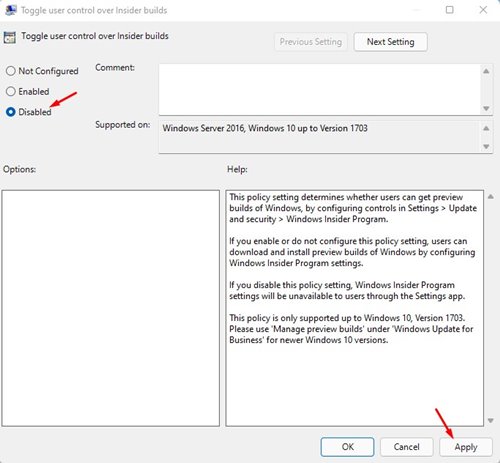
4. On the Toggle user control over Insider builds policy, select Disabled and click Apply.
5. Open Windows Search and type in CMD. Open Command Prompt from the list.
6. In Command Prompt, enter ‘gpupdate /force‘ and hit the Enter button.
7. This will make Windows Insider Program Settings unavailable to users through the Settings app. If you wish to revert the changes, choose the Enabled radio option in Step 4. The rest of the steps are the same.
2. Using Registry Editor
In this method, we will use the Windows Registry to prevent users from getting Windows Insider Preview Build updates.
1. Open the Windows 11 search and type in ‘regedit‘. Open the Registry Editor from the list.

2. In the Registry Editor, navigate to the path shared below:
HKEY_LOCAL_MACHINE\SOFTWARE\Policies\Microsoft\Windows
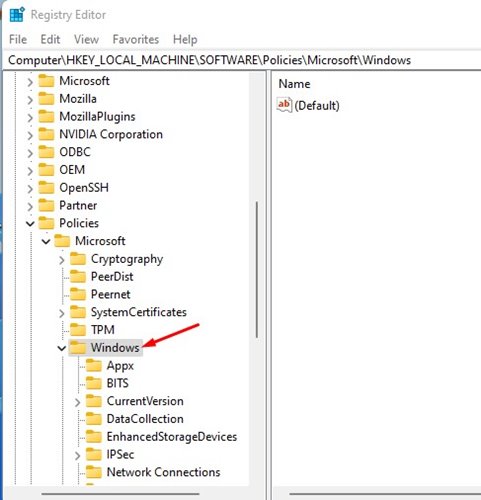
3. Right-click on the Windows folder in the left pane and select New > Key.
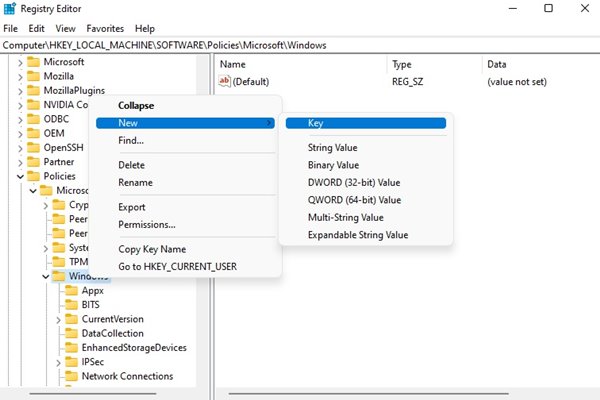
4. Name the new key PreviewBuilds. On the right pane, right-click and select New > DWORD (32-bit) Value.
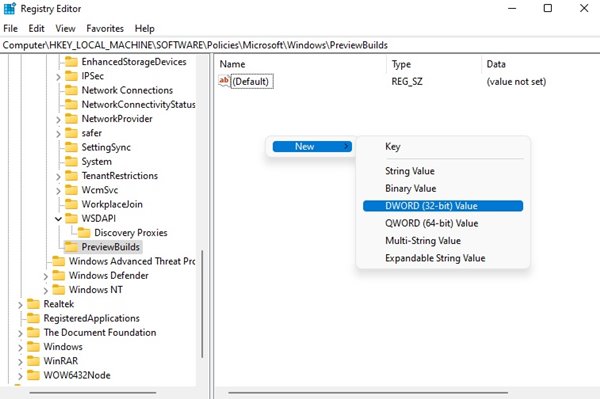
5. You need to rename it to AllowBuildPreview.
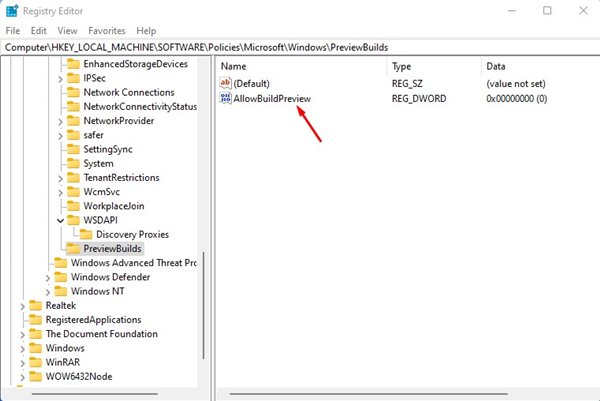
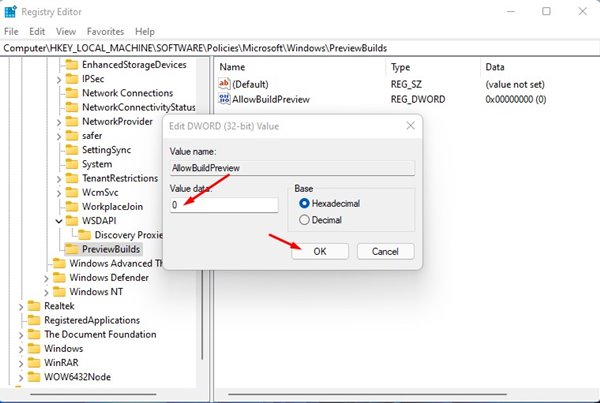
6. Double-click on the AllowBuildPreview DWORD value and enter 0 in the Value data field. Once done, click Ok.
The above methods will prevent all users’ accounts on your Windows 11 from getting the insider preview build updates. I hope this article helped you! Please share it with your friends also. If you have any doubts related to this, let us know in the comment box below.
The post How to Prevent Users from Getting Insider Preview Builds in Windows 11 appeared first on TechViral.
ethical hacking,hacking,bangla ethical hacking,bangla hacking tutorial,bangla tutorial,bangla hacking book,ethical hacking bangla,bangla,hacking apps,ethical hacking bangla tutorial,bangla hacking,bangla hacking pdf,bangla hacking video,bangla android hacking,bangla hacking tutorials,bangla fb hacking tutorial,bangla hacking book download,learn ethical hacking,hacking ebook,hacking tools,bangla ethical hacking course, tricks,hacking,ludo king tricks,whatsapp hacking trick 2019 tricks,wifi hacking tricks,hacking tricks: secret google tricks,simple hacking tricks,whatsapp hacking tricks,tips and tricks,wifi tricks,tech tricks,redmi tricks,hacking trick paytm cash,hacking trick helo app,hacking trick of helo app,paytm cash hacking trick,wifi password hacking,paytm cash hacking trick malayalam,hacker tricks, tips and tricks,pubg mobile tips and tricks,tricks,tips,tips and tricks for pubg mobile,100 tips and tricks,pubg tips and tricks,excel tips and tricks,google tips and tricks,kitchen tips and tricks,season 2 tips and tricks,android tips and tricks,fortnite tips and tricks,godnixon tips and tricks,free fire tips and tricks,advanced tips and tricks,whatsapp tips and tricks, facebook tricks,facebook,facebook hidden tricks,facebook tips and tricks,facebook latest tricks,facebook tips,facebook new tricks,facebook messenger tricks,facebook android app tricks,fb tricks,facebook app tricks,facebook tricks and tips,facebook tricks in hindi,tricks,facebook tutorial,new facebook tricks,cool facebook tricks,facebook tricks 2016,facebook tricks 2017,facebook secret tricks,facebook new tricks 2020,blogger blogspot seo tips and tricks,blogger tricks,blogger,blogger seo tips,blogger seo tips and tricks,seo for blogger,blogger seo in hindi,blogger seo best tips for increasing visitors,blogging tips and tricks,blogger blog seo,blogger seo in urdu,adsense approval trick,blogging tips and tricks for beginners,blogging tricks,blogger tutorial,blogger tricks 2016,blogger tricks 2017 bangla,tricks,bangla tutorial,bangla magic,bangla motivational video,bangla tricks,bangla tips,all bangla tips,magic tricks,akash bangla tricks,top 10 bangla tricks,tips and tricks,all bangla trick,bangla computer tricks,computer bangla tricks,bangla magic card tricks,ms word bangla tips and tricks,bangla computer tips,trick,psychology tricks,youtube bangla,magic tricks bangla,si trick Credit techviral


